
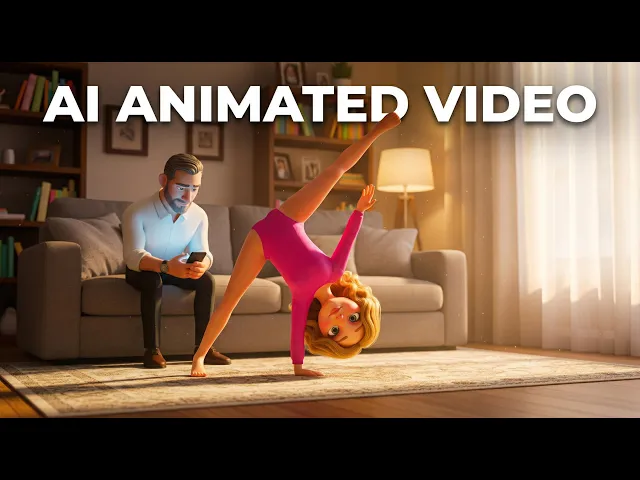
Yes, you can create Masha and The Bear style cartoon video series without expensive animation studios or years of design experience. The distinctive Eastern European animation aesthetic that makes this series iconic can now be achieved using AI video generation tools combined with proper character design, script structure, and visual consistency planning. In 2026, animation creators are shipping professional-quality kids content by combining smart scriptwriting with AI generation, character systems, and motion design that captures that warm, expressive, hand-crafted feel Masha and The Bear is known for. Masha and The Bear has become a global phenomenon precisely because it nails something fundamental: relatable characters, humor that works across languages and cultures, and visual warmth that feels inviting rather than aggressive. Your series can capture that same magic. This guide walks you through the exact workflow, step by step, with real workflow images showing exactly where to click and what to configure.
Step 1: Write Your Script with Character Consistency in Mind
The foundation of any Masha and The Bear style series is a tight script that establishes character personalities, dialogue patterns, and visual moments. Masha and The Bear works because both characters have distinct behavioral patterns: Masha is playful and impulsive, Bear is patient and methodical, and their dynamic creates natural comedy. Your script needs to lock these personalities in from the start so every scene reinforces who these characters are.
Start by outlining your episode in 3-4 key scenes. Each scene should have clear objectives. What does each character want? What happens that subverts their expectations? How do they react? Does the scene advance your story forward or just entertain? Write dialogue that feels natural to kids but also entertains adults watching alongside them, because the best kids content gets watched by families together.
Masha and The Bear episodes follow a specific structure: quiet opening establishing normalcy, escalating chaos introduced by Masha, Bear responding with patience that gets tested, resolution that feels earned. Your scripts should mirror this pacing. You're not just writing random interactions; you're building narrative momentum across episodes.
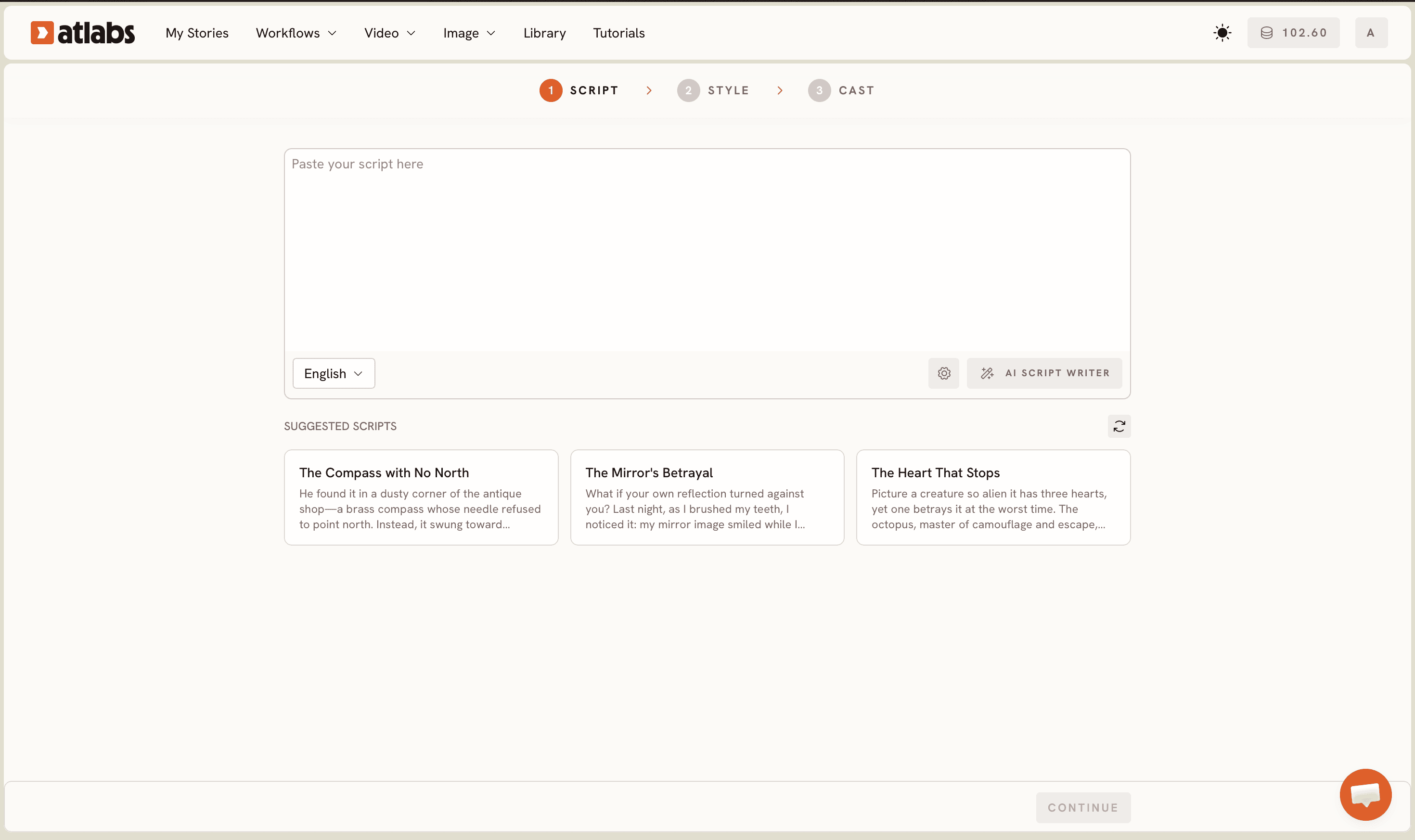
Use Atlabs Animated Video workflow to structure your script. The platform guides you through character introductions, scene descriptions, dialogue formatting, and character consistency parameters. This structure ensures your AI generation respects character consistency across all scenes. When you input your script into Atlabs, you're not just providing text; you're building a character system that AI can learn from and apply consistently.
Step 2: Design Your Visual Style with Precise Animation Direction
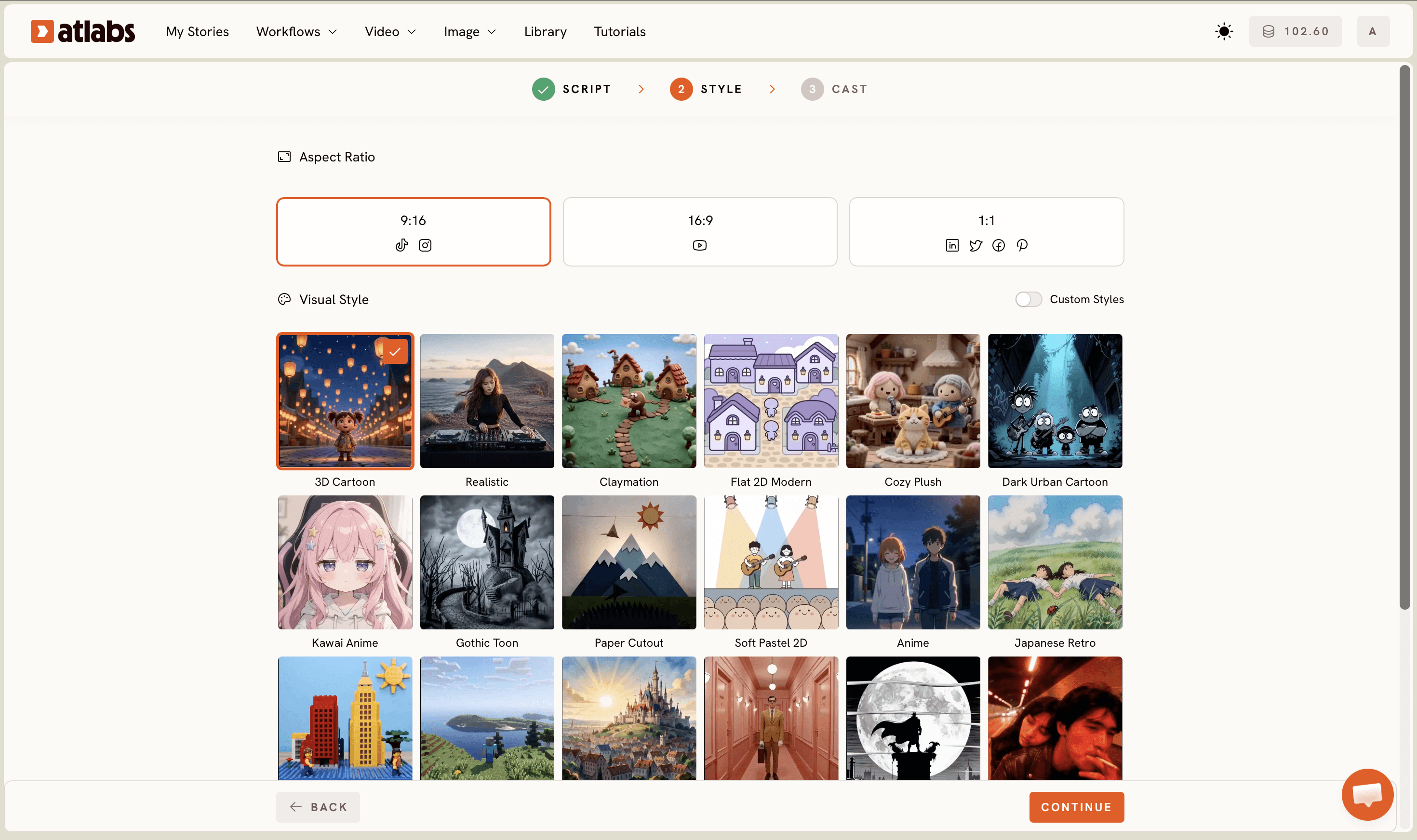
Masha and The Bear has an unmistakable look that you'd recognize in a single frame: soft, rounded character designs with expressive eyes and exaggerated features, warm earth tones that feel welcoming rather than harsh, Russian countryside environments rendered with painterly detail, and a hand-animated quality despite being digital production. This visual consistency is what makes the series feel like a cohesive world rather than random scenes. Creating this style consistently across your series requires visual direction before you generate a single frame.
Define your style through detailed mood boards and reference sheets. Describe the animation aesthetic in precise terms. Are characters flat or slightly dimensional with minimal shading? Do they have thick outlines or soft edges that blend into backgrounds? What color palette dominates your world? For a Masha and The Bear homage, think warm yellows, forest greens, soft skin tones that render well across different characters, and cozy interiors with wood textures and fabric details.
Masha and The Bear specifically uses a technique called soft animation, where characters feel slightly squishy and have exaggerated expressions that push emotion. They avoid stiff poses and favor movement that feels organic. Document this. Write: "Characters have round proportions, soft fill colors without hard shadow lines, expressive dot eyes that convey emotion through size and position changes, minimal shading that suggests form without photorealism." This precision teaches the AI generation model exactly what you want.
Next, test your style with 2-3 sample scenes before committing to a full series. Generate short clips of your characters in different environments and emotional states. This is your visual test drive. Does it feel warm and inviting? Are expressions clear and expressive? Does the animation style feel hand-crafted or mechanical? Adjust your style description based on results. If characters look too angular, add "rounded" and "soft edges." If colors feel cold, warm up your palette description.
Step 3: Lock Your Character Designs Across Every Episode
Character consistency is what makes Masha and The Bear instantly recognizable across 100+ episodes. Kids recognize Masha's red coat and matching red bow in the first 2 seconds. They know Bear by his size, brown fur, and gentle demeanor. This visual signature is so powerful that viewers could identify these characters with the sound off. Your series needs the same visual lock.
Create detailed character designs that persist across your entire series. This means describing each character with precision that an AI can understand and reproduce. For Masha: a young girl with a round face, oversized round eyes, red coat with white collar, red bow in her hair, round button nose, small mouth that expresses exaggerated emotions. For Bear: large brown furry body, rounded posture, wise eyes, patient expression, smaller proportions for vulnerability despite size. Every single detail matters because consistency builds familiarity.
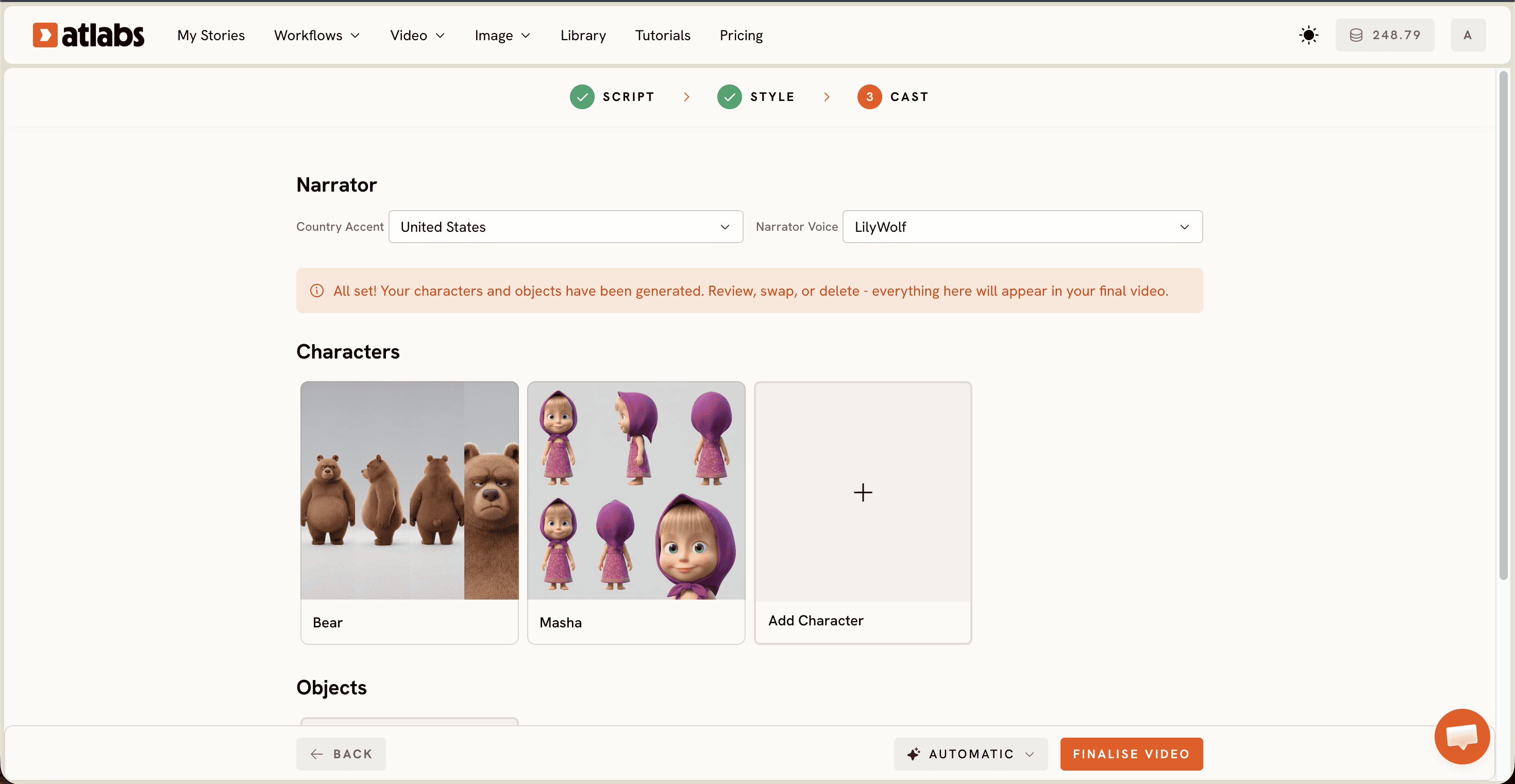
Use the Cast step in Atlabs to assign these character designs to your script. The platform lets you define character appearance once and apply it consistently across scenes. When you reference "Masha" in scene 5, the AI knows exactly what Masha looks like because you've locked the design in the Cast section. Provide your character descriptions with visual references if possible. Link to mood boards, color codes, or detailed sketches.
For multi-episode series, keep a master character sheet document that lives alongside your scripts. Update it as your series grows, ensuring new characters follow the same design philosophy as established ones. If you introduce Hedgehog in episode 3, lock Hedgehog's exact quill pattern, eye shape, and clothing in the character sheet. If Hedgehog returns in episode 7, reference the same locked design. This document becomes your consistency bible.
Step 4: Plan Your Storyboard with Intentional Motion Beats
Before generating full scenes, create visual storyboards that map out action, camera movement, animation pacing, and emotional beats. Masha and The Bear uses specific camera techniques that feel intentional rather than random: close-ups on character reactions that let you see micro-expressions, wide shots of environments that establish location and mood, and smooth pans that feel hand-animated rather than mechanical.
For each scene, plan: Where is the camera positioned? Is it a wide master shot, a medium two-shot, or a tight close-up on a character's face? What is each character doing physically? Are they standing still or moving through space? What is the emotional beat you're trying to hit in this moment? What sound design or music will play? How long will this shot hold before cutting? This storyboard becomes your generation guide.
You're telling AI not just "two characters talking" but "wide establishing shot of forest at dawn for 3 seconds, then cut to medium two-shot of Masha and Bear with forest background slightly blurred, then close-up on Masha's surprised face as she realizes something, hold for 2 seconds, then cut to Bear's reaction." This level of specificity prevents the biggest animation series killer: inconsistent pacing and static shots that feel boring.
Masha and The Bear episodes maintain constant visual interest because every scene has intentional movement. Characters gesture while talking. Cameras drift to emphasize emotion. Edits happen on beats. When Masha gets excited, the animation gets faster and more exaggerated. When Bear responds patiently, movement slows and becomes more measured. Your storyboard embeds this intentionality before you generate. You're not hoping the AI will make something interesting; you're specifying what interesting looks like.
Step 5: Generate, Review, and Iterate With Purpose
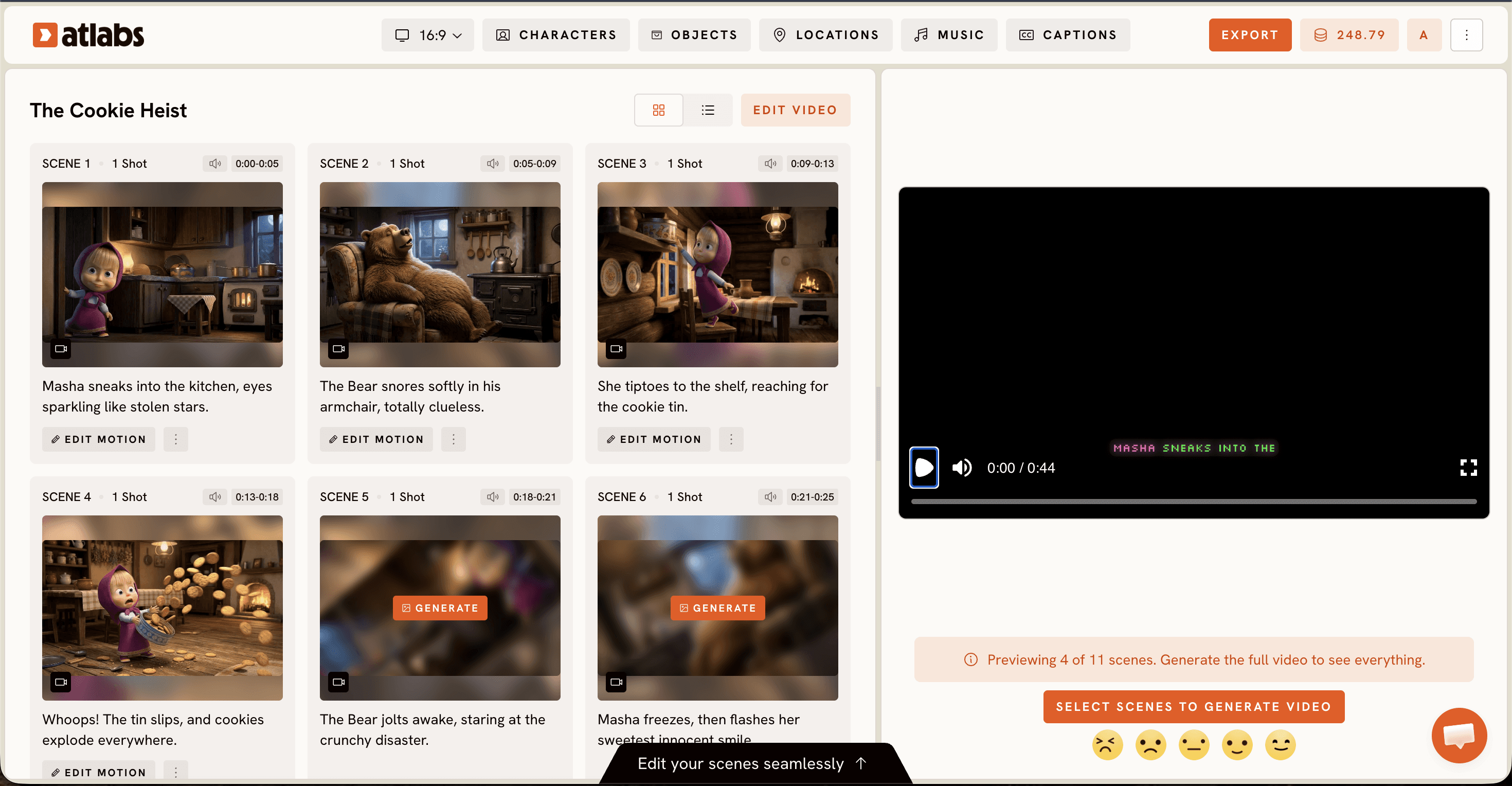
Once your script is locked, style is tested, characters are designed, and storyboards are planned, you're ready to generate full scenes. Upload your script to Atlabs Animated Video. The workflow parses your script automatically, detects character names and dialogue, and generates scene-by-scene video based on your character designs, visual direction, and storyboard specifications.
Generate one full episode first before rolling out your series. Watch it end-to-end, ideally with fresh eyes the next day. Does Masha feel like Masha across all scenes or does her character voice shift? Do the environments feel consistent or does the forest look different in scene 2 versus scene 4? Is the animation pacing right or does it feel sluggish in dialogue scenes? Are there moments that feel off-character or visually disconnected from the established style? Take notes.
Iterate on scenes that miss the mark. Atlabs lets you regenerate individual scenes without regenerating the whole episode. If Masha's expression felt wrong in scene 3, adjust your character description for that specific moment and regenerate just that scene. If the background felt too bright, adjust your style description. This iteration cycle is where professional series happen. You're not just accepting the first output; you're refining until the series feels authentically yours.
Expect 2-3 iteration passes per episode when you're starting. By episode 3, you'll know your character voices well enough that iteration drops to 1-2 passes. By episode 5, first-pass generation quality starts matching what you envisioned. This is normal and expected. Animation is an iterative craft, whether human or AI-assisted.
Once your first episode locks and you're satisfied, the second episode gets exponentially easier. You have a proven template. Character designs are tested. Your style voice is established. Episode 2 takes roughly half the iteration time of Episode 1. Episode 3 takes half the time of Episode 2. By episode 5, you're shipping on a predictable schedule.
Watch The Full YouTube Tutorial
FAQ
Q1: How long does it take to create a full Masha and The Bear style episode?
A typical 5-7 minute episode takes 2-4 hours from script lock to final export, depending on your iteration cycles and how well your style is dialed in. Your first episode takes longer (4-6 hours) as you dial in style and character consistency. By episode 5, production time drops to 2-3 hours per episode because the creative foundation is proven and you're executing on established systems rather than figuring things out.
Q2: Can I use AI generation and still own the series I create?
Yes, absolutely. You own the creative output generated through Atlabs. Your scripts, character designs, visual direction, storyboards, and all editing decisions are yours. Atlabs is the tool, not the creator. You're using it the same way animators use After Effects or Blender. Your series is your intellectual property from day one.
Q3: What if my generated scenes don't match my vision?
Iteration is the answer. AI generation improves dramatically with precise direction. If a scene misses the mark, the issue is usually vague descriptions. Instead of "cute animation," try "rounded character proportions, soft fill colors without hard lines, expressive eyes with dot pupils that shift position for emotion." Most creators nail their vision within 2-3 iteration cycles per scene once they learn to be specific.
Q4: Can I blend AI-generated animation with other tools like Premiere or DaVinci?
Absolutely. Many successful creators use Atlabs for hero scenes and character animation, then layer sound design, music, color grading, and editing in external tools like Adobe Premiere Pro or DaVinci Resolve. This hybrid approach lets you combine AI generation efficiency with professional post-production polish. Atlabs outputs at standard resolutions that work seamlessly with any professional editing software.
Q5: How do I maintain character consistency across a long series of episodes?
Lock your character designs early and document them obsessively. Use identical character descriptions in every script you write. Test new characters in isolation before introducing them to main storylines. Maintain a master character sheet that includes visual references, color codes, proportions, and typical expressions. When introducing new characters in later episodes, reference this sheet explicitly so Atlabs can maintain consistency.
Q6: What happens if I want to change something about a character mid-series?
If you're committed to consistency, don't. The magic of Masha and The Bear is precisely that Masha doesn't change. But if you introduce a new character trait, document it in your character sheet going forward. If you want to make Masha slightly different in a spin-off series, start fresh with new character designs and make it intentional. Never drift; always evolve with purpose.
Q7: Can I create a series in a language other than English?
Yes. Atlabs supports dialogue generation in 40+ languages. Create your scripts in your target language, define character voices in that language, and let the platform handle generation with full lip-sync support. This is actually one of the biggest advantages: you can create content for global audiences in their native language without translation complexity.
From Concept to Series: Real Production Workflow
Here's what successful animation creators are doing in 2026. They treat their series like a content product, not an art project. The difference is simple: products are built on systems; art projects are built on inspiration. You want systems.
Week 1: Script your first 3 episodes. Lock character designs. Create mood boards for your visual style. Total time investment: 10-15 hours.
Week 2: Test your style with sample scenes in Atlabs. Generate 2-3 test clips to confirm your visual direction works. Iterate on style descriptions. Total time: 5-8 hours.
Week 3: Generate your first full episode. Expect 4-6 hours of iteration as you refine character voices and pacing. You're building your production muscle memory.
Week 4: Generate episodes 2 and 3. With proven systems, these go faster. 3-4 hours each, including iteration.
Months 2-3: Maintain a 1-2 episode per week production cadence. Your scripts are locked in advance. Your characters are proven. Your style is established. You're now executing on a system rather than figuring things out.
This is how Masha and The Bear became a phenomenon: consistent, high-quality episodes on a predictable schedule. Kids knew new episodes would arrive. Parents trusted the content. Schools started using it. Your series can follow the same path.
Your Animation Series Starts Today
Creating a Masha and The Bear style cartoon series in 2026 is no longer a studio operation. Individual creators, teachers, homeschoolers, and content producers are shipping professional-quality animated series from home because the tools now exist and are accessible. The workflow is proven: strong script foundation, locked visual style, consistent character design, thoughtful storyboarding, and strategic iteration.
The first episode is your proof of concept. Watch it. Learn from it. Identify what worked and what didn't. The second episode is your system validation. By this point, you know your characters' voices. The third through fifth episodes are your production machine. You're no longer figuring things out; you're executing on systems that work.
Masha and The Bear didn't become a global phenomenon through luck. It became successful through consistent, high-quality episodes released on a predictable schedule that kids could rely on. Your series can follow that same path. The difference between a series that ships and a series that dies in development is usually this: the ones that ship committed to a system and stuck with it. They didn't wait for perfect. They shipped good and iterated toward great.
Your next steps are simple: Write your first three episode scripts. Design your characters. Test your visual style. Generate your first episode. Iterate once. Ship it. Then immediately start episode two. Momentum builds series. Consistency builds audiences. Systems build sustainable creative practice.
Your Masha and The Bear style series isn't a dream anymore. It's a project with a clear timeline, a proven workflow, and accessible tools. All that's left is execution.








