
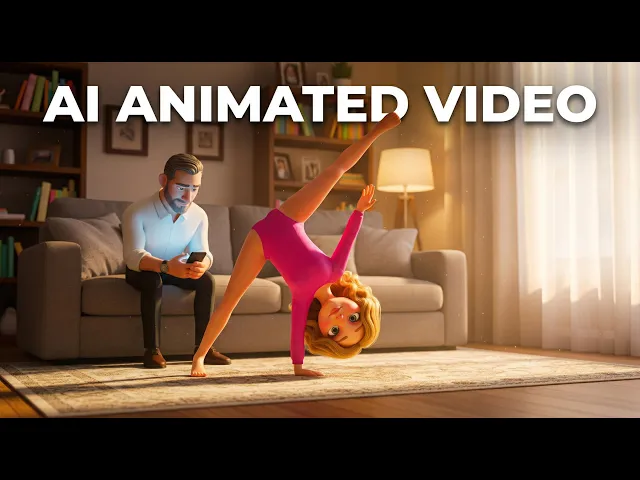
Yes, you can create Shaun the Sheep style stop-motion cartoon videos without a claymation studio, an armature rig, or the eighteen months a real stop-motion production takes. The handcrafted plasticine look that makes this style so beloved, the visible thumbprint texture, the fabric backdrops, the slightly imperfect movement, can now be achieved with AI video generation combined with proper character design, silent comedy scripting, and visual consistency planning. In 2026, animation creators are shipping professional-quality kids content by pairing smart storyboarding with AI generation, locked character systems, and motion design that captures that warm, tactile, hand-built feel that stop-motion is known for.
Shaun the Sheep became a global phenomenon by nailing something rare: it tells complete stories with almost no dialogue. The comedy is physical, the characters are expressive, and it plays identically in Tokyo, Toledo and Tanzania because nothing needs translating. Your series can capture that same magic. This guide walks through the exact workflow, step by step, with real workflow images showing exactly where to click and what to configure.
Start Your Animation Project Now
Step 1: Write Your Script for Visual Comedy, Not Dialogue
The foundation of any Shaun the Sheep style series is a script built around what characters do, not what they say. This is the single biggest difference between writing this style and writing a normal cartoon. Shaun works because every gag is legible with the sound off: a sheep tries to open a gate, the gate wins, the sheep tries something cleverer, that fails funnier. No line of dialogue carries the joke, so the joke survives every border.
Start by outlining your episode in three or four beats. Each beat needs a clear physical objective. What does the character want? What obstacle blocks it? What does the failed attempt look like, and how does the second attempt escalate? Write your script as action description rather than conversation. Instead of "Shaun says he has an idea," write "the sheep pauses, eyes widen, then drags a wheelbarrow into frame." That is the level of physical specificity this style demands.
The classic Shaun structure runs like this: a quiet farm scene establishing normalcy, a small want that seems easy, an escalating chain of physical complications, a chaotic peak where everything goes wrong at once, and a resolution that restores order with one last visual joke. Your scripts should mirror that rhythm. Characters can grunt, bleat, sigh and mutter in nonsense sounds, and that carries enormous emotional information without a single translatable word.
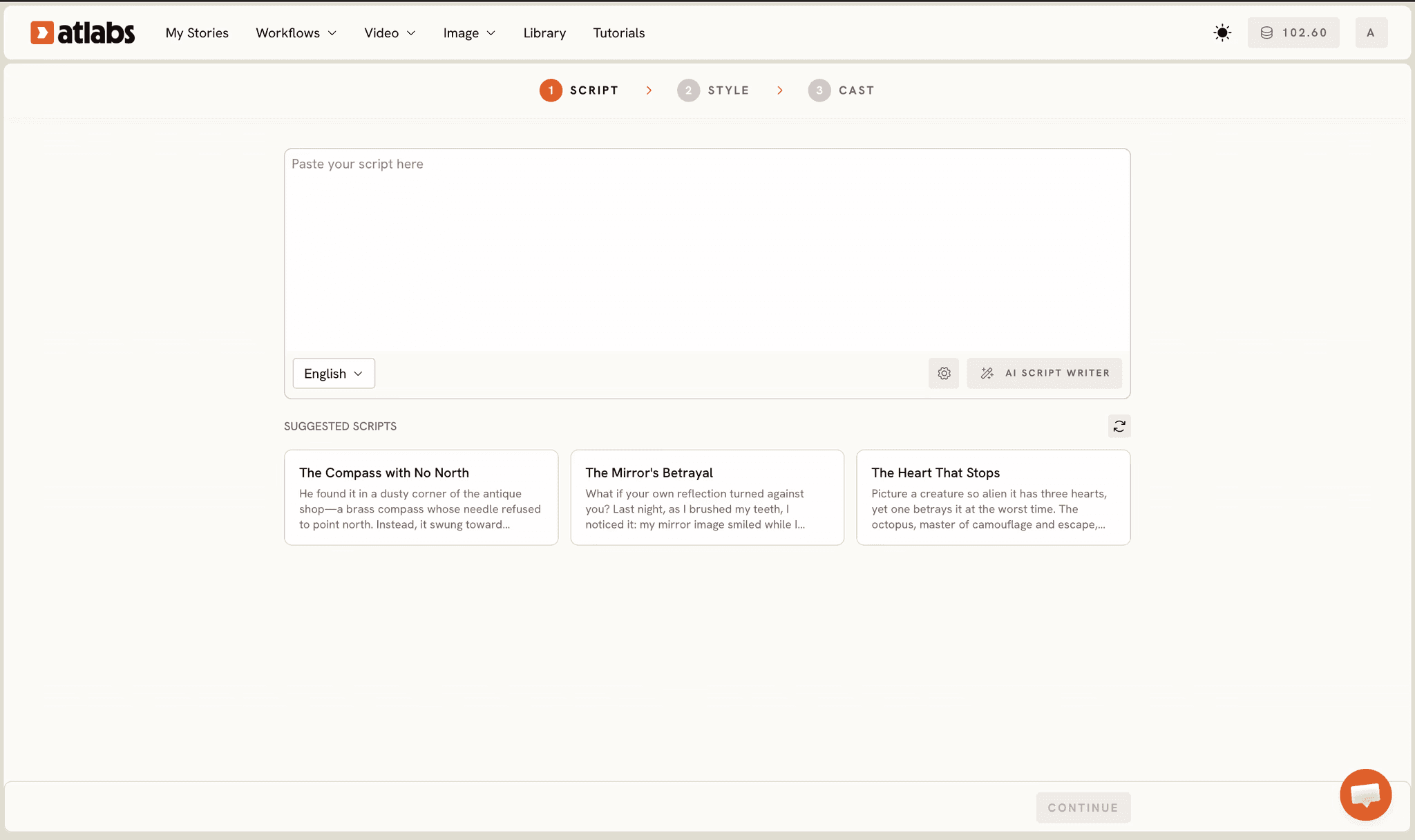
Use the Atlabs Animated Video workflow to structure your script. Paste your action-driven script into the Script step, or start from an idea and let the AI Script Writer draft it for you. The platform parses your scenes, detects your characters, and carries your character consistency parameters through generation. When you input your script, you are not just providing text, you are building a character system that the AI applies across every scene.
Explore the animated video workflow
Step 2: Design Your Visual Style with Precise Claymation Direction
Stop-motion has an unmistakable look you would recognize in a single frame: plasticine characters with visible surface texture and faint fingerprints, slightly uneven edges that betray the human hand, real-feeling miniature sets built from felt, wood and wire, practical lighting that casts soft physical shadows, and a shallow depth of field that gives everything that tabletop-diorama feel. This tactility is what separates stop-motion from flat 2D animation, and getting it right is entirely a matter of how precisely you direct the style. For music-led projects in this look, the claymation music video generator applies the same stop-motion style to every scene of a song.
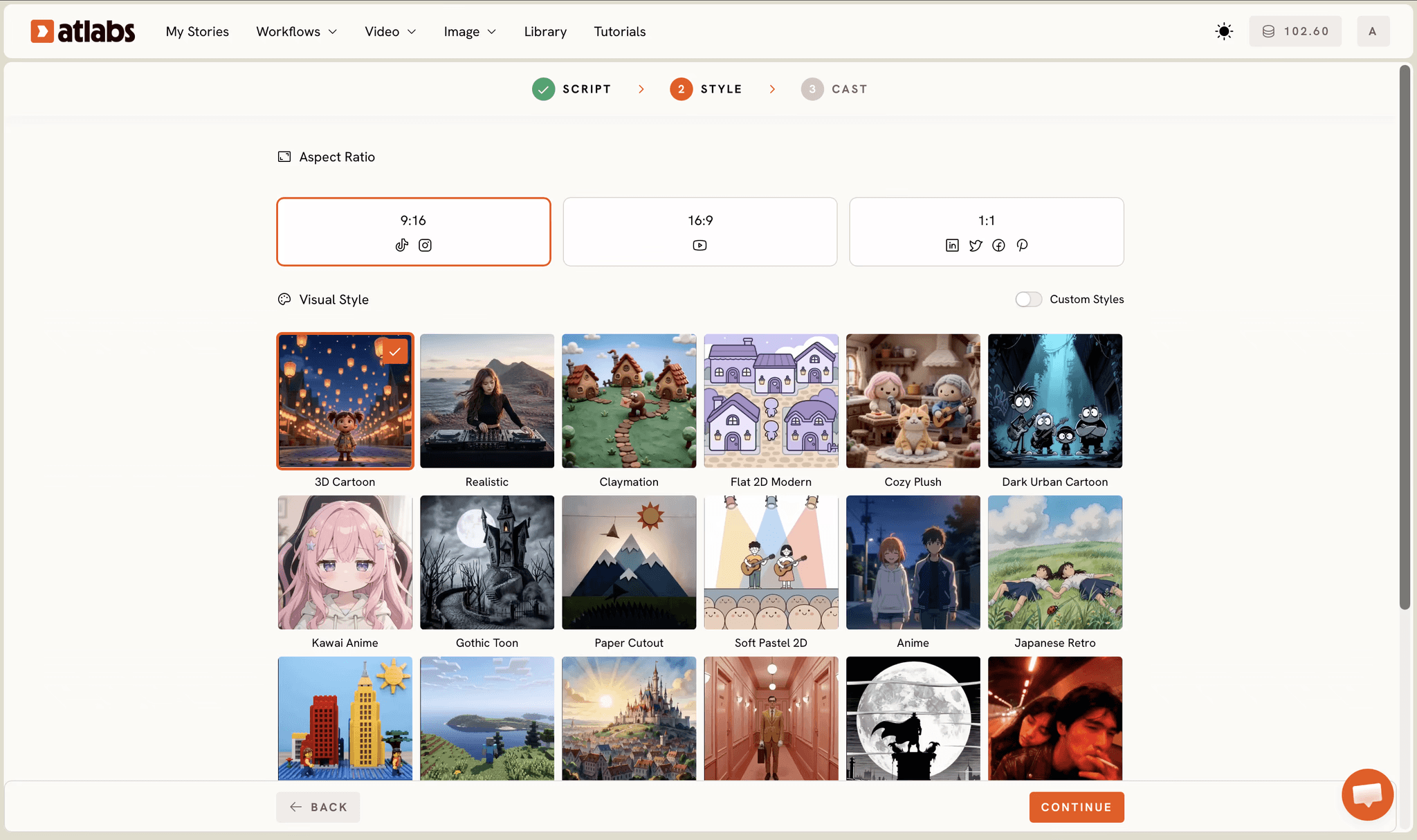
In the Style step, choose Claymation from the visual style library. That is your foundation, and it is the closest match to the plasticine aesthetic. Then sharpen it with descriptive direction. Write your style notes in concrete physical terms: "handcrafted plasticine characters with visible modeling texture, soft matte surfaces, wool rendered as textured white clay rather than fur, miniature practical set built from felt and painted wood, warm overcast daylight, gentle shallow depth of field, muted green and cream palette with weathered barn reds."
Also decide your aspect ratio here. Go 16:9 for YouTube episodes, or 9:16 if the series is built for Shorts. You can produce the master in 16:9 and reframe to vertical later, which is the more efficient order.
Then test before you commit. Generate two or three sample scenes with your characters in different settings and emotional states. This is your visual test drive. Does it feel handmade or does it feel like a smooth 3D render pretending to be clay? Do the surfaces look modeled or plastic? Adjust and regenerate. If characters look too polished, push words like "thumbprint texture," "matte," and "slightly uneven." If the world feels too big, add "miniature set" and "tabletop scale."
If you want this look locked permanently, train a custom style. Every future video in your series then inherits it automatically, which is how a series stays visually identical across fifty episodes without you rewriting style notes every time.
Design your series style today
Step 3: Lock Your Character Designs Across Every Episode
Character consistency is what makes a stop-motion series recognizable across hundreds of episodes. In real claymation, consistency is physical: the same puppet gets used every day, so it cannot drift. In AI production you have to create that lock deliberately, and it is the difference between a series and a pile of unrelated clips.
Design your cast with the kind of precision an AI can reproduce. For a lead sheep character: compact woolly body with textured clay wool, a dark face with an oval head, wide-set round eyes with visible highlights, small dark ears, thin clay legs, and one distinguishing feature that reads instantly at thumbnail size, whether that is a tuft of fringe, a scarf, or a bell. For a farm dog: taller, leaner, upright posture, a specific collar color, eyebrows that carry most of the expression. For a farmer: round glasses, a specific hat, a shape silhouette that reads even in a wide shot.
That last point matters more in stop-motion than in any other style. Because dialogue is minimal, viewers identify characters by silhouette and posture, so every character in your cast needs a distinct shape at a glance.
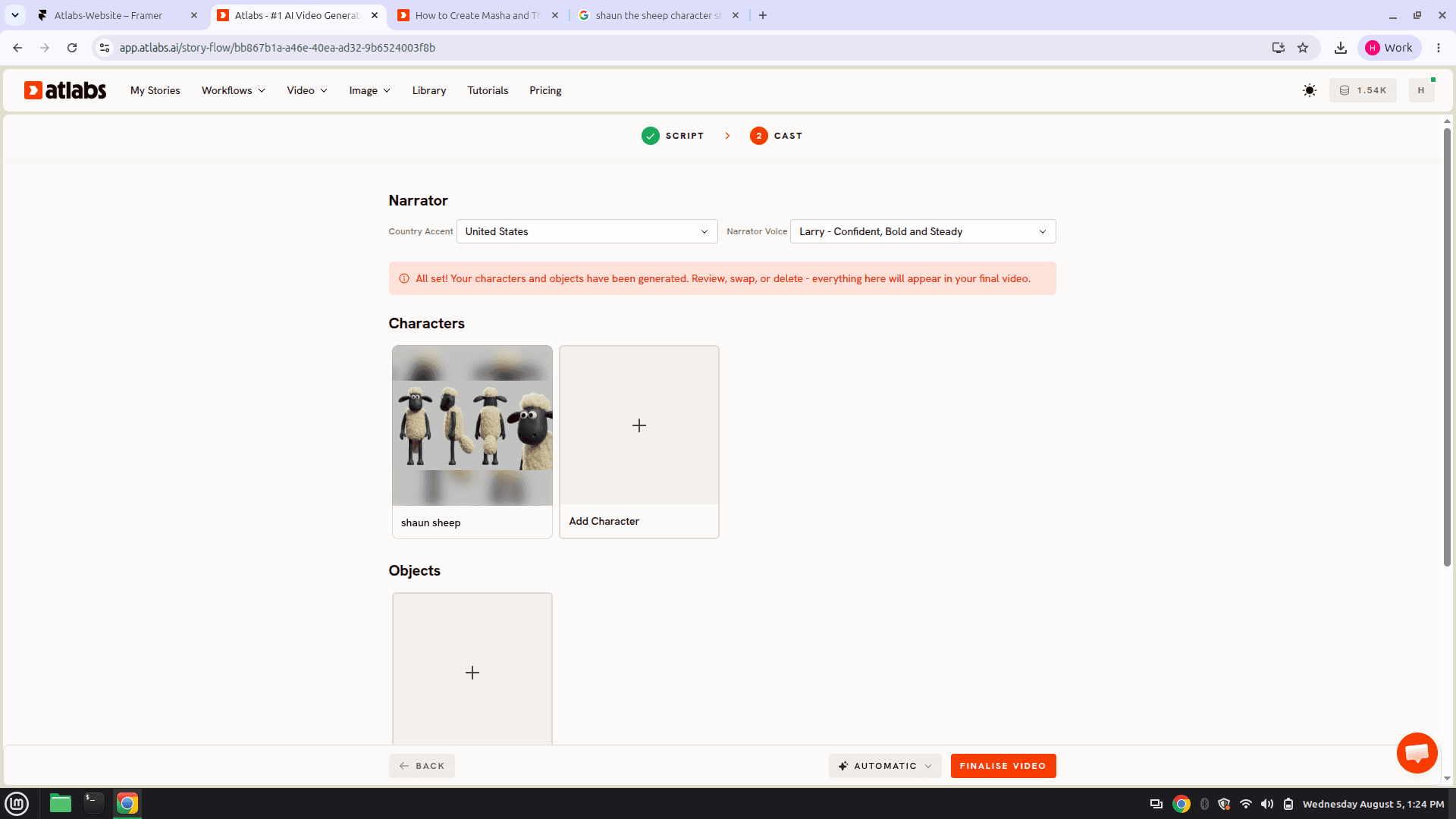
Use the Cast step in Atlabs to lock these designs. Add each character, define the appearance once, and the same face, wool texture and outfit appear in every scene of this video and in every future episode. You can also lock objects and locations here, which matters for this style specifically, since the barn, the tractor and the farmhouse are recurring visual anchors your audience learns to recognize. Set your narrator voice and country accent in the same step, though for a near-silent series the narrator often does very little beyond an occasional title card.
Keep a master character sheet alongside your scripts, exactly as a stop-motion studio keeps its puppet reference photos. When a new character joins in episode four, lock their design in the sheet and reference it identically when they return in episode nine.
Lock your cast and start generating
Step 4: Plan Your Storyboard Around Physical Gags
Before generating full scenes, storyboard the action, camera position, pacing and comic timing. Stop-motion comedy lives and dies on timing, and timing is a storyboarding decision, not a generation decision.
The camera grammar of this style is specific and worth copying deliberately. Wide shots establish the geography of a gag so the audience can see the whole setup, which is essential because the joke depends on spatial logic. Medium shots carry the attempt. Close-ups land the reaction, and the reaction shot is where most of the laugh lives. Low camera angles at character height make the miniature world feel real, and locked-off static shots feel far more authentic to stop-motion than sweeping camera moves, because real stop-motion cameras rarely fly.
For each scene, specify: camera position and shot size, what each character is physically doing, the emotional beat, how long the shot holds, and what breaks the shot. So rather than "sheep tries to reach apple," write "wide static shot of orchard, sheep enters frame left and studies a high branch for two seconds, cut to low-angle medium shot as the sheep stacks three crates, cut to close-up on the sheep's determined face, cut back to wide as the stack collapses, hold on the aftermath for one beat."
Build in the pause. The single most common mistake creators make with this style is cutting too fast. Stop-motion comedy needs a held beat after the disaster, that extra second where the character looks at the camera, or at the mess, and does nothing. That pause is the punchline. Storyboard it explicitly with a duration, or generation will smooth right over it.
Step 5: Generate, Review, and Iterate With Purpose
With script locked, style tested, characters designed and storyboards planned, you are ready to generate. Hit Finalise Video and Atlabs produces the full episode: scenes, animation, sound and pacing in one pass. Videos can run up to 15 minutes, which comfortably covers a standard kids episode rather than just a teaser.
Generate one complete episode before rolling out the series, then watch it end to end with fresh eyes the next day. Does the wool texture hold consistent from scene two to scene nine? Do the gags land, or does the pacing rush past the beat? Does the miniature world feel like one continuous set or several different farms? Does every character still look like themselves in the wide shots? Take notes on specific scene numbers.
Then iterate surgically. Scene level editing means you regenerate one scene without re-rendering the episode. If the reaction close-up in scene six came out flat, adjust that scene's direction and regenerate scene six alone. Everything else stays exactly as approved. This is the difference between a two-hour revision cycle and a ten-minute one, and it is the reason a solo creator can hold a weekly release schedule.
Expect two or three iteration passes per episode when starting out. By episode three, you know your characters well enough that it drops to one or two. By episode five, first-pass quality starts matching what you envisioned. That progression is normal, and it is the same learning curve real animators go through.
When the episode locks, run the Global Release Kit. Translate into 40+ languages with matching accents and subtitles, reframe your 16:9 master to 9:16 for Shorts, and generate a thumbnail in one click. For a near-dialogue-free comedy series this is an unusually large advantage, because the visual comedy already travels globally and the translation only needs to carry your titles and the occasional line.
Watch The Full YouTube Tutorial
Want to see the complete workflow on screen before you start? This tutorial walks through the whole process end to end: pasting the script, selecting aspect ratio and animation style, casting characters, and finalising the video.
Try the workflow after watching
FAQ
Q1: How long does it take to create a full stop-motion style episode with AI?
A five to seven minute episode takes roughly two to four hours from script lock to final export, depending on your iteration cycles. Your first episode runs longer, four to six hours, while you dial in the claymation look and character consistency. By episode five, production drops to two or three hours because you are executing a proven system rather than discovering one. For scale, a traditional stop-motion studio shoots roughly two to six seconds of finished footage per animator per day.
Q2: Can I use AI generation and still own the series I create?
Yes. You own the creative output generated through Atlabs. Your scripts, character designs, visual direction, storyboards and editing decisions are yours. Atlabs is the tool, not the author. Your series is your intellectual property from day one.
Q3: How do I make sure my series does not infringe on Shaun the Sheep?
Take the technique, not the characters. The claymation aesthetic, the silent visual comedy structure, the farm setting and the physical gag rhythm are all general creative approaches that anyone can use. What you must not copy is the specific character designs, names, logos or story content owned by Aardman. Design your own cast with their own silhouettes, names and personalities. A series that is visibly its own thing also performs better, because audiences reward originality and platforms do not flag it.
Q4: What if my generated scenes do not look handmade enough?
The issue is almost always vague style description. Instead of "claymation style," write "plasticine surface with visible modeling texture and faint thumbprints, matte finish, slightly uneven silhouette edges, miniature felt and painted wood set, soft practical lighting with physical shadow falloff." Precision teaches the model exactly what you want, and most creators hit their vision within two or three iteration cycles once they learn to describe physically rather than stylistically.
Q5: How do I keep characters consistent across a long series?
Lock designs early and document them obsessively. Use the Cast step to define each character once, and the same face and outfit carries into every scene and every future episode. Keep a master character sheet with proportions, colors, distinguishing features and typical expressions, and reference it identically whenever a character reappears. Train a custom style if you want the whole look locked, not just the cast.
Q6: Can I blend AI generation with tools like Premiere or DaVinci?
Yes. Many creators generate scenes in Atlabs, then layer sound design, music and color grading in Adobe Premiere Pro or DaVinci Resolve. For this style specifically, external sound design is worth the extra pass, because stop-motion comedy leans heavily on foley: the clatter, the thud, the squeak. Atlabs exports at standard resolutions that drop straight into any professional editor.
Q7: Can I create the series in a language other than English?
Yes, and this style makes it easier than most. Atlabs translates into 40+ languages with matching accents and subtitles, and because a Shaun-style series carries its comedy visually, there is very little dialogue to localize in the first place. One production becomes a genuinely global catalogue.
From Concept to Series: Real Production Workflow
Successful animation creators in 2026 treat a series like a content product, not an art project. Products run on systems. Art projects run on inspiration, and inspiration does not hold a release schedule.
Week 1: Script your first three episodes as physical action, not dialogue. Lock character designs and silhouettes. Build a reference board for the claymation look. Ten to fifteen hours.
Week 2: Test your style with sample scenes. Generate two or three clips to confirm the plasticine texture and miniature-set feel are landing. Refine your style description and consider training a custom style. Five to eight hours.
Week 3: Generate your first full episode. Expect four to six hours including iteration while you learn how your characters read in motion.
Week 4: Generate episodes two and three. With proven systems these run three to four hours each.
Months 2 to 3: Hold a one or two episode per week cadence. Scripts are written ahead, characters are locked, style is trained. You are executing rather than discovering.
That is how the great stop-motion series were built, one consistent episode at a time on a schedule audiences could rely on.
Your Animation Series Starts Today
Creating a Shaun the Sheep style stop-motion series in 2026 no longer requires a studio, a puppet fabrication team, or a year of shooting frame by frame. Individual creators, teachers and content producers are shipping professional-quality claymation-style series from home because the tools finally exist. The workflow is proven: an action-driven script, a locked claymation style, a consistent cast with distinct silhouettes, storyboards that respect comic timing, and surgical iteration at the scene level.
Your first episode is proof of concept. Your second validates the system. By the fifth, you have a production machine. The series that ship are not the ones that waited for perfect, they are the ones that shipped good and iterated toward great.








