
Every kids channel creator hits the same wall. You finish one nursery rhyme video, upload it, and the algorithm immediately wants the next one. Producing a fresh video for every upload slot is how channels burn out in their second month. The creators who last do something different. They treat one rhyme as raw material and repurpose it into twenty distinct videos, each one native to a different platform, style, or audience segment. This guide shows you the complete system using an AI nursery rhyme video generator, so a single afternoon of production covers your entire posting calendar.
Why One Rhyme Can Feed Your Channel for a Month (Beginner Guide)
A nursery rhyme is the most repurposable content format on the internet. The audio is short, the audience watches on every platform, and the same rhyme works in wildly different visual styles. A three year old who loved the 3D cartoon version of Twinkle Twinkle will happily watch the watercolor version tomorrow. Parents searching YouTube do not filter for novelty. They filter for safety, clarity, and repeat watchability, which means style variations of the same rhyme are not duplicates in the audience's eyes. They are a series.
Repurposing also solves the discovery problem for a faceless kids YouTube channel. YouTube long form, YouTube Shorts, Instagram Reels, and TikTok each reward different aspect ratios, durations, and pacing. One 16:9 master video repurposed into 9:16 vertical cuts, 1:1 square posts, and captioned short clips gives you presence on every surface where parents scroll, without four separate production efforts. The math is simple. One rhyme, five visual styles, four platform formats, and you are already at twenty videos.
Make Your Master Video in 10 Minutes
Everything starts with one strong master video, and the fastest path is the Music Video workflow inside Atlabs. It runs in four steps and needs nothing beyond your audio track.
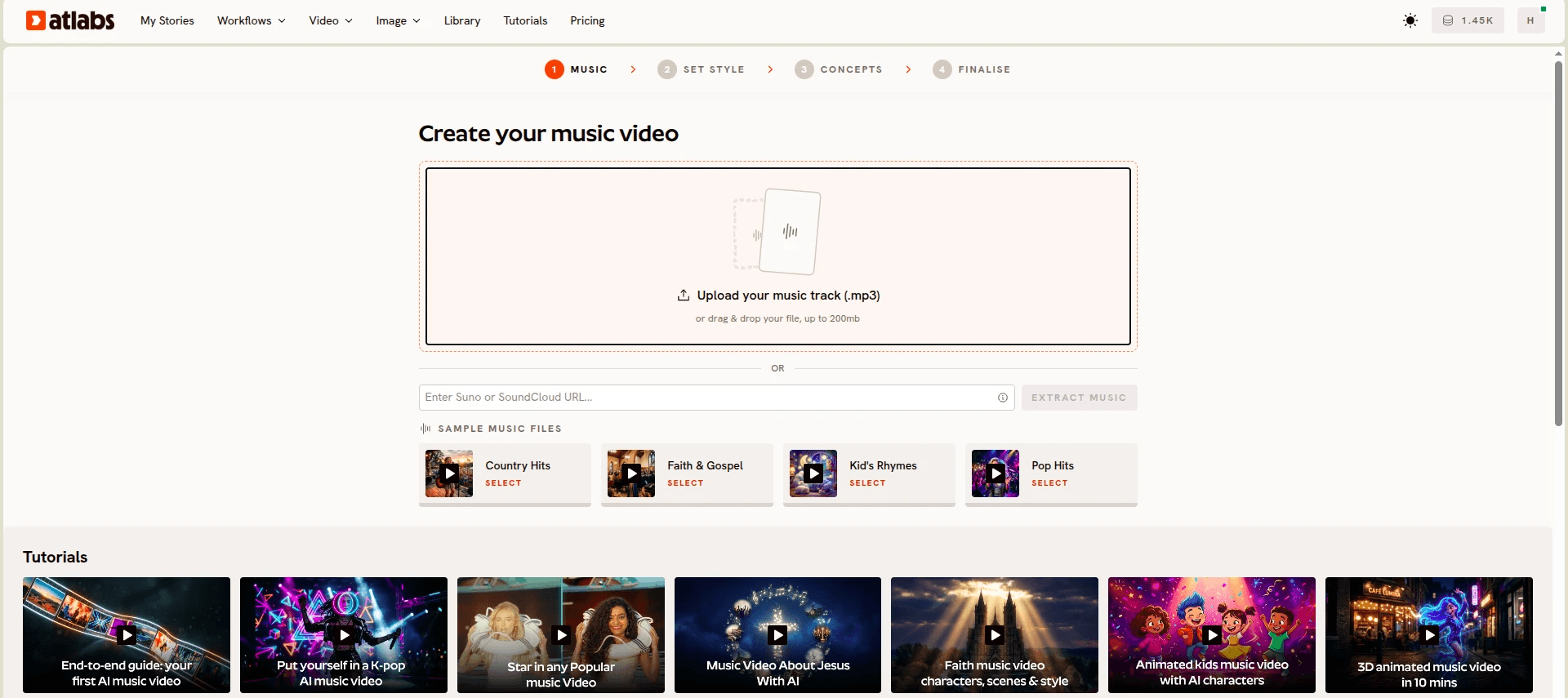
Step 1, Add Music. Upload your nursery rhyme track. Atlabs auto detects the language, BPM, mood, and genre, and lets you adjust each one. For a classic rhyme, Slow Tempo or Mid Tempo with an Uplifting or Dreamy mood usually matches best.
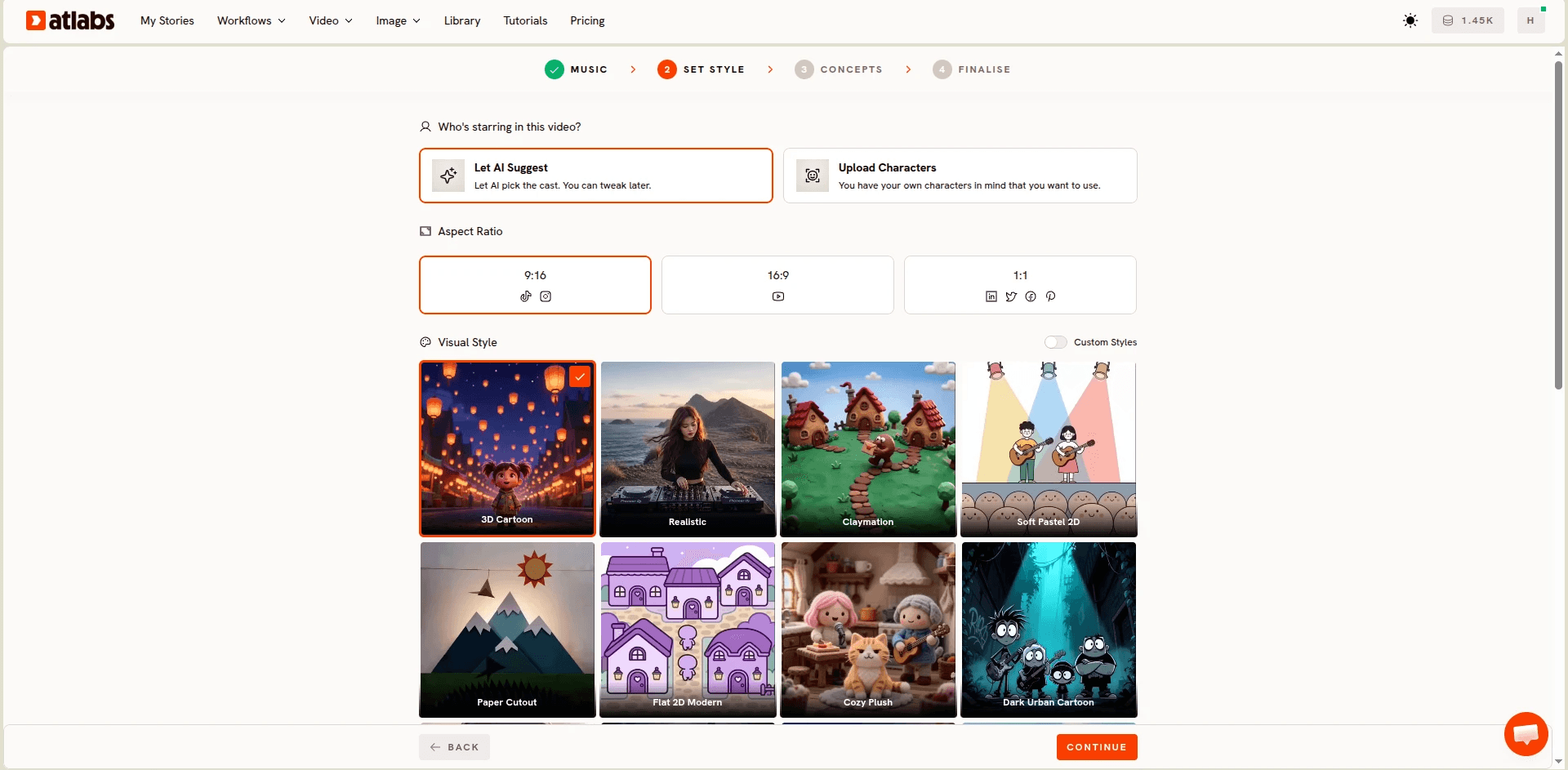
Step 2, Set Style. Choose 16:9 as your aspect ratio, since your master should be built for YouTube first. Pick AI Video as your Video Style, then choose a Visual Style. The library includes 3D Cartoon, Storybook, Clay, Watercolor Ink, Modern Cartoon, and many more. Pick one now. The others become your repurposing fuel later.
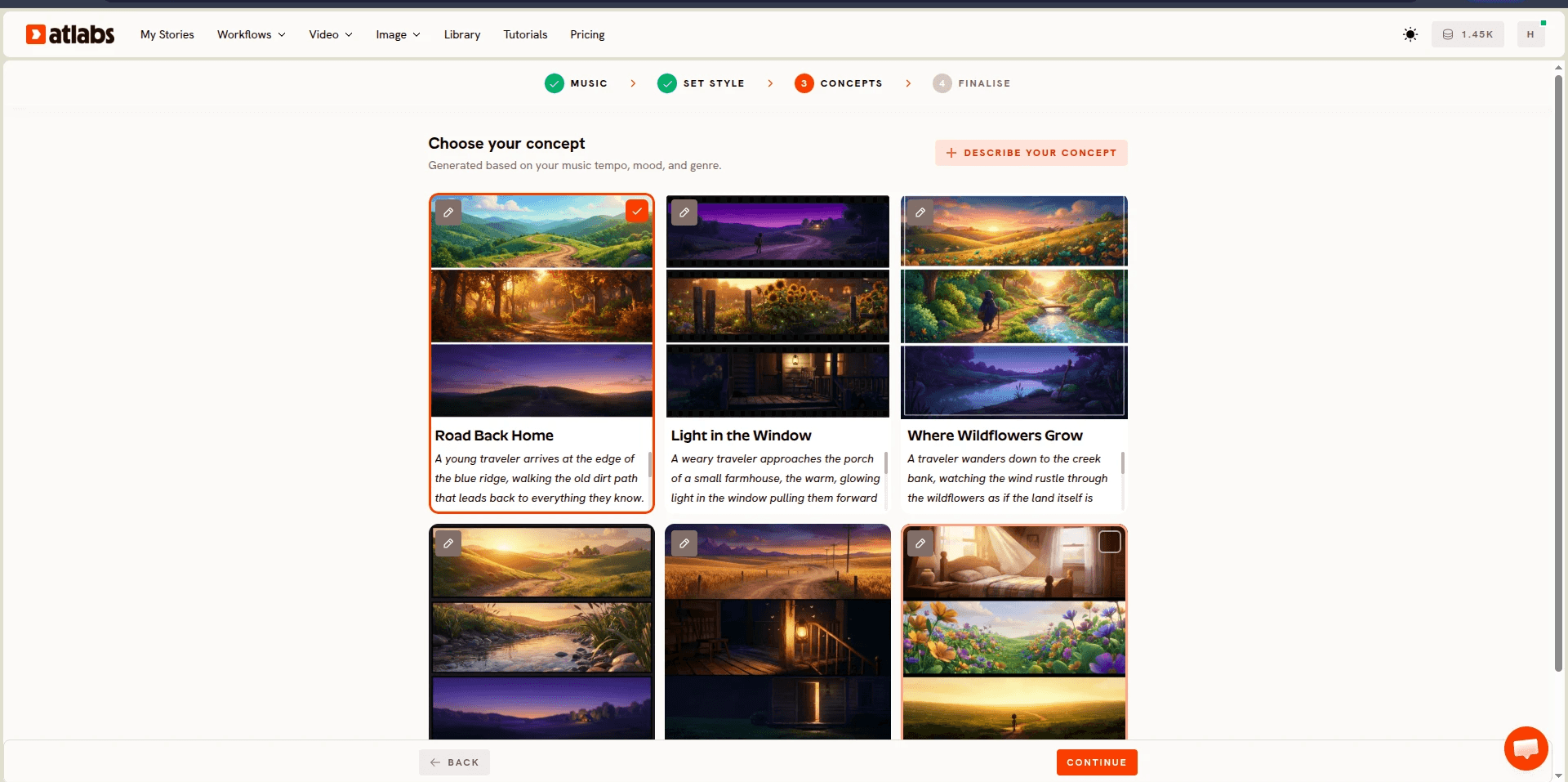
Step 3, Creative Direction. Atlabs generates six scene concepts automatically based on the detected tempo, mood, and genre of your track. Select the one that fits, or click Describe your Creative Direction to write a fully custom concept with its own title, description, tags, and moods.
Step 4, Finalise Cast. Name and define the characters who appear in the video. If your rhyme features a star, a sheep, or a little teapot, define them here so they stay consistent across scenes.

Generate, and your master video is done. This is the asset the other nineteen videos come from.
The 20 Video Repurposing Map (Ultimate Guide)
Here is how one master video becomes twenty. The map breaks into four moves.
Move one, style variations. Regenerate the same rhyme in four additional Visual Styles inside the Music Video workflow. If your master was 3D Cartoon, run Storybook, Clay, Watercolor Ink, and Modern Cartoon versions. Same audio, same characters, five completely different videos. Stylized character work in Atlabs typically routes through Seedance 2.0, which handles closeups and expressive character animation well, so each style version holds up on its own rather than looking like a filter pass. Running total: five videos.
Move two, aspect ratio conversions. Take each of your five style versions through the Reframe workflow, which converts video to a different aspect ratio with AI generated fill. Convert each 16:9 version to 9:16 for Shorts, Reels, and TikTok. Reframe supports 1:1, 3:4, 4:3, 9:16, 16:9, 9:21, and 21:9, and you can add a prompt like "Add more sky to the scene" to guide how the extra space gets filled. Five verticals plus your five originals brings you to ten. Convert your two best performers to 1:1 for square feed posts and you are at twelve.
Move three, transformation edits. The Modify Video workflow AI transforms existing footage. Upload a 3 to 10 second clip from your master, reference it as @Video1 in the prompt, and describe the final video you want. Turn a daytime scene into a nighttime lullaby version, shift the season to winter, or restyle a single scene entirely. You can also attach up to 4 reference images for style guidance. Four transformation edits of your strongest scenes takes you to sixteen.
Move four, character and caption versions. Use Lip Sync to create a singing character version. Upload a character image and your rhyme audio, and Atlabs synchronises the lip movements to the track. That gives you a talking mascot format that performs differently from full scene videos. Then run your best short clips through Caption Video, the auto captioning tool with style options, to produce caption first versions built for sound off viewing in feeds. Two lip synced versions plus two captioned cuts lands you at twenty.
Finish the set by pushing your top three videos through Upscale, which raises resolution up to 4K and frame rate up to 60 FPS, so your flagship uploads look sharp on living room TVs where most kids content actually gets watched.
How to Repurpose Without Animation Skills
None of the twenty videos above requires animation software, keyframes, or editing timelines. That is the point of this system. The Music Video workflow handles scene generation from your audio. Reframe handles platform formatting. Modify Video handles restyling. Lip Sync handles character performance. Caption Video handles accessibility and feed optimization. Each tool is a single screen with a handful of controls, and the whole pipeline runs inside one platform, so you never export from one app to import into another.
The multi model foundation matters here more than it first appears. Atlabs routes work to whichever AI model fits the task, so your stylized character scenes can run through Seedance 2.0 while high motion sequences route through models built for fluid movement like Hailuo 2.3, all within the same workflow. You swap models with a click instead of managing separate accounts and separate outputs that never quite match. For a solo creator running a nursery rhyme video maker operation, that consistency is the difference between a channel that looks professional and one that looks stitched together.
Example Prompts You Can Use for Free
These prompts are ready to paste. Each one targets a specific slot in your twenty video map.
A gentle 3D cartoon night sky where a smiling golden star floats above a sleeping village, soft camera drift upward through wispy clouds, warm moonlight glow, dreamy and calm mood, rich blues and golds, in the style of a modern preschool animation.
Try this prompt in the Atlabs Music Video workflow.
A storybook illustrated meadow at sunrise where three fluffy sheep hop over a wooden fence in rhythm with the music, slow lateral camera pan, watercolor textures with visible brush strokes, cozy and nostalgic mood, pastel greens and pinks.
Try this prompt in the Atlabs Music Video workflow.
A clay animation kitchen where a cheerful little teapot dances on a checkered countertop, stop motion style movement, bright practical lighting from a window, playful and bouncy mood, saturated primary colors. (Best routed through Seedance 2.0)
Try this prompt in the Atlabs Music Video workflow.
Make the scene a snowy winter night, keep the characters and their movements from @Video1 exactly the same, add gently falling snowflakes, replace the warm sunlight with cool blue moonlight and glowing window lights.
Try this prompt in the Atlabs Modify Video workflow.
Add more soft clouds and open sky above the scene so the characters sit in the lower half of the frame, keep the color palette consistent with the original video.
Try this prompt in the Atlabs Reframe workflow.
A watercolor ink forest clearing where woodland animals gather in a circle as fireflies rise around them, slow push in camera movement, dusk lighting with lantern glow, tender and wistful mood, muted earth tones with pops of warm yellow.
Try this prompt in the Atlabs Music Video workflow.
Watch the Full Atlabs Tutorial (Step-by-Step Video)
FAQ (Beginner Guide Questions Answered)
Do the style variations count as duplicate content on YouTube?
No. Each Visual Style produces genuinely different footage, scenes, and character renders from the same audio. YouTube evaluates the video stream, and five distinct visual productions of one rhyme are five distinct videos. Parents and kids treat them as a series, which helps session time.
How long does the full twenty video pipeline take?
The master video generates in minutes, and each repurposing pass is a short single screen task. Most creators complete the full set across one production day, then schedule the uploads over three to four weeks.
What aspect ratio should I publish first?
Publish the 16:9 master on YouTube first, since long form kids content earns the deepest watch time there. Push the 9:16 Reframe versions to Shorts, Reels, and TikTok in the following days to funnel viewers back to the long form upload.
Can I use my own character across all twenty videos?
Yes. Define your characters in the Finalise Cast step of the Music Video workflow so they carry across scenes, and use the same character image in Lip Sync for the singing mascot versions. Consistent characters are what turn a set of videos into a recognizable channel.
Final Verdict: Your Ultimate Repurposing System
The creators winning in kids content are not producing more. They are producing smarter. One nursery rhyme, generated once in the Music Video workflow, then multiplied through Reframe, Modify Video, Lip Sync, Caption Video, and Upscale, gives you a month of platform native uploads from a single production day. Every video in the set reinforces the others, your characters stay consistent, and your channel starts looking like a studio built it. Pick your first rhyme and run the map.








