
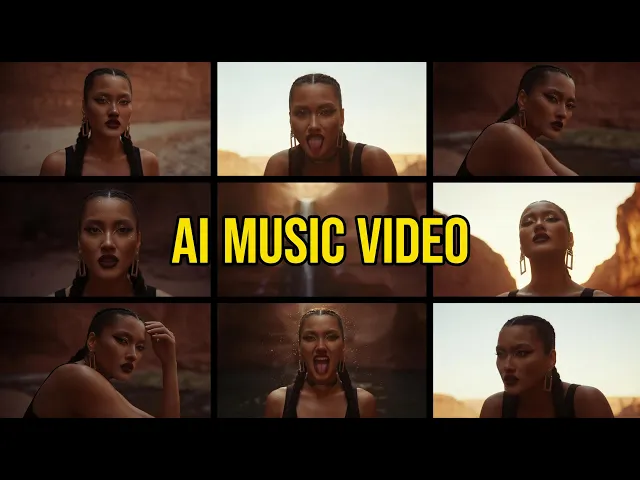
The fastest way to make a hip-hop music video with AI is to upload your track to the Atlabs Music Video workflow, pick a video style, and let it build cinematic scenes around your beat. If you produced your song in Suno, you can paste the Suno link straight in. No camera, no crew, no editing suite. This guide walks an independent hip-hop artist through the whole process step by step, from raw track to a video ready for YouTube, Reels, or TikTok.
What you'll need
Three things get you to a finished hip-hop music video. First, an Atlabs account so you can open the Music Video workflow. Second, your track, either as an mp3 file up to 200MB or as a Suno music URL you can paste directly. Third, about ten to fifteen minutes and a rough idea of the mood you want, whether that is a late-night city vibe, a hard-edged street look, or something more dreamlike. You do not need any video editing skill or prior animation experience to follow along.
Watch the Full Tutorial on YouTube
Make a hip-hop music video step by step
Open the Music Video workflow to begin. The walkthrough below follows the five steps exactly as they appear on screen, so a first-time artist can match each move to what they see.
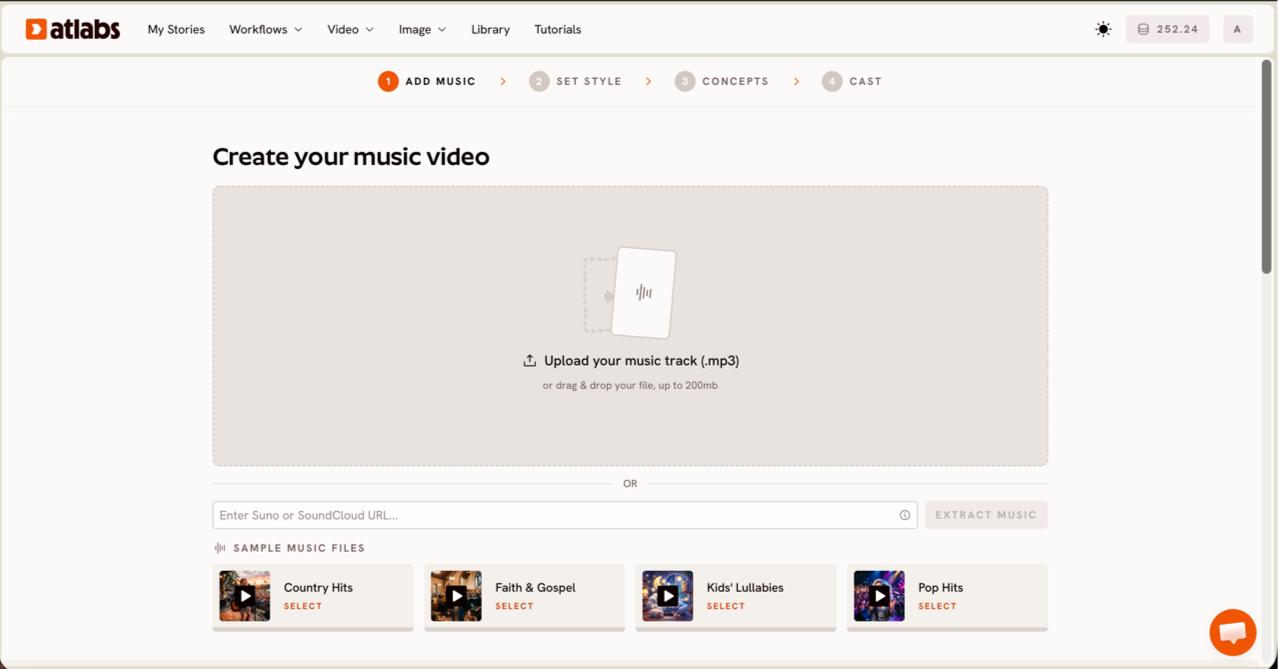
Step 1. Add your music. On the Create your music video screen, upload your mp3 or paste your Suno music URL, then click EXTRACT MUSIC. Atlabs reads the track and auto-detects its properties, so you do not have to tag the tempo or genre yourself. This is the moment your finished Suno beat becomes the foundation for the visuals.
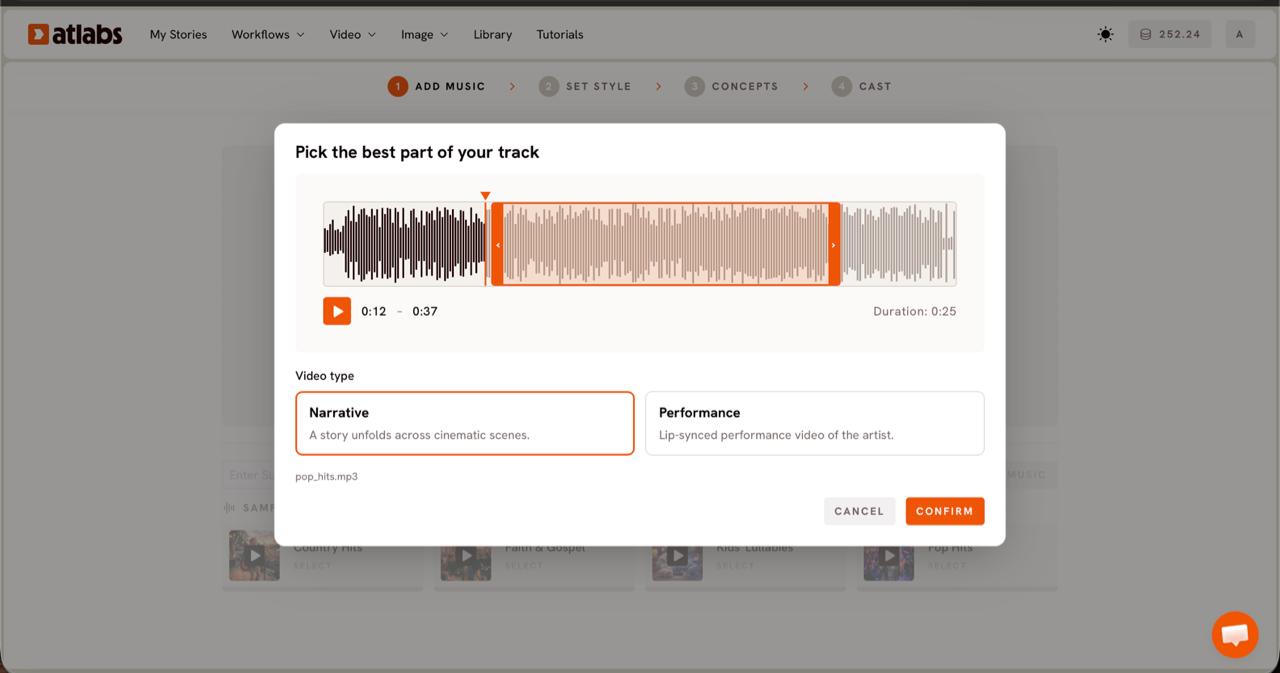
Step 2. Pick the video type. The Pick the best part of your track modal opens with your waveform. Drag the green selection window across the waveform to choose the segment you want to feature, usually up to about twenty-five seconds, ideally your hook or your hardest verse. Then choose a Video Type. Pick Narrative if you want a story to unfold across cinematic scenes, or Performance if your track has vocals and you want a lip-synced performance look.
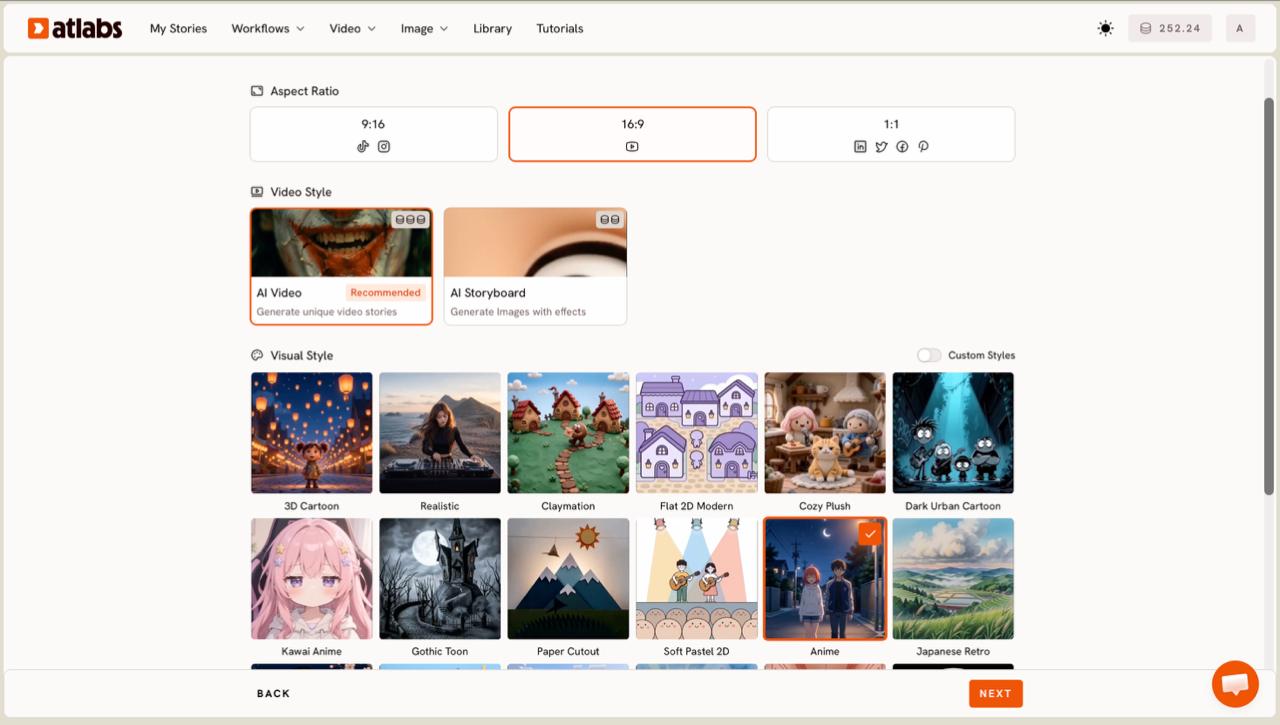
Step 3. Set the style. Choose your Aspect Ratio first. Use 9:16 for TikTok and Instagram, 16:9 for YouTube, or 1:1 for square posts. Leave Video Style on AI Video, which generates unique video stories rather than still images with effects. Then open the Visual Style library and pick the look that fits your sound. For hip-hop, Dark Urban Cartoon and Realistic both read well, the first for a stylized street feel and the second for a grounded, live-action vibe.
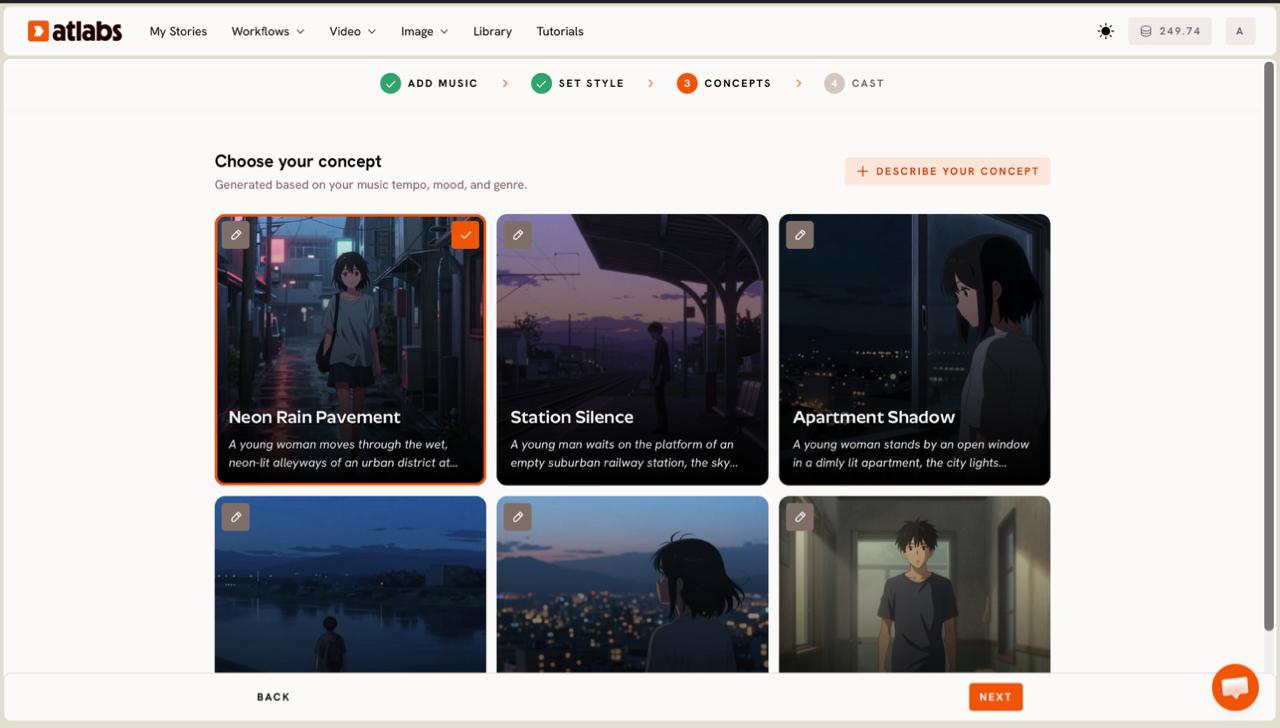
Step 4. Choose your concept. Atlabs displays six scene concepts generated based on your music tempo, mood, and genre, each shown as a card. Read through them and select the one that fits the story in your head, marked with a green tick. Want full control over the visuals? Click DESCRIBE YOUR CONCEPT and write your own direction, which is where an artist with a clear vision can steer every scene.
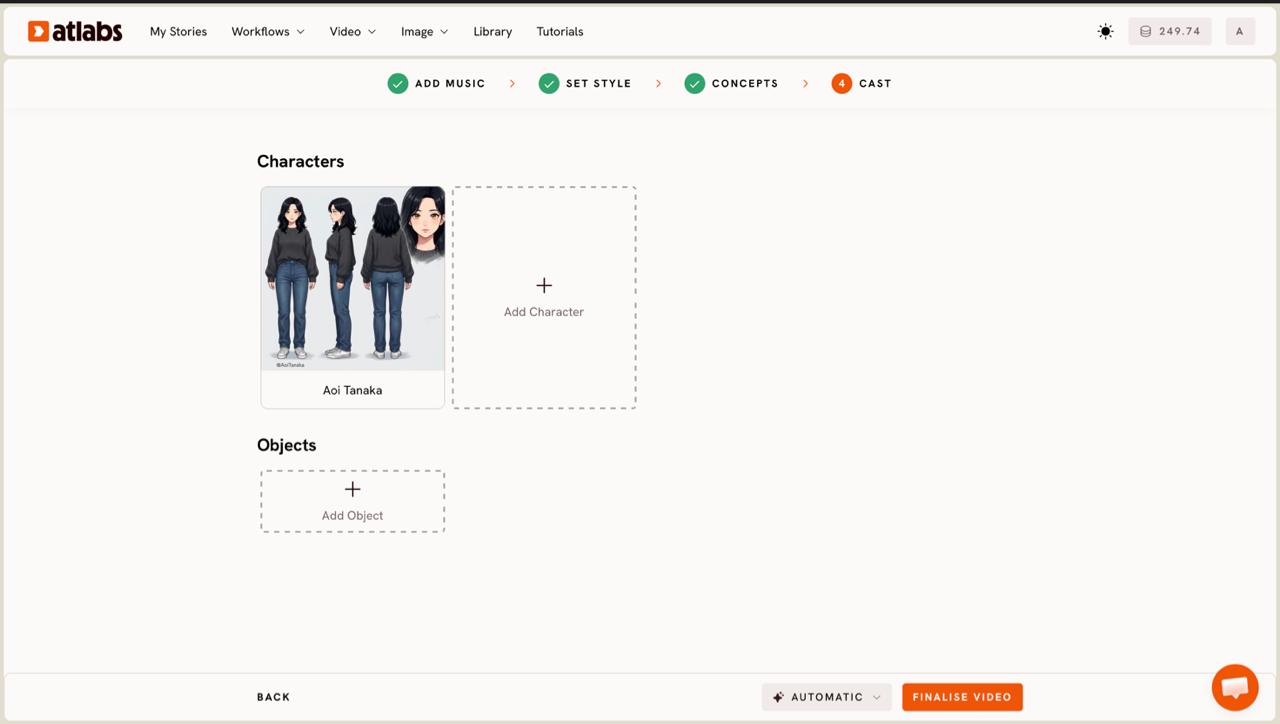
Step 5. Cast your characters. Define the Characters and Objects that appear in your video. Each character card shows a generated reference sheet with multiple angles and a portrait, so your artist stays consistent from scene to scene. Click any empty slot to Add Character, then use the Click to edit overlay to refine the look. Add props in the Objects section if your concept calls for them. When the cast looks right, generate, and your hip-hop music video builds out scene by scene.
Tips for a better hip-hop music video
Match the model to the motion you want. The Music Video workflow can route your scenes through models like Kling 3.0 for cinematic motion and realism, Google Veo 3.1 for wide establishing shots, and Wan 2.6 for cinematic depth, so a track that wants smooth camera movement and a track that wants a stylized look can each get the right treatment.
Pick the segment that hits hardest. The twenty-five second window rewards your strongest hook, not your intro. Drag the green selection to the part of the track a listener would replay. For vertical platforms, set 9:16 in Step 3 from the start so nothing important gets cropped later. If you want your artist mouthing the bars, run a clip through Lip Sync as a finishing pass, and tighten captions for silent autoplay feeds with Caption Video before you post.
Concept prompts you can copy
If you click DESCRIBE YOUR CONCEPT in Step 4, these two prompts give you a strong hip-hop starting point. Paste one in and adjust the details to your track.
Late-night rooftop in a neon-lit city, lone rapper in an oversized jacket, breath visible in cold air, rain-slick streets glowing below, slow push-in camera, moody magenta and cyan lighting, cinematic haze, gritty urban realism.
→ Try this in Atlabs Music Video
Underground concrete parking garage at night, crew walking toward camera in a wide low-angle shot, flickering fluorescent tubes, graffiti walls, smoke drifting through headlight beams, high-contrast dark urban style, confident energy on the downbeat.
→ Try this in Atlabs Music Video
FAQ
How long does it take to make a hip-hop music video with AI?
From uploading your track to generating the video, most artists finish the setup in about ten to fifteen minutes. The five steps move quickly because Atlabs auto-detects your track properties and generates scene concepts for you. Generation time then depends on the length and style of the video you chose.
Can I use a song I made in Suno?
Yes. In Step 1 you can paste your Suno music URL directly instead of uploading a file, then click EXTRACT MUSIC. You can also upload an mp3 up to 200MB if you prefer to work from a downloaded track.
Do I need video editing or animation skills?
No. The Music Video workflow handles scene building, characters, and motion for you, so you never touch an editing timeline. You make creative choices like aspect ratio, visual style, and concept, and the workflow generates the scenes around your beat.
What video format should I export for TikTok or YouTube?
Set your aspect ratio in Step 3. Use 9:16 for TikTok and Instagram Reels, 16:9 for YouTube, and 1:1 for square feed posts. Choosing the right ratio before you generate keeps your framing intact instead of cropping it afterward.
Get started
Ready to turn your next hip-hop track into a video? Open the Music Video workflow, paste your Suno link, and build your first scene.
Open Atlabs








