
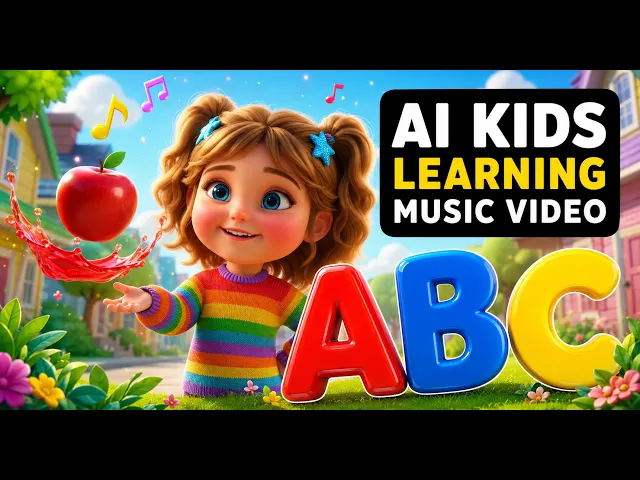
You can make animated moral stories for kids with AI in about ten minutes using Atlabs. Write or paste a short story with a clear lesson, pick a bright animated style, choose a warm narrator voice, and Atlabs builds an animated short with characters, scenes, and narration. There is no drawing, no animation software, and no camera. This guide walks through the exact steps that parents, teachers, and kids channel owners follow to publish a finished moral story that children actually want to watch.
Why Kids Moral Stories Work So Well (Beginner Guide)
Moral stories are one of the most watched formats in kids content because every parent and teacher wants a story that entertains and teaches at the same time. A short tale about sharing, honesty, or kindness gives children a lesson they remember, and it gives your channel a reason to be recommended by parents. The problem has always been production. Animating a single moral story by hand needs an illustrator, a voice artist, and hours in animation software, and that cost is why so many great story ideas never reach kids. AI removes that wall. You bring the story and the lesson, and the animation, characters, and narration are handled for you.
This shift matters most for the people who make kids content on a schedule. A teacher who wants a fresh moral story for Monday morning, a parent building a calm bedtime series, or a channel owner who needs to publish weekly can now produce a finished animated story in a single sitting. The lesson stays the star of the video, and the character stays consistent from the first scene to the last, so children follow the same friendly hero through the whole story.
➜ Start Your First Moral Story
What You Need to Start for Free
You need three things and none of them cost you a design skill. You need an Atlabs account, a short story idea that carries one clear moral such as be kind, tell the truth, or help others, and roughly ten to fifteen minutes. If you do not have a script written yet, that is fine, because the Animated Video workflow includes an AI Script Writer that drafts a kids story around the lesson you type. Parents and teachers with a lesson in mind but no words on the page can start from a blank script and let the AI Script Writer shape the first draft.
▶ Watch the full Atlabs tutorial for kids stories
➜ Open the Animated Video Workflow
How to Make a Moral Story Step-by-Step in 10 Minutes
The Animated Video workflow moves through three stages shown in the progress bar at the top: SCRIPT, SET STYLE, and CAST. Follow them in order and you will have a complete animated moral story ready to render.
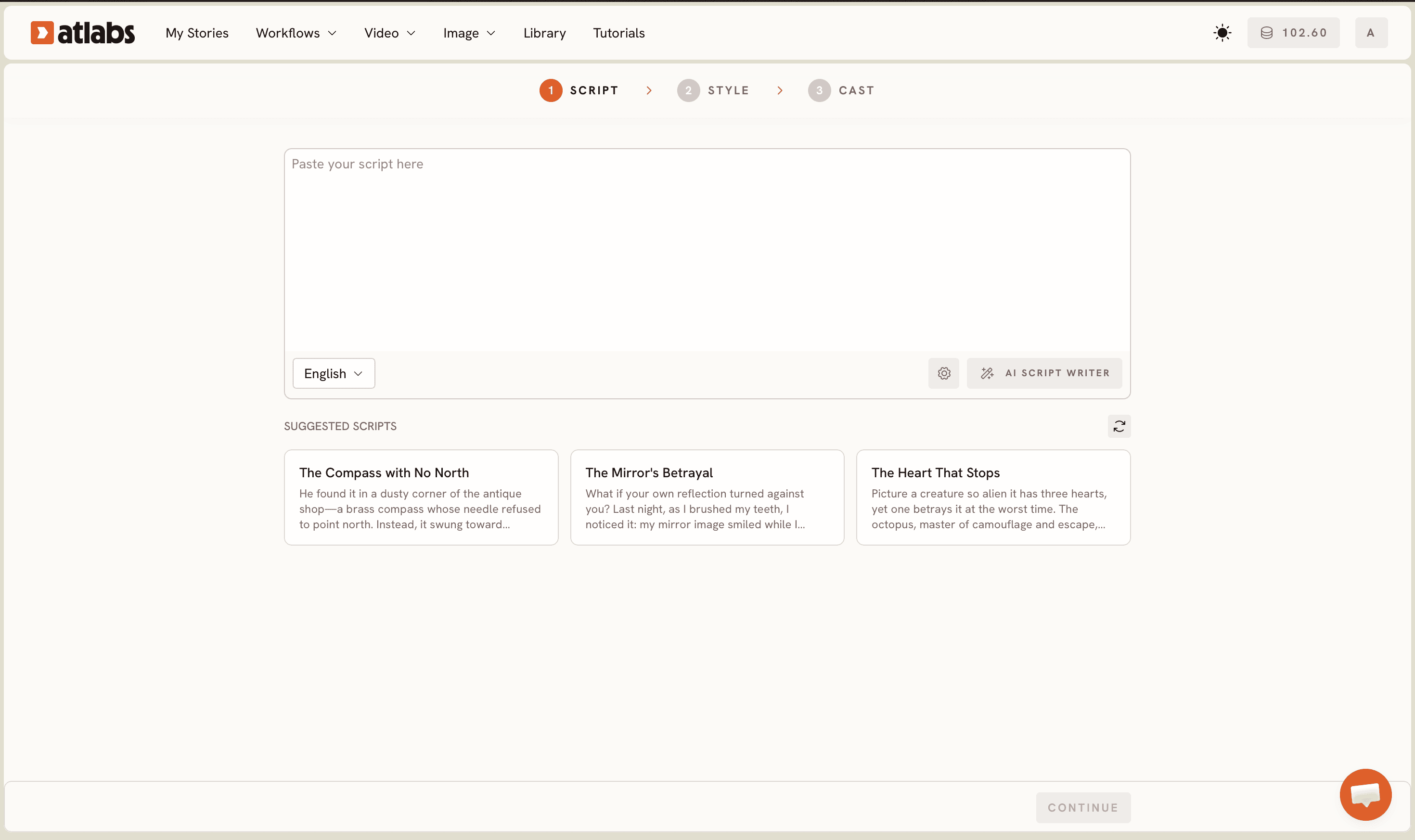
Open the Animated Video workflow from the Atlabs dashboard to begin Step 1, the script stage. At the top you will see two tabs, Add your script for free-form text and Add your screenplay for structured scenes. Paste your moral story into the editor, or click the AI Script Writer button on the bottom right to generate one from a one line lesson. Set the Language selector in the bottom left if your kids audience is not English speaking. If you want inspiration, the SUGGESTED SCRIPTS cards below give ready story ideas to start from.
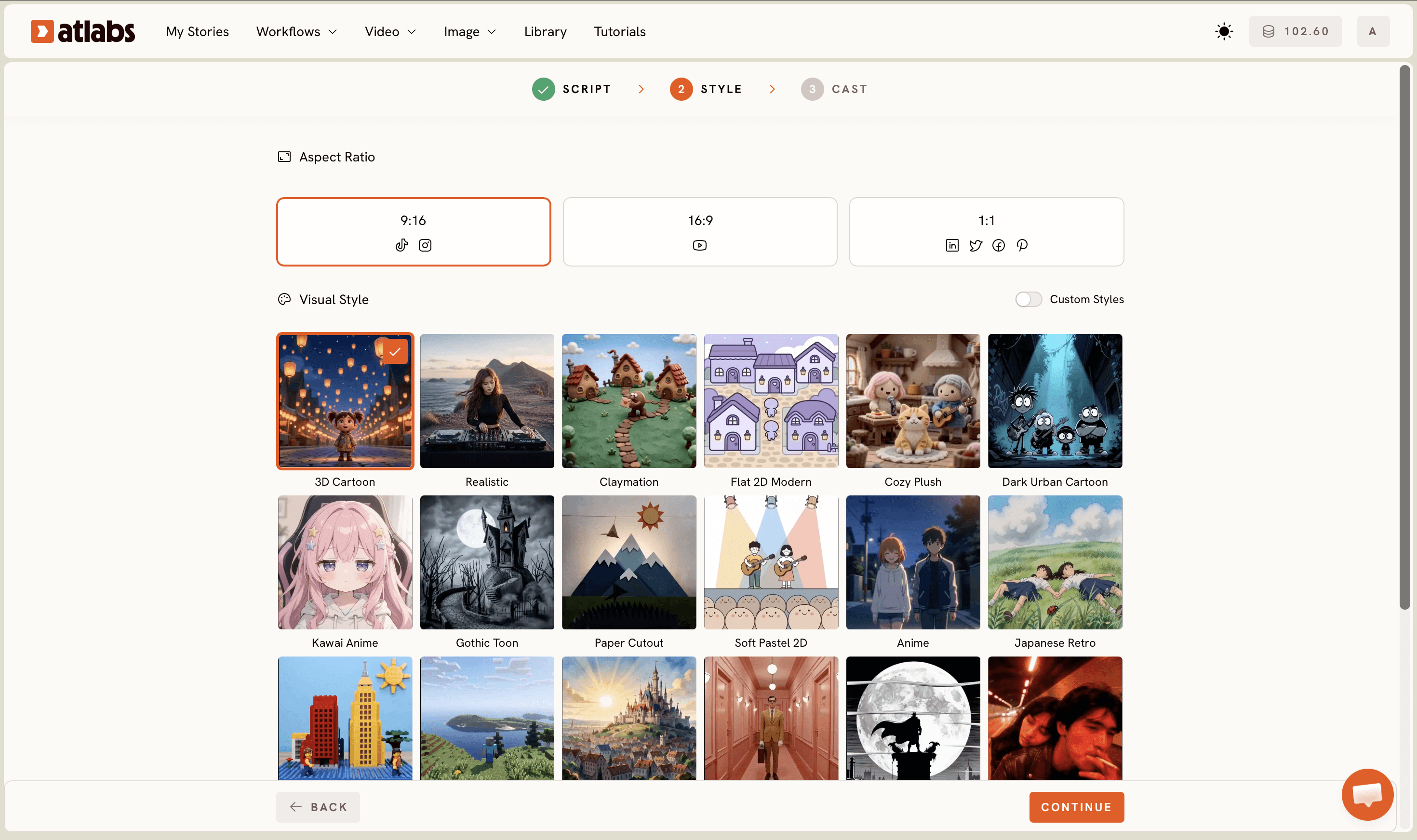
Choose your look in Step 2, the Set Style stage. Pick an Aspect Ratio of 16:9 for YouTube or 9:16 for Shorts and Reels. Keep Video Style on AI Video, the recommended option that generates unique animated scenes rather than still frames. Then pick a Visual Style from the library. For kids moral stories, 3D Cartoon and Soft Pastel 2D read as bright, warm, and age appropriate, which is exactly the tone young children respond to.
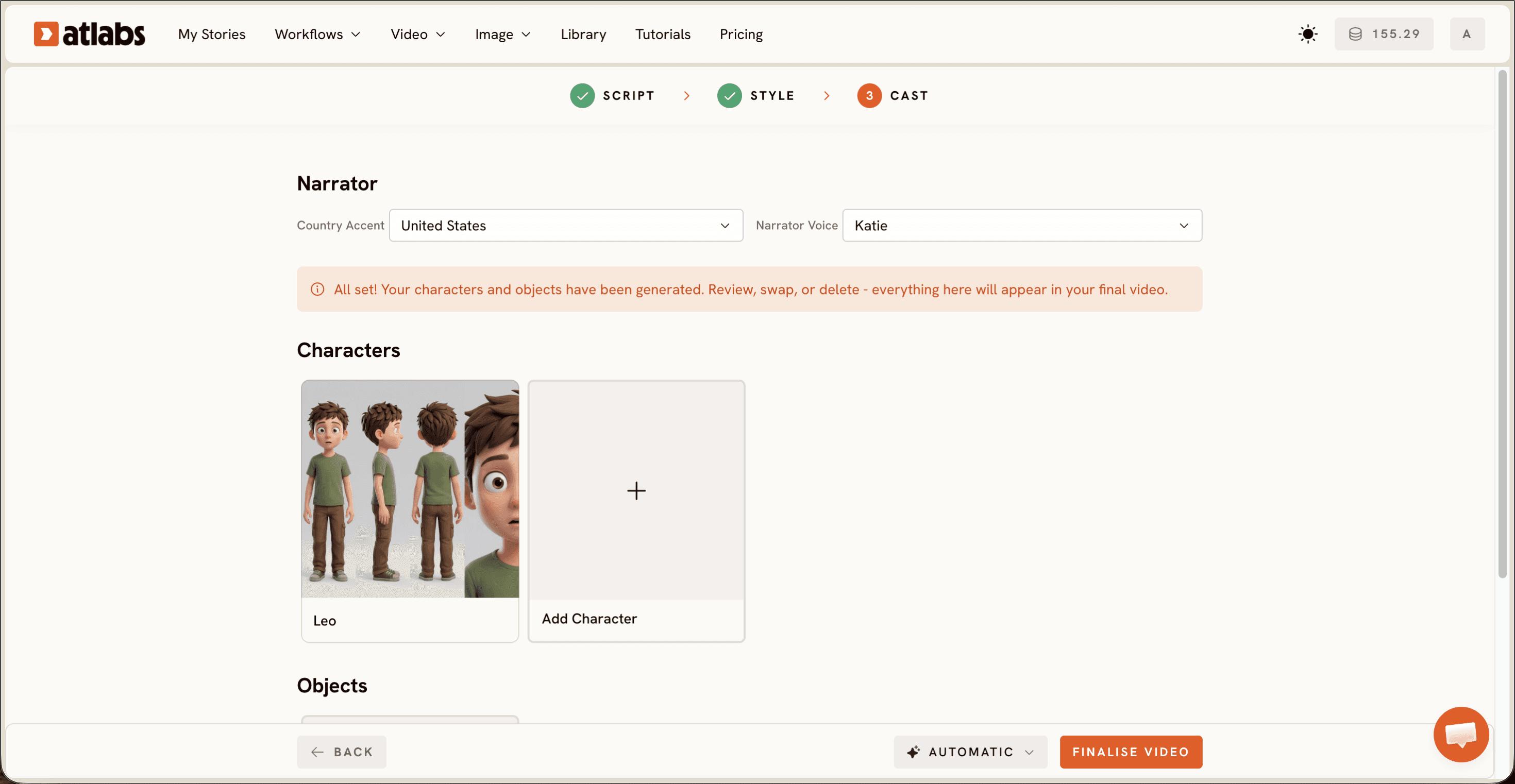
Cast your narrator and characters in Step 3, the Cast stage. At the top, set the Narrator with a Country Accent dropdown, which defaults to United States, and a Narrator Voice dropdown such as David for a warm reading voice. In the middle, Atlabs shows the generated Characters as cards with name tags, so your fox, rabbit, or child hero stays consistent across every scene. The Objects section at the bottom lets you add props your story needs, like a basket or a lantern. When the cast looks right, generate the video and your animated moral story is built.
Tips to Get Better Stories Without Animation Skills
A few small choices make kids stories land much better. Keep the moral to one clear sentence so children finish the video with a single takeaway rather than a mixed message. Stay on AI Video instead of AI Storyboard when you want smooth motion, because storyboard mode produces images with effects rather than moving scenes. For expressive character closeups where a little animal reacts to the lesson, the Seedance 2.0 model handles stylized faces and dialogue scenes well. If a character needs to speak on screen, run the clip through Lip Sync so the mouth matches the narration. Finally, keep each scene short, since young children hold attention best when the story moves quickly from one beat to the next.
➜ Make a Moral Story in 10 Minutes
Copy These Prompts: The Ultimate Guide to Scene Direction
Prompts save you time. Paste the first block into the AI Script Writer to draft a kids story around your chosen lesson, then use the second block in the script editor to steer how a scene looks and feels.
Write a 60 second animated moral story for children aged 4 to 8 about honesty. Use a friendly fox named Milo who finds a lost coin. Keep the language simple, add gentle humor, and end with one clear lesson said out loud by the narrator.
Try this in Atlabs Animated Video
Scene direction: a warm meadow at golden hour, soft rounded 3D Cartoon style, Milo the fox smiling as he returns the coin to a small bear, bright storybook colors, gentle camera push in on the two characters shaking hands.
Try this in Atlabs Animated Video
➜ Try These Prompts in Atlabs
Publish Your First Kids Story Without Animation Software
Once the video is generated, you can send it straight to your kids channel or classroom. Use Reframe if you want both a 16:9 version for YouTube and a 9:16 version for Shorts, run Caption Video to add on screen text for early readers, and Upscale the final clip for a crisp finish. A single moral story can become a weekly series simply by changing the lesson and the character each time. Keep a short list of lessons you want to cover, sharing, patience, courage, and honesty, and you have a full month of kids stories mapped out before you write a single scene.
➜ Create Your Kids Story Without Animation Skills
FAQ
How long does it take to make an animated moral story?
Most kids moral stories take about ten to fifteen minutes from script to generated video. Writing the story is usually the slowest part, and the AI Script Writer speeds that up if you only have the lesson in mind.
Do I need animation or editing skills?
No. The Animated Video workflow handles the animation, characters, and narration for you. Your job is to bring the story and the moral, then pick a visual style and a narrator voice.
What visual style works best for young children?
Bright, warm styles read best for kids. 3D Cartoon and Soft Pastel 2D from the Visual Style library feel friendly and age appropriate, which keeps young viewers engaged through the lesson.
Can I make moral stories in other languages for my classroom?
Yes. The Language selector on the Script step lets you set the story language, so teachers can produce the same moral story for different classrooms and audiences.
Get started
Atlabs takes a short story with a lesson and returns a finished animated moral story with narration, characters, and scenes, ready for your kids channel or classroom.








