
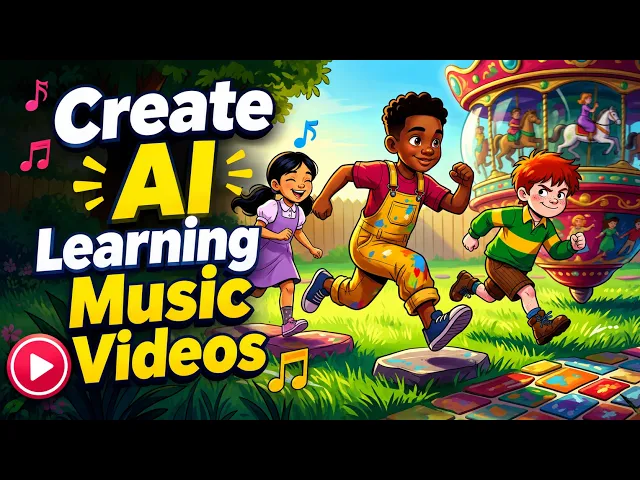
The fastest way to make counting songs for kids with AI in 2026 is Atlabs. You upload your counting song, pick the best part of the track, choose a bright cartoon style, and the Music Video workflow builds the animated scenes and characters around your audio. No drawing, no timeline editing, no animation software. This beginner guide walks through every step so a parent, teacher, or kids channel can publish a finished counting video in about ten minutes. Counting songs are some of the most searched kids videos on YouTube, and with AI you can turn one track into a whole series.
What you need to get started (beginner guide)
You need very little to make a counting song video. An Atlabs account gives you the Music Video workflow, which turns an audio track into an animated video with scenes and characters. You bring your counting song as a file or a link. You set aside about ten minutes. That is the whole checklist, and the rest happens inside the workflow.
An Atlabs account with the Music Video workflow open
Your counting song as an mp3 file up to 200MB, or a Suno music link
About ten minutes and a target platform, such as YouTube or a classroom screen
Open the Music Video workflow
▶ YouTube tutorial: Watch: make a counting song video with Atlabs
How to make a counting song video in 10 minutes
Open Atlabs and pick the Music Video workflow. It runs in five steps: Add Music, Video Type, Set Style, Concepts, and Cast. Work through them in order and the workflow generates an animated counting video built around your song. You never touch a drawing tool or a video editor, so the same process works whether you make one counting song or a weekly number series. Here is each step with the exact buttons to click.
Step 1: Add your counting song
Open the Music Video workflow, where the header reads 'Create your music video'. Upload your counting song as an mp3 up to 200MB, or paste a Suno music URL, then click EXTRACT MUSIC. Atlabs reads the track and detects its tempo, mood, and length, which it uses later to suggest matching scenes. This audio is the backbone of the whole video, so use the final version of your song.
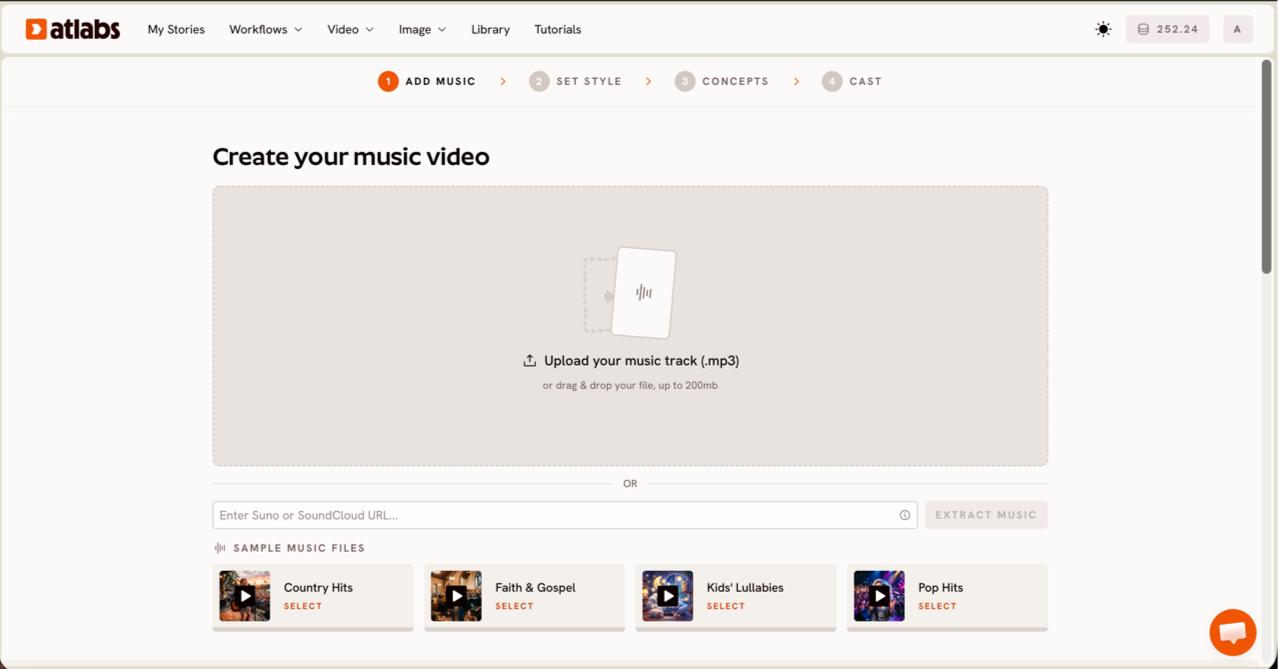
Upload your counting song
Step 2: Pick the part and video type
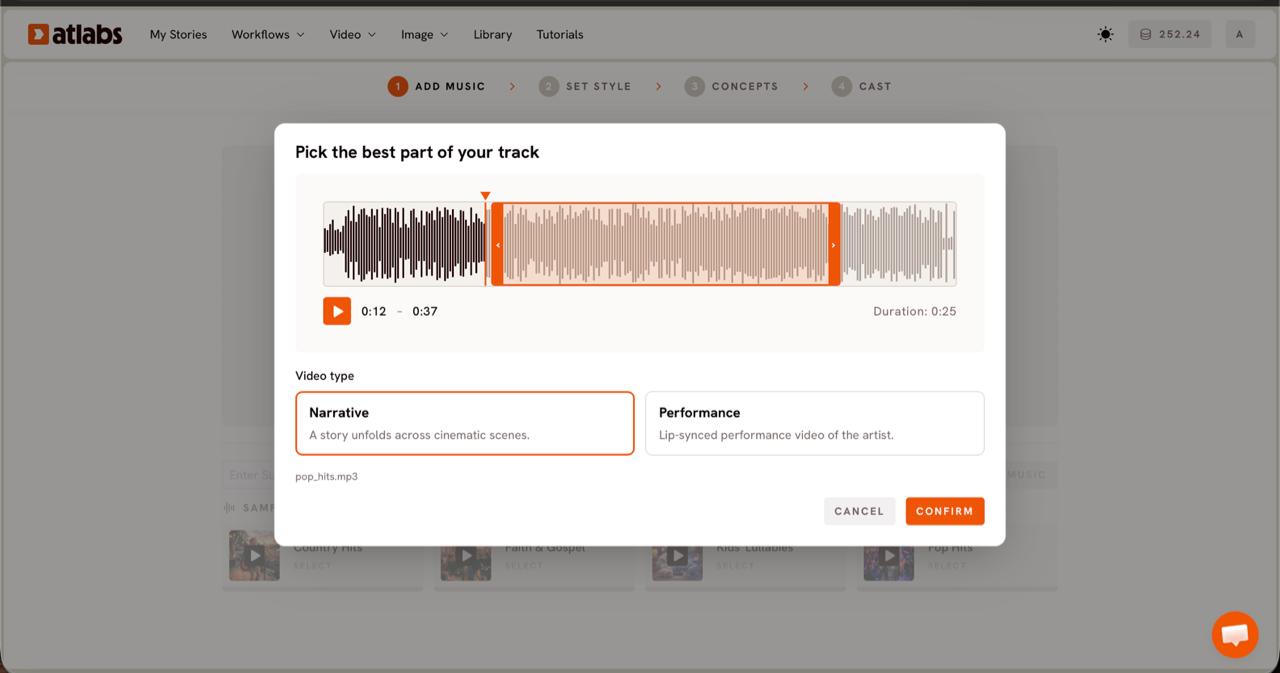
Choose the part of the song to animate. The 'Pick the best part of your track' panel opens with your waveform. Drag the orange selection window to the section you want, usually up to about twenty five seconds, such as the chorus where the numbers repeat. Then pick a Video Type. Choose Narrative for a story that unfolds across counting scenes, which suits most number songs for young children.
Step 3: Set the style
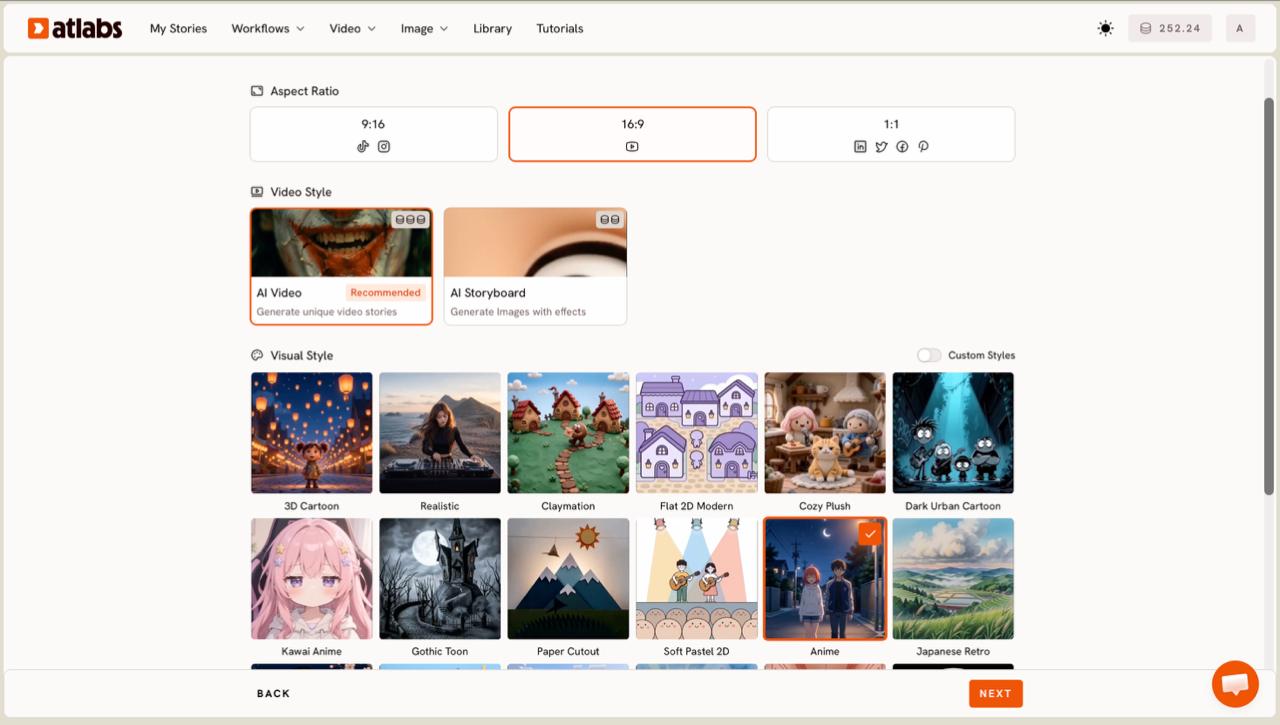
Set how the video looks. Pick an Aspect Ratio of 16:9 for YouTube, 9:16 for Shorts and Reels, or 1:1 for square posts. Leave Video Style on AI Video, which is recommended and builds full animated scenes, or switch to AI Storyboard for an image led look. Then choose a Visual Style. Bright, soft styles like 3D Cartoon, Cozy Plush, Soft Pastel 2D, or Kawai Anime read well for young viewers. Toggle Custom Styles for the full library.
Step 4: Choose your concept
Pick the story for your counting video. Atlabs shows six concept cards under 'Choose your concept', generated from your track's tempo, mood, and genre. Each card has an edit pencil, and the one you select shows a green tick. If you want a specific counting theme, like animals on a farm or balloons in the sky, click '+ DESCRIBE YOUR CONCEPT' and write it in your own words.
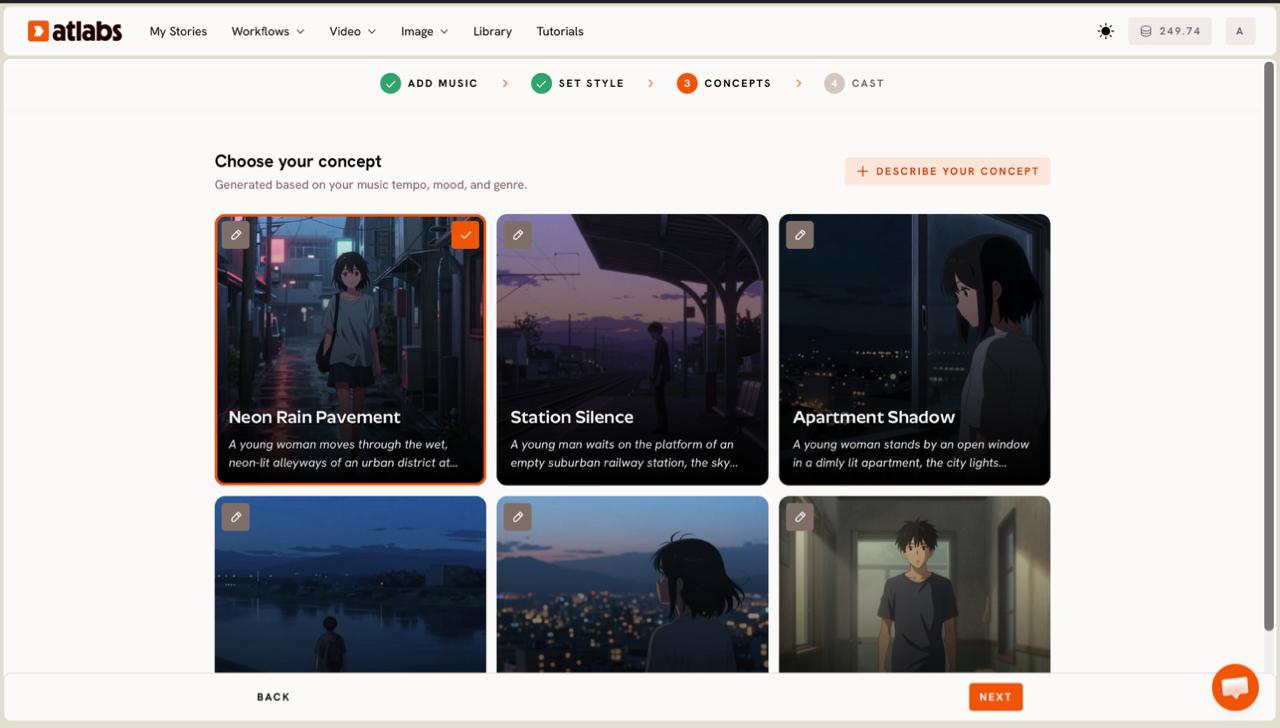
Pick your counting concept
Step 5: Cast the characters
Set the cast for the scenes. In the Cast step you define Characters and Objects. Each character card shows a generated reference sheet with multiple angles, and the 'Click to edit' overlay opens the character editor so you can adjust the look. Add countable items like apples, ducks, or balloons in the Objects section so kids have something to count on screen. Generate the video and your counting song is ready to review.
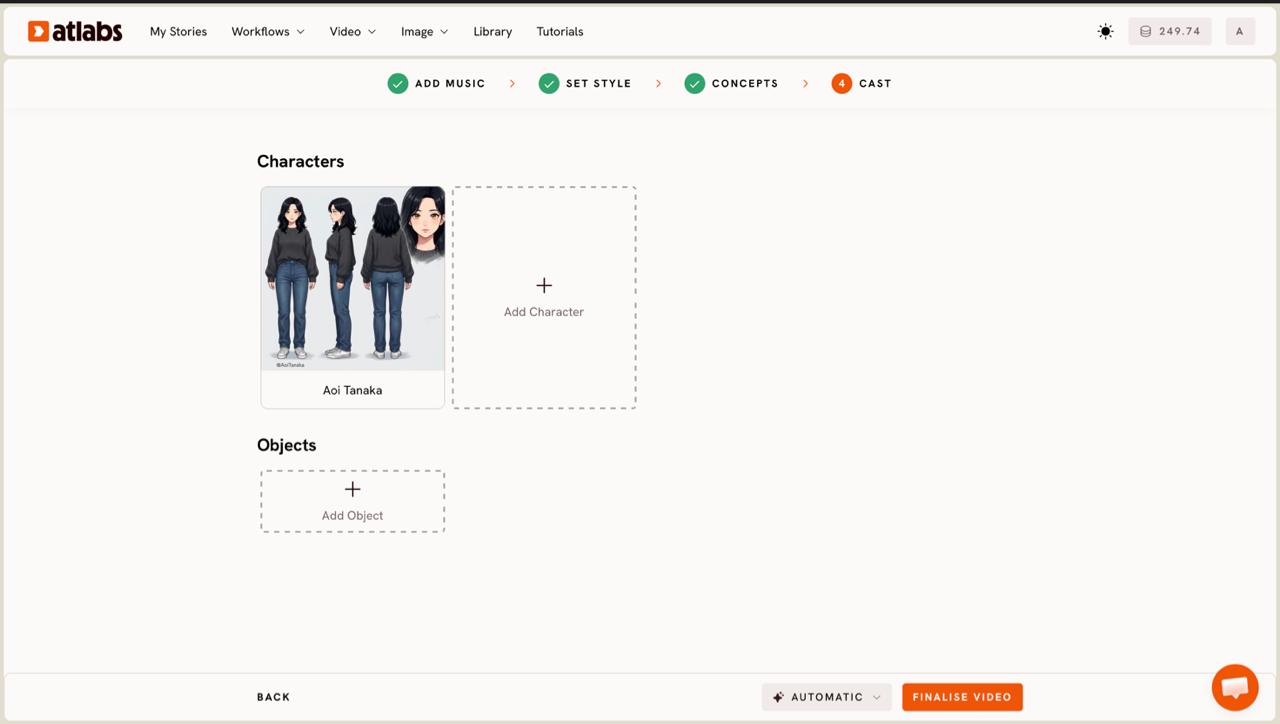
Make your counting video now
Tips to make counting songs without animation skills
A few choices make a big difference for kids content. Pick the Narrative video type so the numbers play out as a little story. Choose a stylized model like Seedance 2.0 when you want clean character closeups, since it handles expressive cartoon faces well. Select 16:9 for a YouTube counting series or 9:16 for a Shorts version of the same song. Add on-screen number words with the Caption Video app so early readers connect the sound to the digit, and keep each counting song short, ideally under a minute, so younger children stay with the numbers from one to the end.
Try a kid-friendly visual style
Counting song prompts you can copy for free
Use these two prompts as a starting point. Paste the first into a music tool like Suno to generate your counting song, then bring the track into Atlabs. Use the second in the '+ DESCRIBE YOUR CONCEPT' box to shape the scenes. Edit the numbers, animals, or setting to fit your channel.
A cheerful, upbeat counting song for kids aged three to six that counts from one to ten. Bright major key, simple singalong melody, one clear number per line, and a short repeating chorus after every two numbers. Warm friendly vocals at a gentle tempo, nursery rhyme style.
Try this in Atlabs Music Video
An animated counting video set in a bright meadow. Two cheerful cartoon characters count five red balloons floating up one by one. Each balloon shows a large number from one to five as it appears, and the characters clap and count along. Soft 3D Cartoon style with warm daylight.
Try this in Atlabs Music Video
FAQ
How long does it take to make a counting song video?
Most counting songs take about ten minutes once your track is ready. The five steps, Add Music, Video Type, Set Style, Concepts, and Cast, move quickly, and the longest part is usually choosing the concept and characters.
Do I need animation or editing skills?
No. The Music Video workflow builds the scenes and characters around your song, so you never open animation software or a video timeline. You only upload the track and make a few choices about style and cast.
What can I upload as my counting song?
You can upload an mp3 file up to 200MB, or paste a Suno music URL, then click EXTRACT MUSIC. Any finished counting track works, whether you recorded it yourself or generated it with a music tool.
Can I choose my own scenes and characters?
Yes. The Concepts step gives you six generated concepts, or you can click '+ DESCRIBE YOUR CONCEPT' to write a custom counting theme. The Cast step then lets you edit the characters and add countable objects like apples or balloons.
Get started
You now have a step-by-step way to make counting songs for kids with AI, from uploading your track to a finished animated music video. Open the Music Video workflow and make your first counting video.








