The fastest way to make an onboarding explainer video in 2026 is a script to video workflow: paste the policy copy you already have, pick an animation style, cast a narrator, and let the platform generate the finished narrated video with cuts, captions and motion graphics already applied. A two minute module takes about ten minutes end to end. The same module used to take a studio three weeks and a five figure invoice, which is why most onboarding programs still run on a slide deck and a live call that somebody has to repeat every month.
This guide walks through the whole workflow in five steps, using Atlabs, and then covers the ten modules most teams should build first, how to write scripts that survive a compliance review, and how to update a module when a policy changes without rebuilding it.
The Five Step Workflow at a Glance
You add your script. You set your style. You finalise your cast. You generate, then edit at the scene level. You publish everywhere with the Global Release Kit. That is the entire process, and steps one through three take about four minutes once you have the script.
The part that matters most for onboarding is step four, because onboarding content changes. Scene level editing means a policy update touches one scene, not the whole video.
Why Teams Are Switching to AI Onboarding Videos in 2026
Three things changed at once.
The first is cost. Agency produced onboarding video priced most teams into making one video, usually a welcome film, and delivering everything else as a PDF and a meeting. When a module costs minutes instead of thousands, you stop rationing. You make twelve short modules instead of one long one, and each new hire gets the same explanation every time rather than whichever version their manager happened to give that week. The employee onboarding video generator is built for this module-by-module approach.
The second is consistency. The old failure mode was a folder of unrelated assets: a welcome film shot in 2023, a benefits deck from HR, a security video from IT that opens with a different logo. AI workflows that lock a narrator and a visual style across every module produce a series that reads as one program, and new hires finish programs at much higher rates than they finish folders.
The third is maintenance. This is the underrated one. Onboarding content has a short shelf life. Benefits change annually, tools get swapped, the org chart moves. A workflow where you regenerate a single scene means your content stays accurate. A workflow where any edit means a re-render means your content quietly goes stale, and new hires learn to distrust it.
What You Need Before You Start
You need a script and a account. That is it. No camera, no voice talent, no editor, no animation background.
The script does not need to be written from scratch. Most of it already exists inside your employee handbook, your benefits summary, your IT setup instructions and your code of conduct. The work is compressing those into 150 to 220 word chunks, which is roughly 60 to 90 seconds of narration per module.
Pricing starts free for trial, with paid plans from $15 per month. Trustpilot rating: 4.5/5. The free plan is enough to build your first module, show it to a few recent hires and get a read on whether video onboarding works for your team before anyone requests a budget.
Step by Step: Make an Onboarding Explainer Video in 10 Minutes
Step 1: Add Your Script
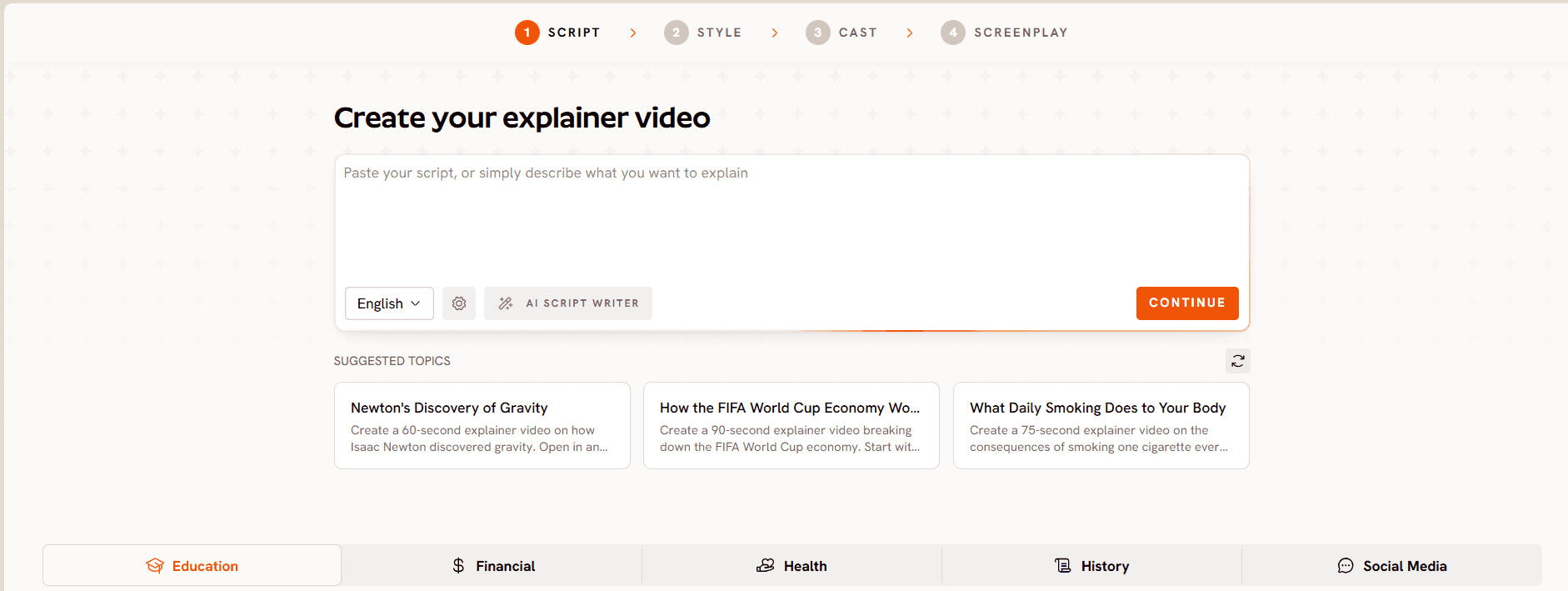
Open the workflow and paste your script into the script field. If you are starting from a handbook page rather than finished copy, the built in AI Script Writer will draft a version you can edit down, and there is a Suggested Scripts library if you want a structure to work from. A language selector sets the output language.
Write to the arc that onboarding content actually needs: what this is, why it matters to you specifically, and what to do next. A benefits module that explains the plan without telling the new hire that enrollment closes on day thirty produces a support ticket, not a completed task. Every module should end with an instruction.
Keep the numbers general where you can. "Enrollment closes thirty days after your start date" ages better than a specific calendar date, and it means one fewer scene to regenerate next year.
This is also the stage where legal or compliance should review. Reviewing a 200 word script takes two minutes. Reviewing a rendered video takes a meeting.
Step 2: Set Your Style
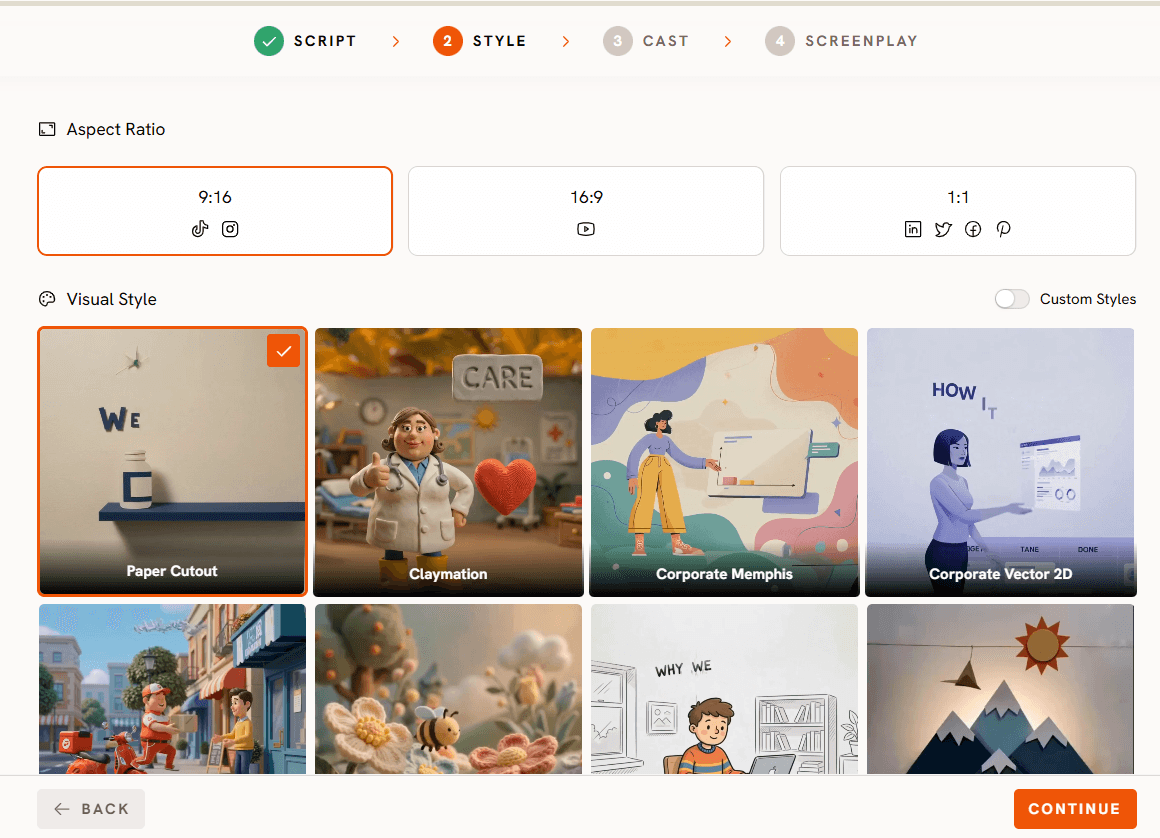
Choose your aspect ratio first. 16:9 for your LMS and intranet, 9:16 if you also push modules into a mobile app or an internal Slack or Teams feed, 1:1 if the same content goes anywhere square. You can produce the same module in more than one ratio later in step five, so pick your primary here.
Then pick from the library of more than 30 animation styles. For onboarding, the calmer options wear better across a twelve module series than the highly stylised ones. Corporate vector styles read as credible for policy and benefits content. Whiteboard doodle works well when you are explaining a process with steps, like an expense claim or a support escalation path. Paper cut out and softer illustrated styles suit culture and values modules where the tone should be warmer than the policy modules.
The rule that matters more than which style you pick: pick one and use it for the whole series. If your brand team has a defined look, the custom style option lets you train the series to sit inside it.
Step 3: Finalise Your Cast
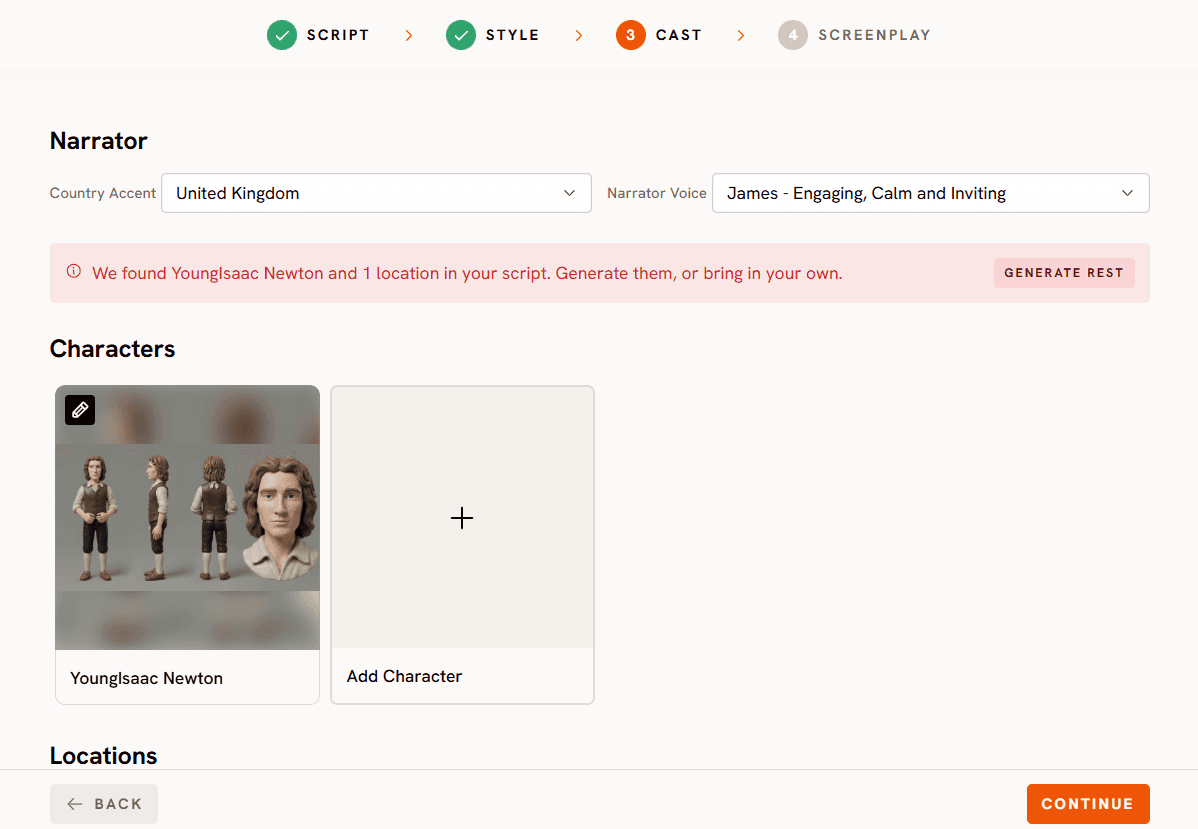
Choose a narrator, including a country accent that matches the workforce who will watch it. If you hire across regions, this is worth thinking about, because a narrator who sounds local to the listener measurably improves how the content lands.
Add any characters the script calls for. The new hire, the manager, the IT contact. Then lock your recurring objects: the laptop, the badge, the branded mug, whatever appears across modules. The Consistent Cast system keeps all of it identical from module one to module twelve, which is what turns a set of videos into a program.
You can also upload your own cast if your brand team has approved specific character designs, so the series matches the illustrations already used on your careers site or in your handbook.
One caution worth stating plainly: avoid building a character that closely resembles a specific named employee. People leave, and a module fronted by a likeness of someone who left is a module you have to remake.
Step 4: Finalise and Edit at the Scene Level
Generate. The full video renders in one pass with the narration, the cuts, the captions and the motion graphics already applied, so there is no timeline to assemble and no separate captioning step.
Then review scene by scene. If a line is wrong, if compliance flags a phrase, if the visual for scene four does not match what you meant, you rewrite that scene and regenerate only that scene. The rest of the module is untouched, which also means your reviewer only has to re-approve the part that changed.
This is the step that makes an onboarding library sustainable. Build the habit now: when a policy changes, you are not remaking a video, you are editing one scene of one module.
Step 5: Publish Everywhere with the Global Release Kit
Once the module is approved, the Global Release Kit translates it into more than 40 languages, reframes it into the aspect ratios you need for different destinations, and generates a thumbnail in one click.
Do this at the same time as the original, not a quarter later. Producing the Spanish, German and Japanese versions as part of the same publish step costs almost nothing. Producing them three months later, after the module has already been through two edits, means reconciling versions across four languages.
Download the finished files and load them into your LMS, your intranet, your HR system or wherever your new hire checklist lives.
Watch the Full Atlabs Explainer Video Tutorial
If you want to watch the workflow before you try it, the full Atlabs tutorial covers pasting a script, choosing a style, casting the narrator, generating and editing at the scene level, start to finish.
Watch it here: https://www.youtube.com/watch?v=oQl2myIzXUQ
The demo uses a general explainer script, but every step maps directly onto an onboarding module. Swap in your benefits copy and the process is identical.
The Ten Onboarding Modules to Build First
If you are starting from nothing, build these in this order. Each is one 60 to 90 second module.
Start with the day one welcome, which sets the tone and is the one piece of content that stays accurate for years. Then the company story and values, which is also stable. Then the org and who does what, so a new hire can find the right person without asking their manager twice.
Next come the practical ones. Your tools and accounts setup. Security basics, including passwords, phishing and device rules. Where to find things, meaning your wiki, your handbook, your ticketing system. How to get help, with the actual escalation path rather than a vague invitation to reach out.
Then the ones that change most often. Benefits and enrollment, with the deadline stated as a number of days rather than a date. Time off and how to request it. Expenses and how to claim them.
Keeping the last three separate from the first seven is deliberate. Those are the modules you will regenerate most, and separating them means the annual refresh touches three short videos instead of your whole library.
Pro Tips for Better Onboarding Explainer Videos
Write to 200 words per module and stop. If a topic needs more, it is two modules. Completion rates fall off sharply past two minutes, and short modules are cheaper to keep current.
Plan the series before you build the first one. Decide the narrator, the style and the recurring objects up front. Retrofitting consistency after eight modules exist means rebuilding eight modules.
Put the action last, every time. Every module should end with the specific thing the new hire does next: sign this, install that, book this call. Onboarding video that informs but does not direct produces a checklist nobody finishes.
Review at the script stage, not the render stage. Send the 200 words to legal, compliance or your subject matter expert before you generate. It is the cheapest possible point to catch a problem.
Version your modules with a date in the file name. When someone asks whether the security module reflects the new device policy, you want to answer in five seconds.
Build the translations in the same session as the original. It is one extra step then and a full second production later.
Final Verdict
Onboarding explainer video stopped being a budget question in 2026 and became a workflow question. The tools are fast enough and cheap enough that any HR or People Ops team can produce a full library. What separates the programs that stay useful from the ones that go stale is whether the workflow lets you fix one scene when a policy changes.
Start with one module. Write 200 words for your day one welcome, build it on the free plan, and show it to the last three people you hired. If they say it is clearer than what they got, build the next nine.
Frequently Asked Questions
Can I make an onboarding explainer video for free? Yes. Atlabs pricing for trial starts free, with paid plans from $15 per month, so you can script, generate and review your first module before committing a budget.
How long does it take to make an onboarding video with AI? About ten minutes for a two minute module once the script is written. Script entry, style and cast take roughly four minutes, generation runs in one pass, and scene level review takes a few minutes more.
How long should each onboarding module be? 60 to 90 seconds, which is a 150 to 220 word script. Split the program into short modules by topic rather than making one long video, because short modules get completed and are much cheaper to update.
Can I keep the same narrator and characters across every module? Yes. The Consistent Cast system locks your narrator, characters and recurring objects once and reuses them across the entire series, so module one and module twelve look like chapters of the same program.
Can I make the same onboarding video in multiple languages? Yes. The Global Release Kit translates the finished module into more than 40 languages and reframes it for different platforms, so a distributed workforce gets the same content in the language they work in.
Do I need video editing experience? No. The module generates with cuts, captions and motion graphics already applied, so there is no timeline to assemble and no separate captioning step.
Can I use this for compliance and policy training as well as onboarding? Yes, and the same approach applies with more force. Review at the script stage, keep modules short and single topic, and correct at the scene level after render. This is guidance on production workflow rather than legal advice, so route the output through whatever review process your organisation requires.