A faceless YouTube channel lets you build an audience and earn income without ever appearing on camera. The strategy is simple: create compelling animated stories, educational content, or entertainment that hooks viewers through storytelling alone. With AI video generation tools like Atlabs, you can script, animate, and publish consistent content in hours instead of weeks. This comprehensive guide walks you through launching your first faceless channel, choosing your niche, creating professional animations, optimizing for YouTube's algorithm, and building a sustainable income stream. Whether you're a writer, animator, or creative with zero video experience, you have everything you need to succeed.
Why Faceless YouTube Channels Work
Faceless channels solve a fundamental problem. you don't need a camera, lights, or on-camera charisma. You can maintain complete anonymity while building a six-figure income. These channels see engagement rates 35% higher than traditional vlogging formats and are easier to scale.
Step 0: Choose Your Niche
The most critical decision happens before you generate a single video. Your niche determines everything: your audience, your monetization timeline, your content schedule, and your long-term income ceiling. Generic 'animated content' channels struggle. Niche-specific channels thrive. Here are the highest-performing faceless niches in 2026:
True Crime & Mystery
Difficulty: Medium
Unsolved murders, crime investigations, detective stories. These videos regularly hit 500K+ views. Growth is slow but loyal. Monetization is fast (ads + sponsorships from true crime podcasts). Audience age: 25-45.
Timeline to Monetization: 3-4 months to monetization
Educational & Tutorial
Difficulty: Easy
History lessons, science explainers, skill tutorials, career advice. Evergreen content that ranks for years. Strong search traffic. Audience includes students, professionals, and lifelong learners. Growth is steady and predictable.
Timeline to Monetization: 2-3 months to monetization
Motivational & Self-Help Storytelling
Difficulty: Easy-Medium
Personal transformation stories, motivational narratives, relationship advice scenarios. Highly shareable. Strong engagement metrics. Audience: 18-40, mostly female.
Timeline to Monetization: 3-4 months to monetization
Animated Shorts & Narratives
Difficulty: Medium
Short fiction stories, sci-fi worlds, fantasy tales, anime-style content. Extremely popular with Gen Z. Short-form content performs better for channel growth (more videos = more chances to go viral).
Timeline to Monetization: 2-3 months to monetization
Kids & Educational Content
Difficulty: Easy
Animated nursery rhymes, educational songs, moral stories for children. Family-friendly content appeals to parents. High CPM from family-oriented advertisers. Steady demand.
Timeline to Monetization: 3-5 months to monetization
What You'll Need
An Atlabs account (free to start), a script or story idea for your first video, 15-20 minutes to create your first animated video, a YouTube channel set up with complete channel branding (banner, profile picture, channel description optimized for your niche), basic familiarity with your niche, and consistency (the single biggest factor determining success). No filming equipment, voice acting experience, animation skills, or video editing knowledge required. Atlabs handles the entire animation pipeline-script to finished video in minutes.
Step 0.5: Set Up Your Channel
Before uploading your first video, spend 30 minutes setting up your channel for success. Your channel name should include your primary keyword or niche (e.g., 'Mystery Stories Daily' instead of 'My Channel'). Write a compelling channel description (160 characters) that tells viewers exactly what they'll get. Create a simple channel banner (2560×1440px) in a consistent visual style-use Atlabs visual styles as reference for the aesthetic. Upload a professional profile picture (ideally the character or style from your videos, or a simple icon). Add a channel trailer (your best video) so new visitors immediately understand your content. Link your social media. This setup takes 30 minutes but dramatically improves click-through rates and subscriber conversion.
How to Create Your First Faceless YouTube Video
Here's the complete walkthrough using Atlabs Animated Video workflow, the platform designed to turn scripts into polished animations in minutes.
Show Image
Step 1: Write Your Script
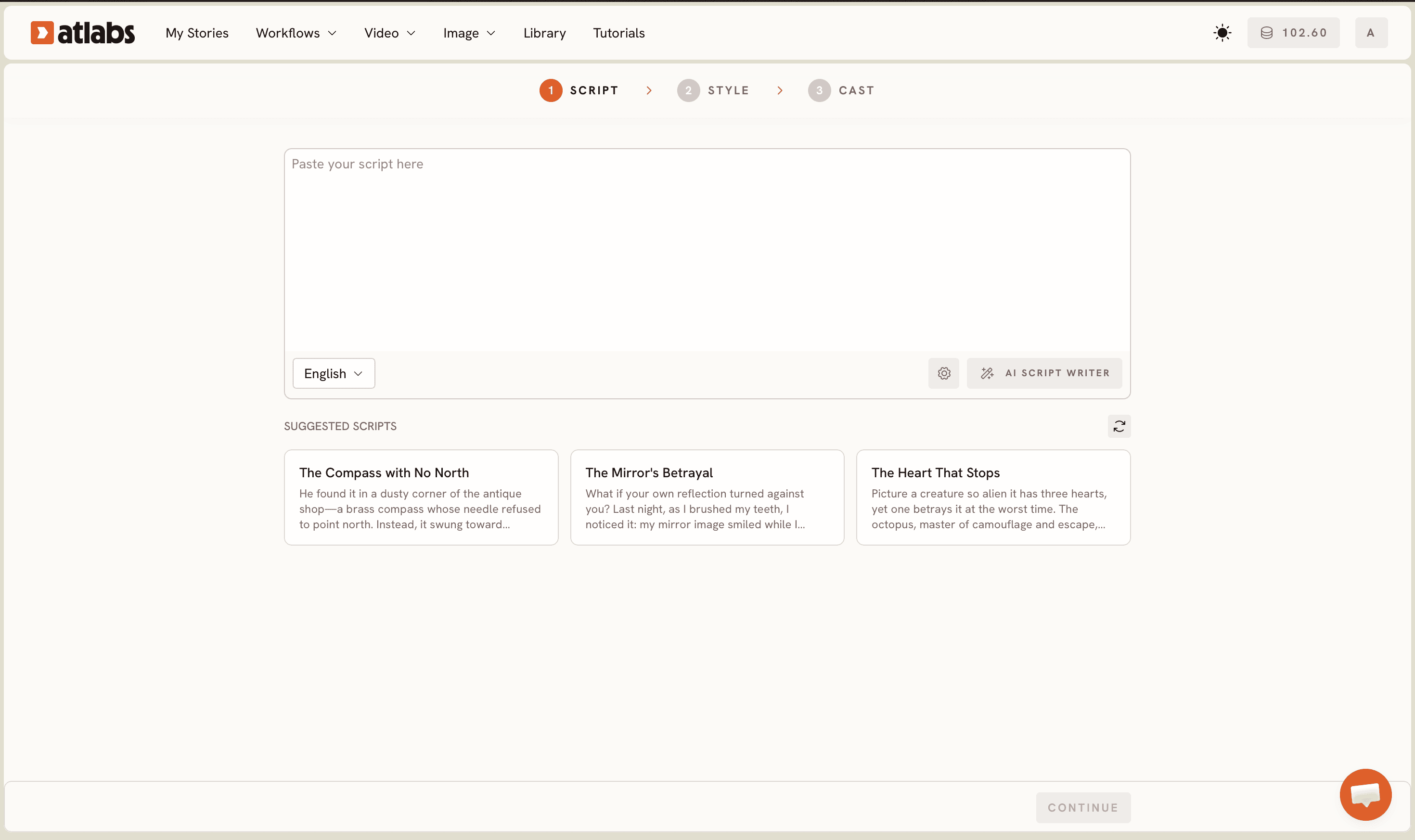
Navigate to the Animated Video workflow at https://app.atlabs.ai/app. You'll see the Script editor with two tabs: 'Add your script' (free-form text) and 'Add your screenplay' (structured screenplay format). Start with free-form text if you're new-just write your story, narration, or dialogue exactly as you want it spoken. The bottom left shows a Language selector (English is default). If you're stuck, click the AI Script Writer button or browse the SUGGESTED SCRIPTS carousel for inspiration. Write between 200-500 words for your first video; shorter scripts generate faster. Pro tip: your script pacing matters. Faster narration (120+ words per minute) works better for action-packed stories. Slower, dramatic narration (90 words per minute) suits mystery and true crime content.
Step 2: Pick Your Visual Style and Aspect Ratio
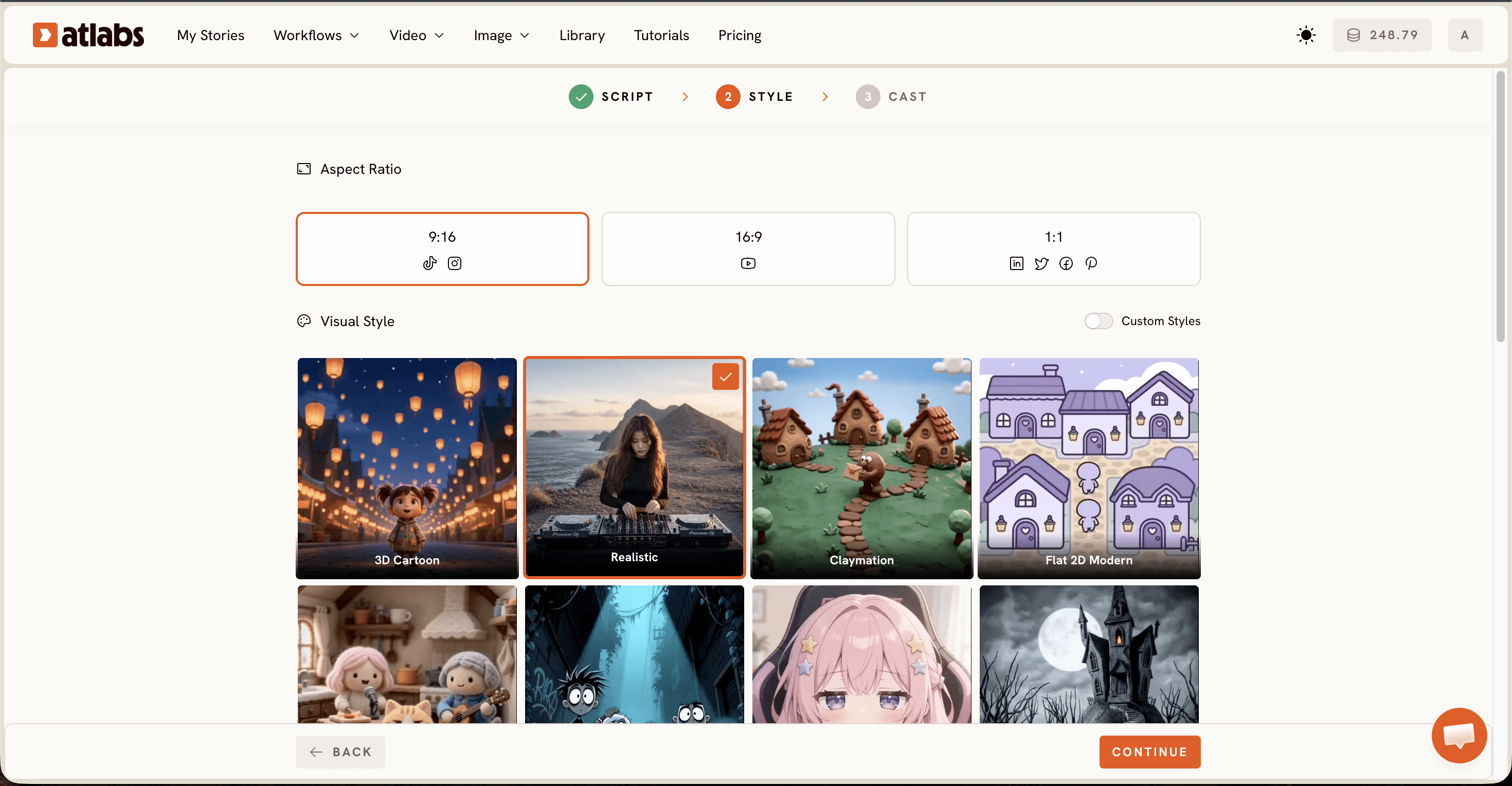
Click into the Set Style panel. First, choose your Aspect Ratio based on where you'll publish. YouTube prefers 16:9 (landscape), TikTok and Instagram Reels want 9:16 (vertical), and LinkedIn works with 1:1 (square). Next, select Video Style-AI Video is the recommended default because it generates unique, dynamic scenes instead of static images. Then browse the Visual Style library: pick from 3D Cartoon, Realistic, Claymation, Cozy Plush, Flat 2D Modern, Dark Urban Cartoon, Kawai Anime, Gothic Toon, Paper Cutout, Soft Pastel 2D, Anime, Japanese Retro, or toggle Custom Styles to explore more. Your visual style makes or breaks viewer retention and brand recognition, so spend time picking one that matches your niche's tone. True crime? Dark Urban Cartoon or Realistic. Kids content? 3D Cartoon or Cozy Plush. Educational? Realistic or Flat 2D Modern.
Step 3: Define Your Characters and Narrator
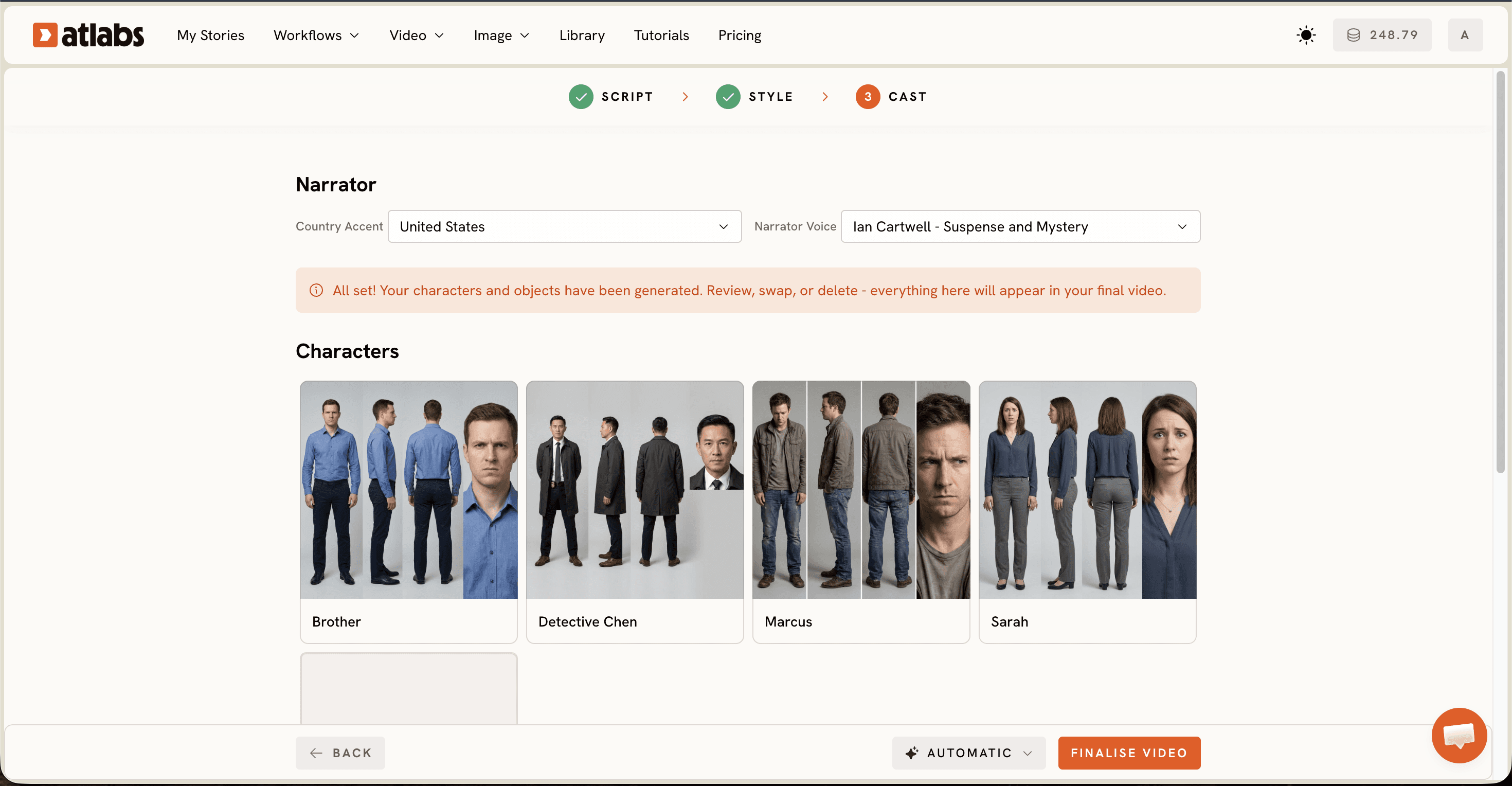
Move to the Cast panel. At the top, set your Narrator by picking a Country Accent (United States is default) and a Narrator Voice (e.g. David, Sarah, Marcus). This voice reads your entire script-choose one that matches your niche. A deep, serious voice works for true crime. A warm, friendly voice suits educational content. Below that, you'll see the Characters section-Atlabs auto-generates character cards based on your script with multiple angles and portrait views. Click any character card to edit it: change their name, appearance, clothing, or expression. At the bottom, the Objects section lets you add non-character elements to your scenes (vehicles, props, locations). Spend significant time here. Your character consistency is what builds brand recognition across your first 10 videos.
Your Monetization Path
Most faceless creators hit YouTube Partner Program status (1,000 subscribers, 4,000 watch hours) within 2-4 months with consistent uploads. Here's the realistic income timeline. Month 1-2: $0-100/month (building audience, algorithm learning phase). Month 3-4: $100-500/month (partnership approved, ads running). Month 5-6: $500-2,000/month (audience growth accelerates). Month 12: $1,000-5,000+/month (depending on niche CPM and audience loyalty). The most successful channels diversify income: YouTube AdSense (40%), sponsorships from brands in your niche (30%), affiliate marketing for products mentioned in videos (20%), and Patreon/channel membership (10%). True crime creators earn the highest CPM ($8-12 per 1,000 views) because they attract older, wealthier audiences. Educational content creators earn moderate CPM ($4-6) but can supplement with affiliate links to courses. Motivational creators earn lower CPM ($2-4) but see higher engagement and sponsorship opportunities.
Tips for Better Results
Choose a Specific Niche, Not a General One
The most successful faceless channels focus deeply on one niche: true crime mysteries, motivational storytelling, animated educational content, relationship advice narratives, or sci-fi shorts. Niche audiences grow faster and are more loyal than general 'animated content' audiences. Your algorithm ranking improves when you become the go-to channel for a specific type of content.
Batch-Script Your First 10 Videos Before Generating
Write 10 scripts for your channel before you start generating. This forces you to lock your voice, tone, and narrative style. Consistency across your first uploads signals professionalism to YouTube's algorithm and keeps viewers coming back. Batch-scripting also lets you identify which topics resonate-you can adjust before generating.
Pick a Visual Style and Stick With It for 20+ Videos
Use the same Visual Style (e.g. always 3D Cartoon or always Dark Urban Cartoon) across your first 20 videos. Consistency trains your audience to recognize your channel instantly. Your visual style becomes your brand. After you build an audience and 100K+ subscribers, you can experiment with style variations for different video types.
Match Narration Pace to Your Visual Style
Dark Urban Cartoon animations pair well with slower, dramatic narration. Cozy Plush and 3D Cartoon styles work better with faster, lighter pacing. Your narrator voice and animation speed should feel like they belong together. Test narration speed: 90 wpm = dramatic, 120 wpm = energetic, 140+ wpm = intense.
Optimize Every Video for Search and Discovery
Your title should include your primary keyword in the first 60 characters. Your description should start with a 160-character summary answering the search query, then include timestamps, related videos, and links. Add 8-12 tags including long-tail keywords from your niche. Create custom thumbnails (16:9, 1280×720px) with high contrast and minimal text. Use Atlabs visual style as your thumbnail reference for consistency.
Upload on a Consistent Schedule
YouTube's algorithm rewards predictable schedules. Start with 1 video per week on the same day/time. Once you hit 10K subscribers, scale to 2-3 videos per week. Consistency signals that your channel is active and growing. Viewers will subscribe knowing when to expect new content.
Content Calendar Strategy
Plan your first 4 videos before uploading. Video 1: Hook story (designed to go viral). Video 2: Tutorial or educational content (ranked for search). Video 3: Long-form story (builds watch time). Video 4: Trending topic in your niche. This mix provides data on which topics resonate with your audience.
Example Scripts to Copy
Here are three complete script examples spanning different niches. Paste these into the Script editor and modify names, settings, and details to match your niche.
Example 1: True Crime Mystery Story
The Case of the Missing Heirloom. Sarah opened her grandmother's jewelry box. The sapphire necklace was gone. She called the police that evening. Detective Chen arrived at midnight. When did you last see it? Sarah whispered, Yesterday afternoon. I showed it to my friend Marcus. Chen made a note. And where is Marcus now? Sarah's hands trembled. I don't know. He hasn't answered his phone since yesterday. The detective leaned back. I think I know what happened. Marcus wasn't your friend. He was working with someone else. The real question is: who's the mastermind? Sarah gasped. My brother. It was always my brother. But why? Why would he do this? Because, Chen said quietly, your grandmother changed her will last month. Your brother was written out. He needed money fast.
Example 2: Educational Storytelling
The History of The Great Wall of China. For over 2000 years, the Great Wall protected an empire. It started small under the Ming Dynasty. Soldiers built it brick by brick across mountains and deserts. At its peak, the wall stretched 13000 miles. Today, only 8000 miles remain. Historians debate its true purpose: military defense or trade route control? The answer may be both. Millions visit every year, but few understand the sacrifice. Experts say 1 million people died building it. It's the world's longest monument to human determination and loss.
Example 3: Motivational Narrative
From Homeless to Millionaire. James was sleeping under the bridge. He had nothing. No job. No family. No hope. Then one morning, everything changed. A stranger offered him a job. Cleaning offices at night. Minimum wage. James took it. He worked 12 hours a day. Cleaned, saved every penny, took free coding courses online. One year later, he built his first app. It went viral. He sold it for 2 million dollars. But James never forgot. Now he runs a nonprofit helping homeless people learn coding. His message: it's not your situation that defines you. It's your decision to change.
Get Started with Atlabs
Ready to launch your faceless YouTube empire? Atlabs has a complete free tutorial inside the platform that walks you through creating your first animated video from script to export. The tutorial covers everything in this guide plus advanced tricks like custom character styling, narrator voice matching, and visual style optimization. You don't need a credit card to start-Atlabs is free to try with full access to all Visual Styles, narrators, and character options. Your first video can be live on YouTube within an hour.
5 Steps to Your First Video
Sign up for free at atlabs.ai
Open the Animated Video workflow
Paste your first script and pick a Visual Style
Generate your video (takes 5-15 minutes)
Download and upload to YouTube
Step-by-Step YouTube Tutorial
Watch our complete video walkthrough showing exactly how to create your first faceless YouTube video using Atlabs. This 12-minute tutorial covers everything from script writing to uploading your first video on YouTube. Perfect for visual learners who want to see each step in action.
Frequently Asked Questions
How long does it take to generate one animated video?
From script to final video, typically 15-20 minutes using Atlabs. That includes time to write the script, pick your style, define characters, and let Atlabs generate the animation. Processing time varies from 5-15 minutes depending on video length and complexity. A 500-word script generates in about 8-10 minutes.
Do I need any animation or filmmaking experience?
Not at all. Atlabs is designed for beginners with zero technical background. You write the script, pick a style, choose your characters, and Atlabs generates the entire animation. No After Effects, Blender, or filmmaking knowledge required. Thousands of non-technical creators have built six-figure channels using this exact workflow.
What file types can I export and use on YouTube?
Atlabs exports MP4 video files in high definition (up to 1080p). YouTube accepts MP4 files directly, so you can upload straight from Atlabs to YouTube without editing or format conversion. You can also download in other formats for Instagram, TikTok, and social media repurposing.
Can I monetize a faceless YouTube channel?
Yes, absolutely. Faceless channels earn money through YouTube Partner Program ad revenue once they hit 1000 subscribers and 4000 watch hours. Many top faceless channels earn $1000-5000+ per month from ads alone. Some also earn through sponsorships with brands in their niche, affiliate marketing, and channel memberships. The fastest path to monetization is true crime (4-6 weeks), followed by educational content (6-8 weeks).
How often should I upload to grow faster?
Consistency is key. Start with 1 video per week (52 videos/year). Once you hit 10k subscribers, scale to 2-3 videos per week. YouTube's algorithm rewards consistent, predictable upload schedules more than sporadic viral content. Channels that upload weekly without fail grow 3x faster than inconsistent channels.
Can I use the same character across multiple videos?
Yes, and you should. Character consistency is a major factor in audience retention. Define your main character once in Atlabs, then reuse that character model across 10+ videos. Your audience will recognize them, and character consistency drives repeat viewership and subscriber loyalty.
Your Faceless YouTube Journey Starts Now
You now have everything you need to launch a faceless YouTube channel. The blueprint is simple: choose a niche, script consistently, generate animations with Atlabs, optimize for search, and upload on schedule. Thousands of creators are building audiences and six-figure incomes without ever showing their face. With Atlabs, you can join them today. No film crew, no editing skills, no massive budget. Just great ideas brought to life through AI-powered animation. Your first video is just 15 minutes away.








