
You can turn a Suno song into a finished AI music video in Atlabs in about fifteen minutes. Paste your Suno track link, pick the strongest part of the song, choose a visual style, and Atlabs generates cinematic scenes that move with your music. No filming, no editing suite, no director needed. This guide walks an indie artist through the full Music Video workflow, from importing the audio to casting the characters who carry your story on screen.
What you'll need
Three things get you to a finished video. First, a Suno song you want to visualize, either as a downloaded mp3 or a shareable Suno link. Second, an Atlabs account so you can open the Music Video workflow. Third, about fifteen minutes and a rough sense of the mood you want, whether that is moody lo-fi, bright pop, or a slow folk ballad. The clearer your mental picture of the video, the faster the styling step goes.
Watch the full video on YouTube
The full walkthrough: Suno song to music video
Atlabs builds your music video in five steps. The header reads Create your music video, and a progress path guides you from the audio import to the final cast of characters. Here is each step in order, using the exact labels you will see on screen.
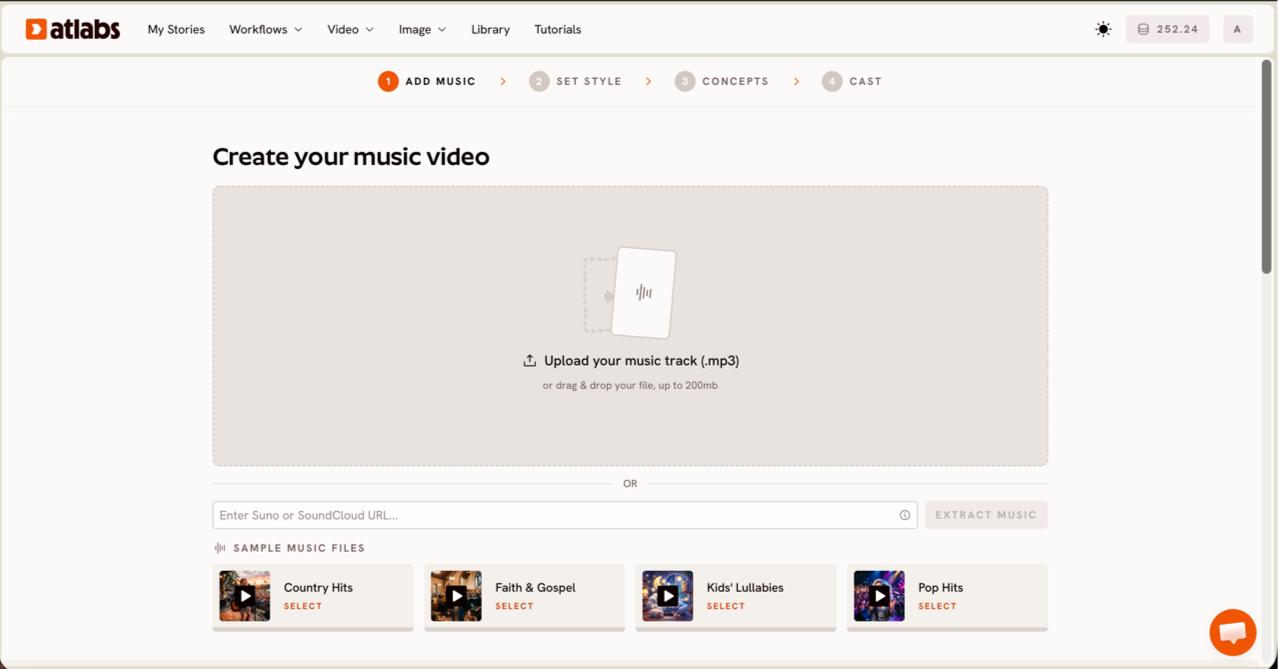
Open the Music Video workflow and add your music. On this first screen, Add Music, paste your Suno music URL or upload an mp3 up to 200MB, then click EXTRACT MUSIC. Atlabs reads the track and auto-detects its properties, so the rest of the workflow can match the tempo and mood of your song. For a Suno track, the link route is fastest, since you skip the download entirely and let Atlabs pull the audio straight in.
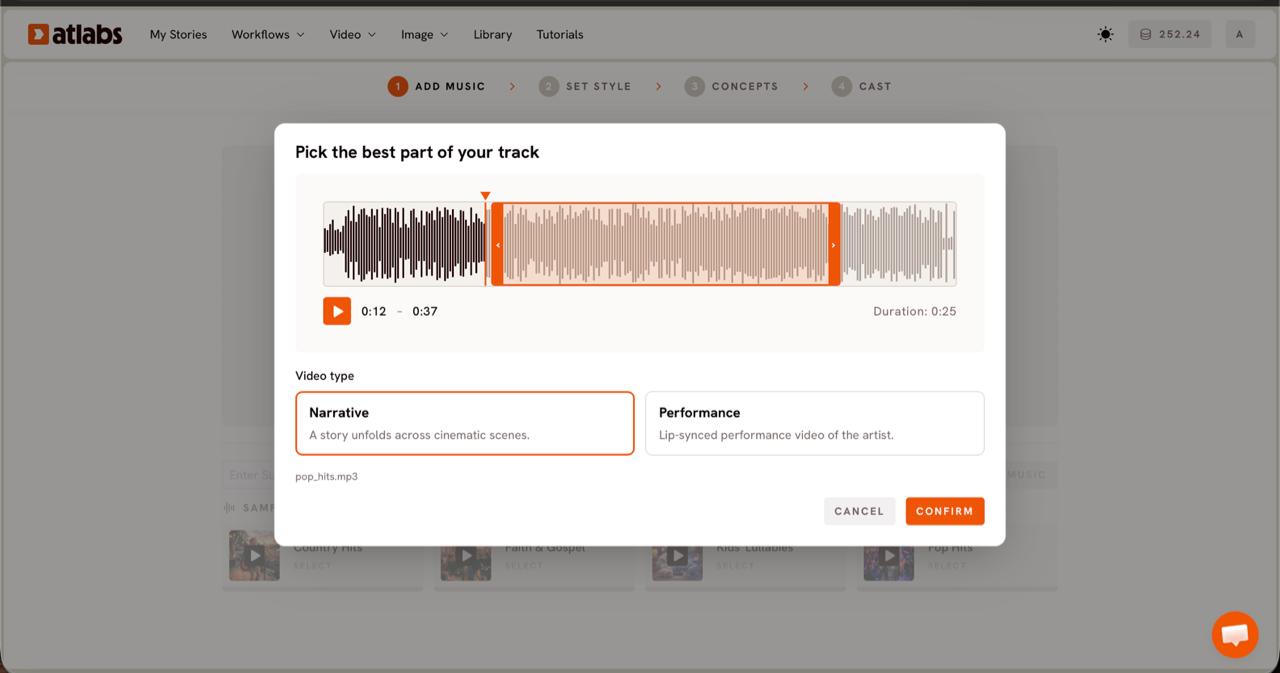
Pick the strongest part of your track. When the Pick the best part of your track modal opens, drag the orange selection window across the waveform to choose the segment you want to visualise, usually up to about twenty five seconds. Then set the Video Type. Choose Narrative for an atmospheric track where a story unfolds across cinematic scenes, or Performance for a vocal song where you want a lip-synced artist on screen. Most indie and lo-fi tracks read best in Narrative.
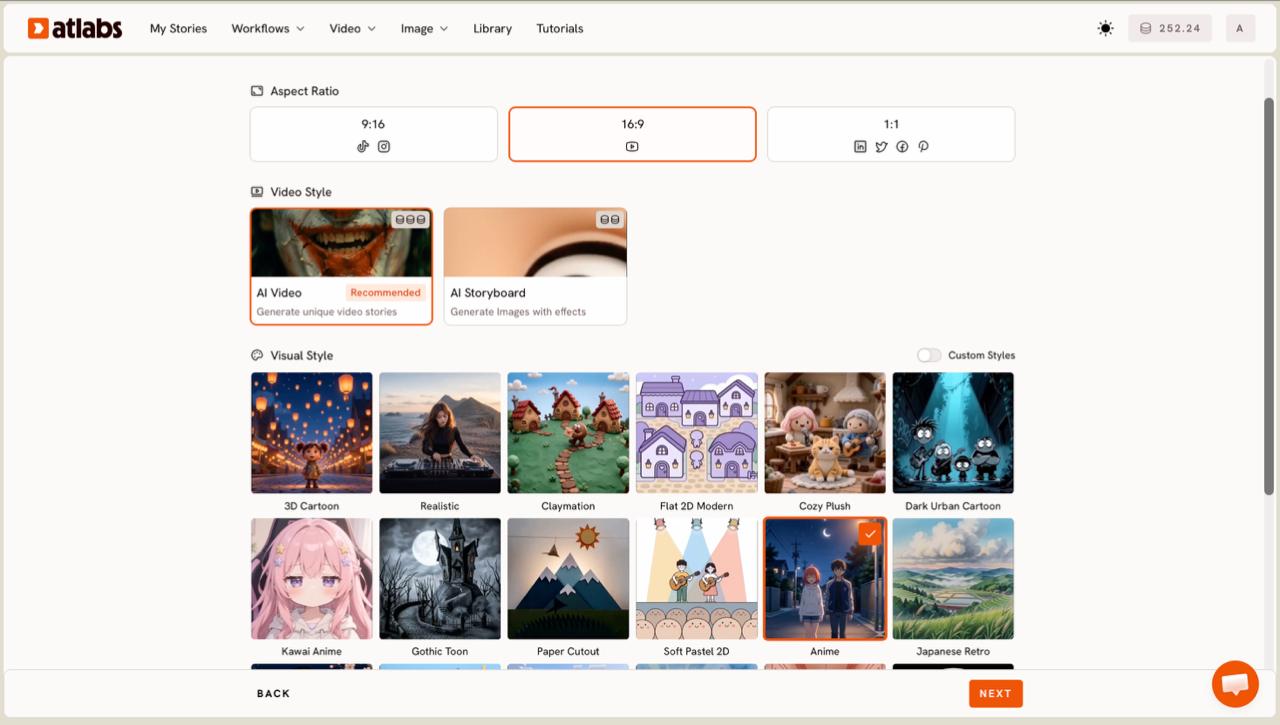
Choose your aspect ratio and visual style. On the Set Style screen, set the Aspect Ratio to 9:16 for TikTok and Reels, 16:9 for YouTube, or 1:1 for feed posts. Keep Video Style on AI Video, the recommended option that generates unique video stories rather than still frames with effects. Then open the Visual Style library. For a cinematic indie look, Realistic holds the live-action feel, while Dark Urban Cartoon suits grittier hip hop and Anime fits stylized pop. Toggle Custom Styles to browse the full library before you commit.
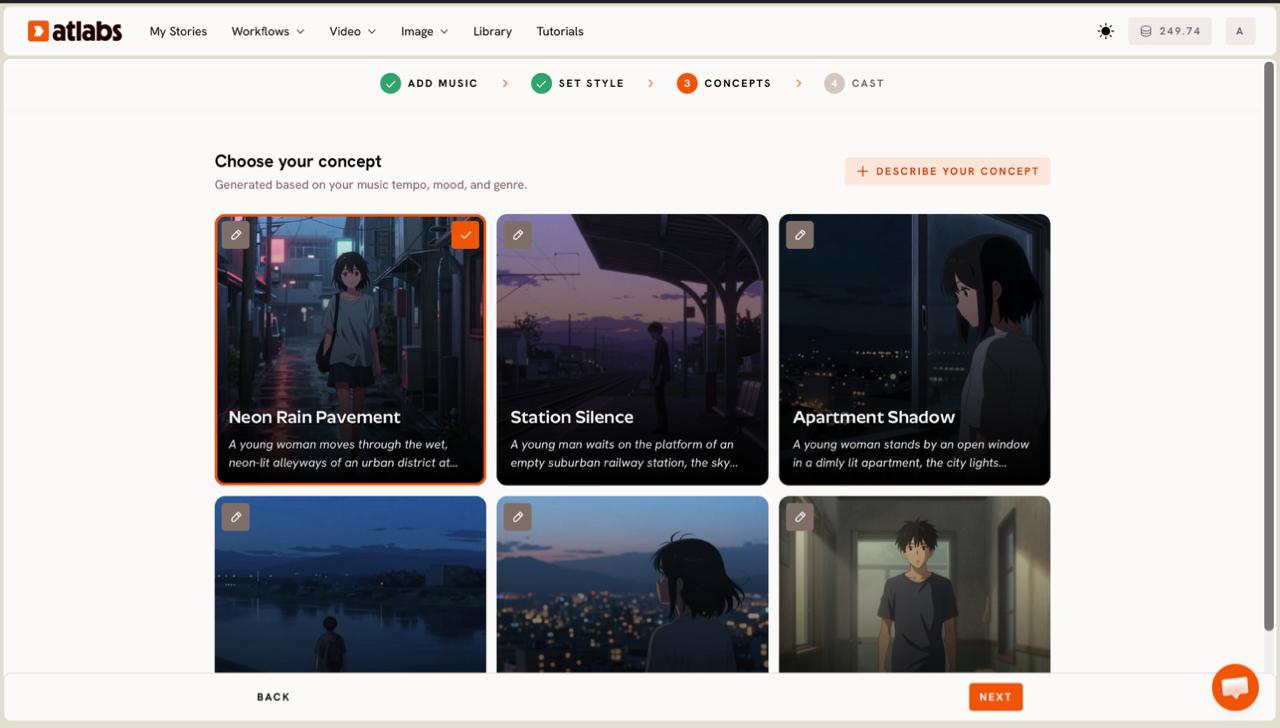
Pick a concept for your scenes. The Concepts step shows six scene ideas generated from your music tempo, mood, and genre, each on its own card. Click a card to select it, marked with a green tick, or use the edit pencil to adjust the direction. If none fit your vision, click DESCRIBE YOUR CONCEPT and write your own scene direction in plain language. This is where your song stops being audio and starts becoming a storyboard.
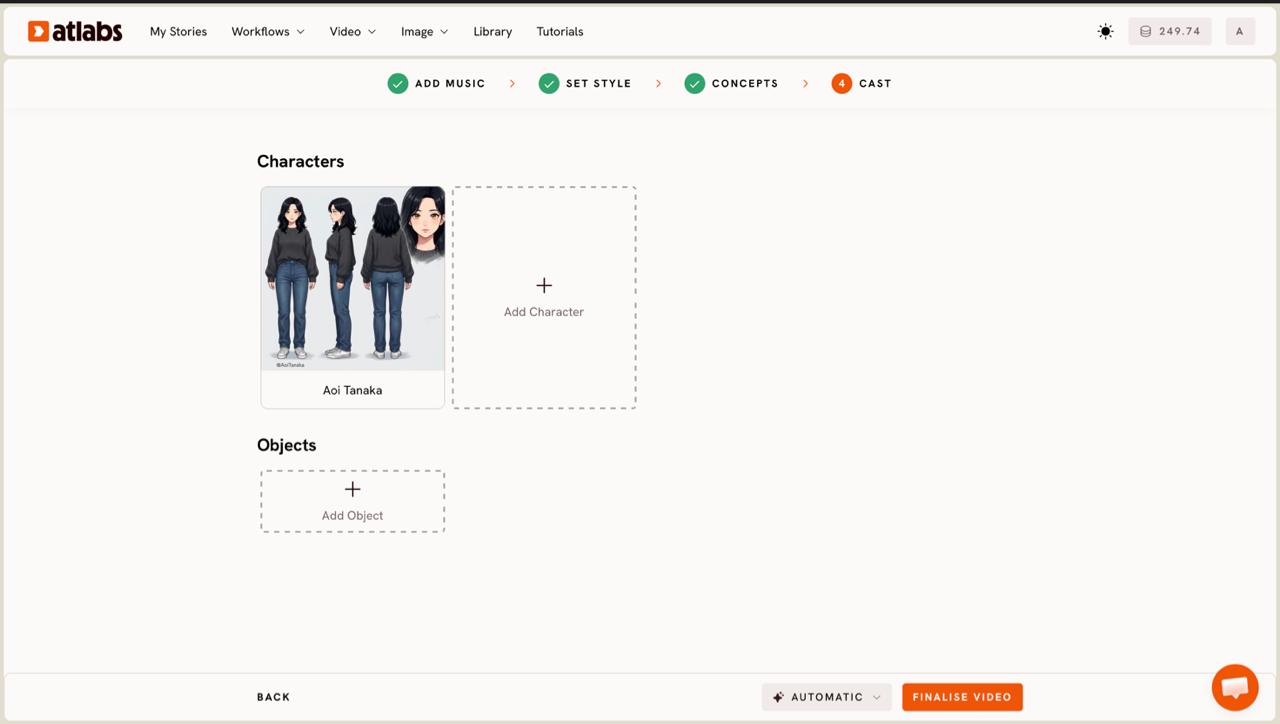
Cast the characters who carry your video. On the final step, Cast, Atlabs generates character cards, each with a reference sheet showing multiple angles and a portrait so the face stays consistent across every scene. Click any empty slot to Add Character, or use the Click to edit overlay to open the character editor and refine a look. Add props in the optional Objects section at the bottom. When the cast feels right, generate, and Atlabs renders the scenes into a finished music video.
From here, the render runs on the model best suited to your style. Kling 3.0 drives cinematic motion and realism for live-action-feeling sequences, while Google Veo 3.1 handles wide establishing shots and photoreal depth. You do not pick the model by hand. Atlabs routes your chosen style to the model that renders it best, so your job stays creative rather than technical.
Tips for a better indie music video
A few choices separate a flat result from a video that feels directed. Pick your segment in Step 2 around the song's emotional peak, the drop, the final chorus, or the most atmospheric bridge, since that twenty five second window sets the energy for every generated scene. In Step 3, match the Visual Style to the genre instead of defaulting to Realistic for everything, because a lo-fi track often reads better in a softer, stylized look than a hyperreal one. When you write a custom concept in Step 4, name the setting, the time of day, and the camera feeling, since specific direction produces more coherent scenes than a single mood word. If your song has vocals and you want the artist on screen, choose Performance in Step 2 so the lip movement lands, then tighten the mouth timing afterward with the Lip Sync app.
Two concept prompts to copy
If you would rather steer the look yourself, paste one of these into the DESCRIBE YOUR CONCEPT box in Step 4 and adjust the details to fit your track.
A lone figure walks a rain-slicked city street at night, neon signs reflecting in puddles, slow handheld push-in, warm streetlight against cool shadow, cinematic anamorphic mood, soft film grain.
Try this in Atlabs Music Video workflow
Golden hour in an open field, tall grass moving in the wind, a quiet figure seen from behind looking toward distant hills, soft natural light, gentle drifting camera, nostalgic and calm.
Try this in Atlabs Music Video workflow
FAQ
How long does it take to make a music video from a Suno song?
Most artists finish in about ten to fifteen minutes. Importing the Suno track and selecting the segment takes a couple of minutes, and the scene generation runs in the background while you review the cast. Longer or higher-resolution videos take a little more time to render.
Do I need video editing skills?
No. The Music Video workflow handles scene generation, character consistency, and pacing for you. You make the creative calls like style, concept, and cast, and Atlabs assembles the video. If you want to fine-tune the format or resolution later, the Reframe and Upscale apps cover that.
What audio formats does Atlabs accept for a Suno track?
You can upload an mp3 up to 200MB, or paste a Suno music URL and click EXTRACT MUSIC to import the track directly. The link route skips the download and is usually the fastest way to start from a Suno song.
Can I make a vertical version for TikTok and Reels?
Yes. In the Set Style step, set the Aspect Ratio to 9:16 for TikTok and Instagram Reels, 16:9 for YouTube, or 1:1 for feed posts. You can also re-frame a finished video later with the Reframe app to repurpose one render across platforms.
Get started
Your Suno song already has the mood. The Music Video workflow gives it a face. Import your track, pick a style, and watch the scenes come together.
Open Atlabs








