
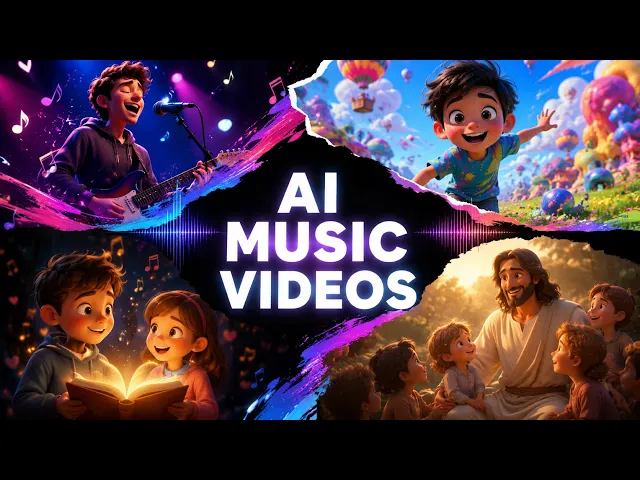
The fastest way to turn a song into a music video is to upload your track to the Music Video workflow in Atlabs, pick a cinematic visual style, and let the platform build scenes that match your tempo and mood. Indie artists can go from a finished audio file to a shareable video in minutes, with no camera, no crew, and no editing software. Here is the full process, step by step, using the same five screens every track passes through.
What you'll need
To follow along, three things help. First, a finished track exported as an mp3, or a Suno link if that is where the song lives. Second, an Atlabs account on the platform. Third, about ten minutes and a rough sense of the mood you want on screen, whether that is a neon city at night or a quiet road at golden hour. No filming gear, no animation skill, and no prior video editing experience are required, and this holds for any genre, from lo-fi to hip hop to folk.
Watch the full video on YouTube
The step by step walkthrough
Every music video in Atlabs moves through five screens in order. Each one asks for a single decision, so you are never staring at a blank timeline. Follow these in sequence.
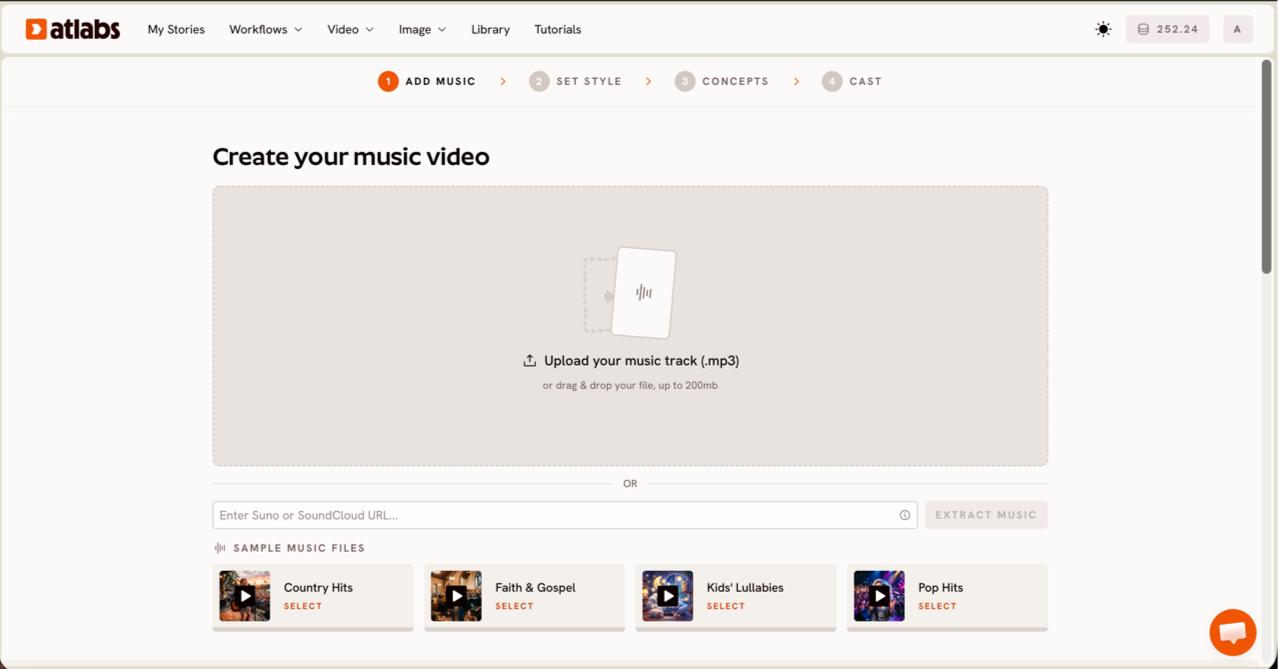
Step 1: Open the Music Video workflow and add your music. The screen header reads Create your music video. Upload an mp3 up to 200MB, or paste a Suno music URL and click EXTRACT MUSIC. Atlabs reads the file and auto detects the track properties, so the scenes it builds later line up with the actual tempo and energy of your song. This first screen is identical for every genre, so the same flow works for an instrumental beat or a vocal single.
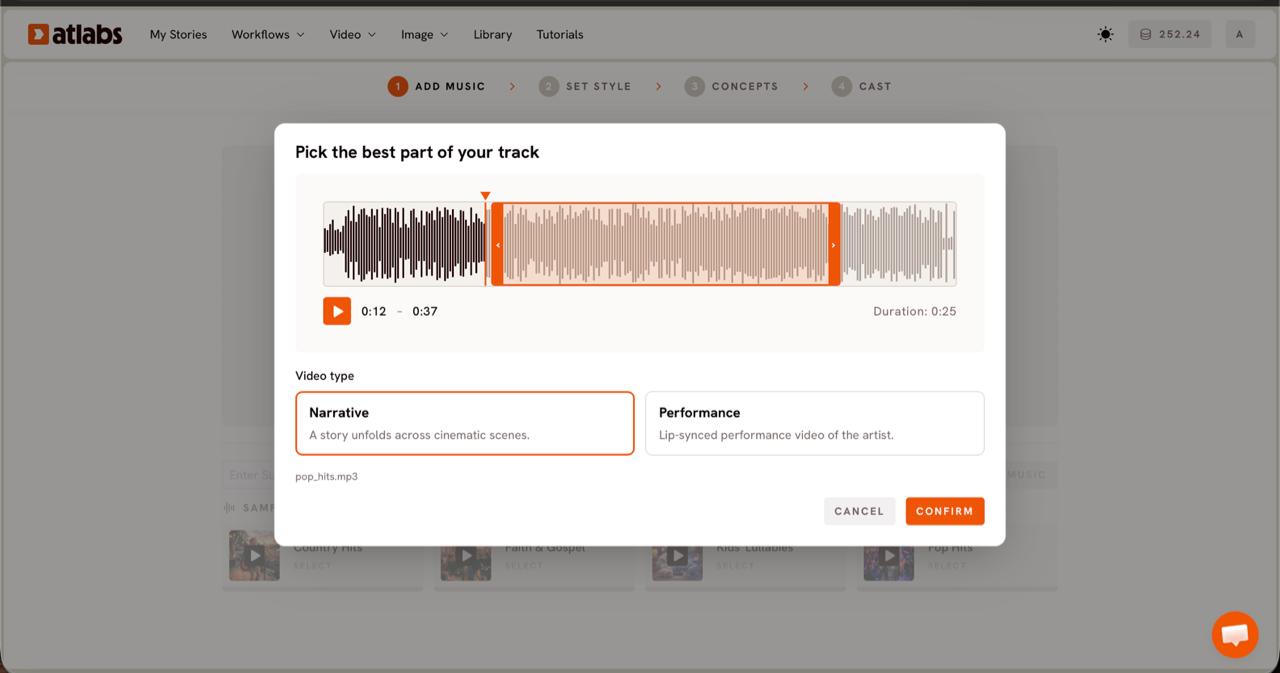
Step 2: Pick the part of the track that matters most. A modal titled Pick the best part of your track opens with your waveform. Drag the green selection window across it to choose a segment, usually up to around 25 seconds, the stretch that hits hardest. Then choose a Video Type. Pick Narrative when you want a story to unfold across cinematic scenes, which suits instrumental and atmospheric tracks. Pick Performance when the song has vocals and you want a lip synced performance video of the artist.
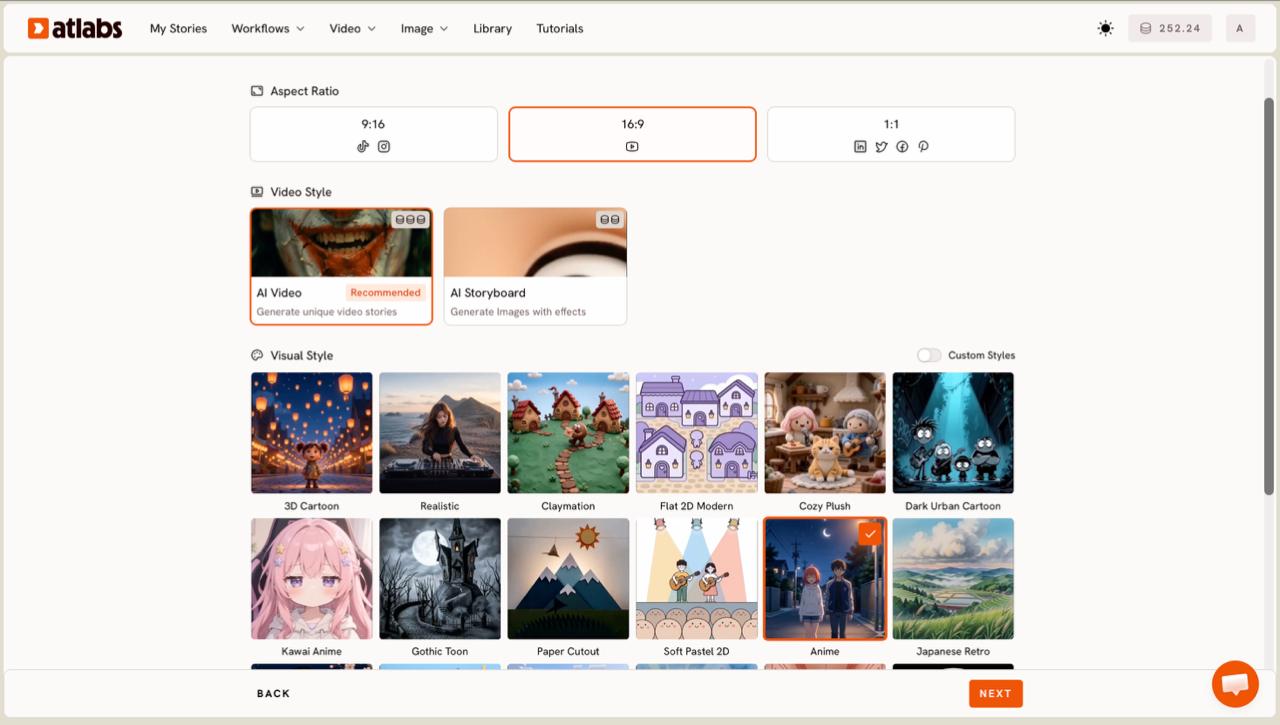
Step 3: Set the look. Choose an Aspect Ratio first: 9:16 for TikTok and Instagram, 16:9 for YouTube, or 1:1 for square feeds. Leave Video Style on AI Video for unique generated scenes, or switch to AI Storyboard for an image led edit. Then open the Visual Style library and pick Realistic for a live action, cinematic feel. Indie artists who want a music video that looks filmed rather than animated should stay in the Realistic lane here. Toggle Custom Styles if you want to see the full library.
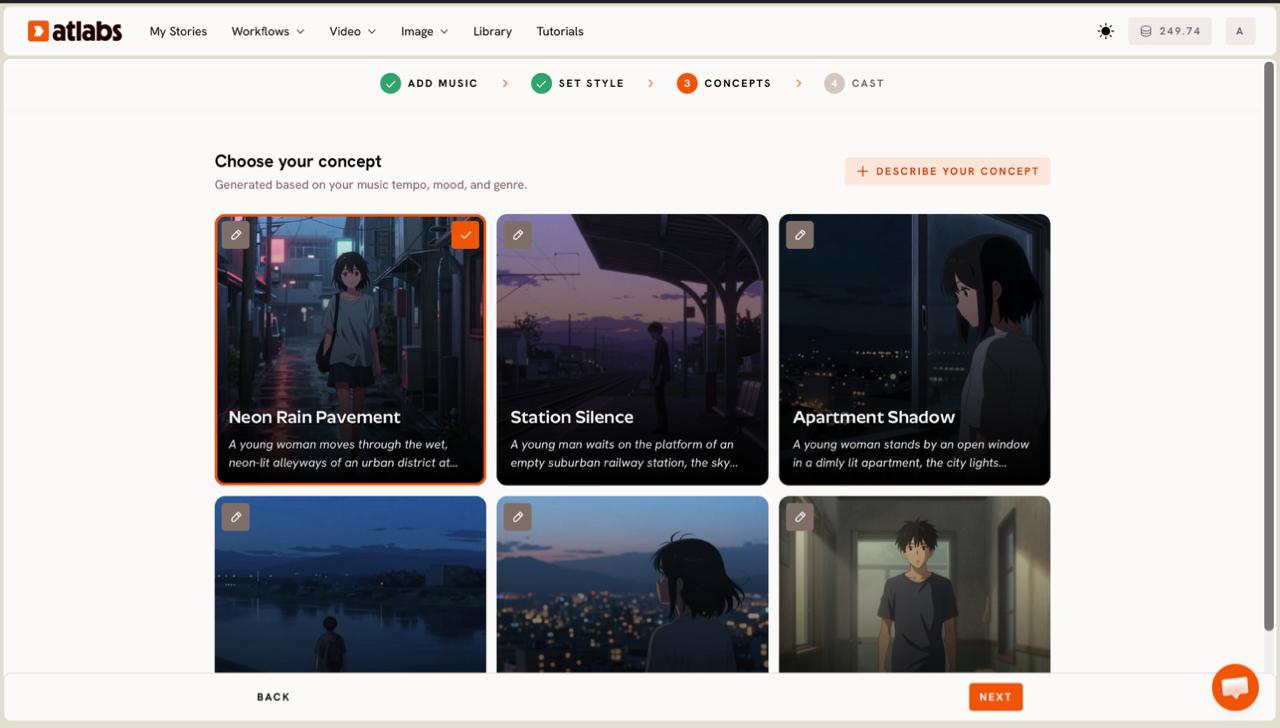
Step 4: Choose your concept. Atlabs displays six scene concepts as cards, generated from your track's tempo, mood, and genre, each with a short description and an edit pencil. Click the one that fits your song and a green tick marks it. Want something tied to your own lyrics or world? Click + DESCRIBE YOUR CONCEPT and write your own direction in plain language. This is where a moody R&B track becomes a rain soaked city and a folk track becomes an open highway at dusk.
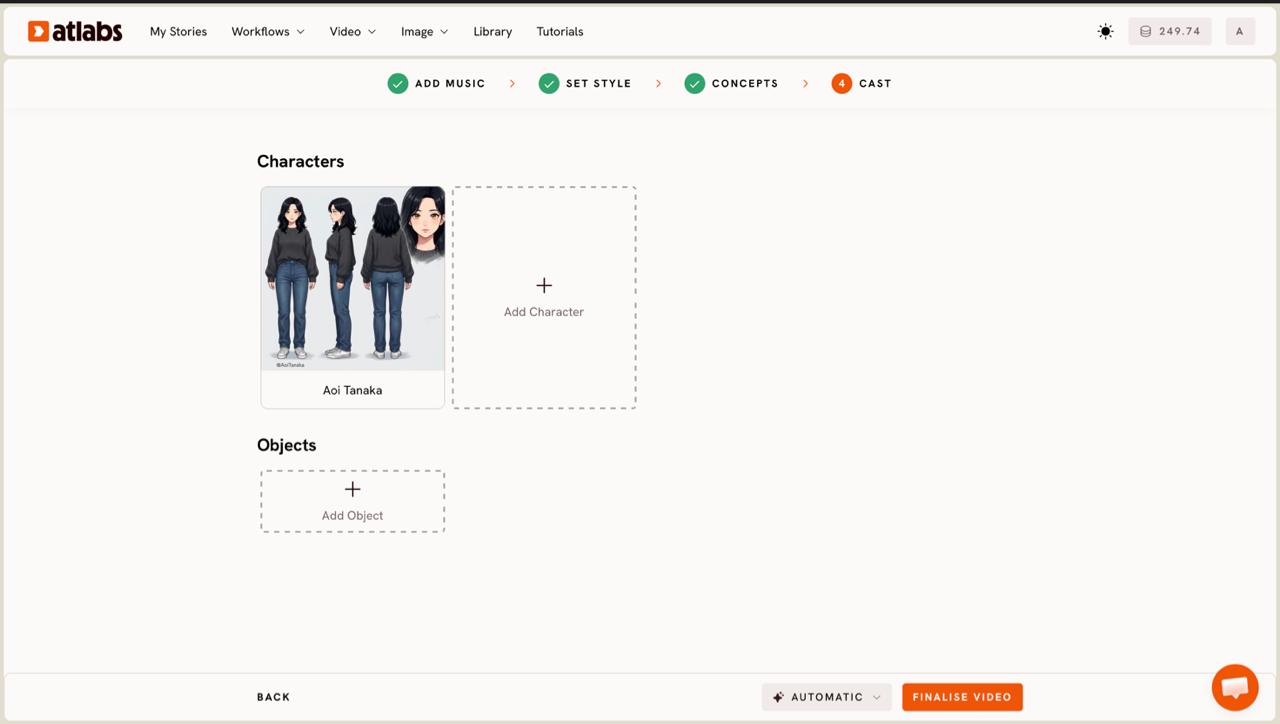
Step 5: Cast your characters. The Cast screen lets you define Characters and Objects that appear across your scenes. Each character card shows a generated reference sheet with multiple angles and a portrait, so the same face stays consistent shot to shot. Click any empty slot to Add Character, then use the Click to edit overlay to refine the look. Add recurring Objects at the bottom if your video has a hero prop, a vintage car, a guitar, a neon sign. Then generate, and your music video renders.
Tips for a better music video
A few choices separate a video that looks generated from one that looks directed. Match the model to the feel you want, since Kling 3.0 and Kling 2.6 give the smoothest cinematic motion for live action style sequences, while Google Veo 3.1 is strong for wide establishing shots. Lock your Aspect Ratio before you generate, because reframing later costs you composition. Keep your selected segment on the most dynamic part of the track, the drop or the hook, since motion follows energy. Write any custom concept in concrete nouns, a place, a time of day, a kind of weather, rather than adjectives like epic or beautiful, which give the model less to hold onto. And keep one or two named characters consistent across the video so the edit reads as intentional rather than random.
Concept prompts to copy
If you want a fast start, paste one of these into the + DESCRIBE YOUR CONCEPT box on the Concepts screen and adjust the details to fit your track.
Lo-fi night drive: a lone driver moves through a rain slicked city at 2am, neon reflections sliding across the windshield, warm streetlights blurring past, slow dreamy camera, cinematic and moody.
Try this in Atlabs Music Video
Folk golden hour: a figure walks an empty country road at dusk, tall grass swaying, dust catching the low sun, wide cinematic shots cut with close handheld moments, warm and nostalgic.
Try this in Atlabs Music Video
FAQ
How long does it take to turn a song into a music video?
Most indie artists go from upload to a finished render in under ten minutes for a short segment. The exact time depends on the length of the clip you selected and the model you chose, since cinematic models render a little slower than image led storyboards.
Do I need any video editing or filming skills?
No. The Music Video workflow handles scene generation, character consistency, and timing for you. You upload a track, pick a style, choose a concept, and the platform builds the video. There is no camera, timeline, or keyframe work involved.
What file types and sources can I use for my track?
You can upload an mp3 file up to 200MB, or paste a Suno music URL and click EXTRACT MUSIC. Atlabs auto detects the tempo and mood from the audio, which is what the scene concepts are built around.
Can I make a vertical music video for TikTok and Reels?
Yes. Set the Aspect Ratio to 9:16 on the Set Style screen for TikTok, Reels, and Shorts, choose 16:9 for YouTube, or 1:1 for square feeds. Pick this before generating so the composition is framed correctly from the start.
Get started
Upload your track, pick a cinematic style, and watch your song become a music video. The Music Video workflow is ready when you are.
Open Atlabs








