Neural Frames has earned a loyal following among musicians and visual artists who want AI-generated visuals that move with their music. Its audio-reactive generation and psychedelic aesthetic have made it a go-to for a specific kind of music video creator. But once you start asking more from it, say a narrative arc, a specific visual style, recognisable characters, or output ready for YouTube alongside TikTok, the ceiling becomes obvious. The tool does one thing well and is largely fixed at that one thing. This post covers five alternatives that handle the full range of what modern AI music video creation actually demands.
Why Are Creators Looking for a Neural Frames Alternative?
The most common frustration is the lack of narrative control. Neural Frames generates visuals that react to the beat, but the output is almost always abstract: swirling patterns, morphing shapes, colour pulses. If you want a story, a character, a specific setting, or even a consistent visual mood that maps to your lyrics, you are working against the tool rather than with it.
Output variety is another pressure point. Neural Frames has a recognisable look. After a few videos, audiences and creators alike start noticing the aesthetic fingerprint. When every AI music video from a creator looks like it came from the same template, it undermines the distinctiveness that visual artists are trying to build.
There is also the format question. Neural Frames outputs a single video format. Creators who need 9:16 for TikTok and Reels, 16:9 for YouTube, and 1:1 for LinkedIn or Pinterest have to export once and crop manually, losing composition quality in the process. That workaround adds time and degrades the final result.
Finally, model lock-in has become a real constraint. The AI video generation landscape has moved fast in the past eighteen months. Tools like Kling 3.0, Google Veo 3.1, and Seedance 2.0 each bring meaningfully different aesthetics and motion characteristics. Neural Frames does not give you access to that model diversity. Creators who want to route a cinematic scene through one model and a stylised character closeup through another have no way to do that inside Neural Frames.
Comparison: 5 Best Neural Frames Alternatives
Tool | Best For | Key Advantage Over Neural Frames | Tradeoffs |
Atlabs AI | Full music video workflow with model choice | Complete 4-step music video workflow with 27 visual styles, 6 AI models, and automatic scene generation tied to track mood and BPM | Requires a few minutes of setup; best results come from using Creative Direction thoughtfully |
Kaiber | Psychedelic and abstract visuals synced to music | Strong real-time audio reactivity and a dedicated Audioreactivity mode | Limited narrative control; output style skews heavily abstract |
Pika | Short motion clips with flexible text prompts | Fast generation; useful for quick stylized clips | No dedicated music video workflow; requires manual scene-by-scene assembly |
Runway | Cinematographic video from image or text | High visual quality with Gen-3 Alpha; good motion fidelity | No built-in music sync or mood-based scene generation |
Luma Dream Machine | Photorealistic short video clips | Excellent motion smoothness from still images | No music-aware generation; no visual style library for music contexts |
1. Atlabs AI: A Complete Music Video Studio
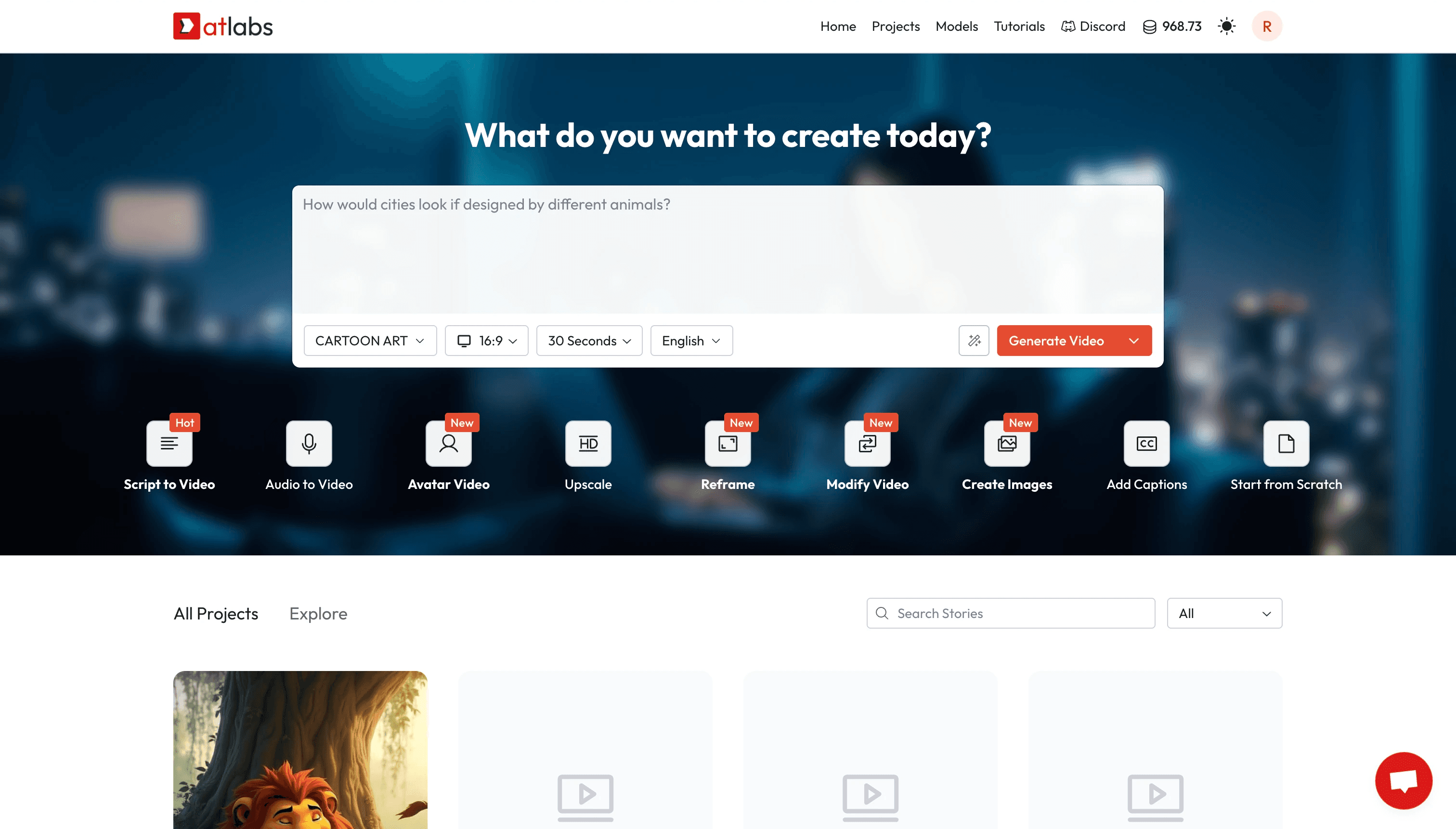
Atlabs approaches music video creation as a workflow rather than a single generation step. The Music Video workflow at atlabs.ai walks through four distinct stages, each one building on the last, so the output is a coherent video rather than a collection of unrelated clips.
Step 1: Add Music
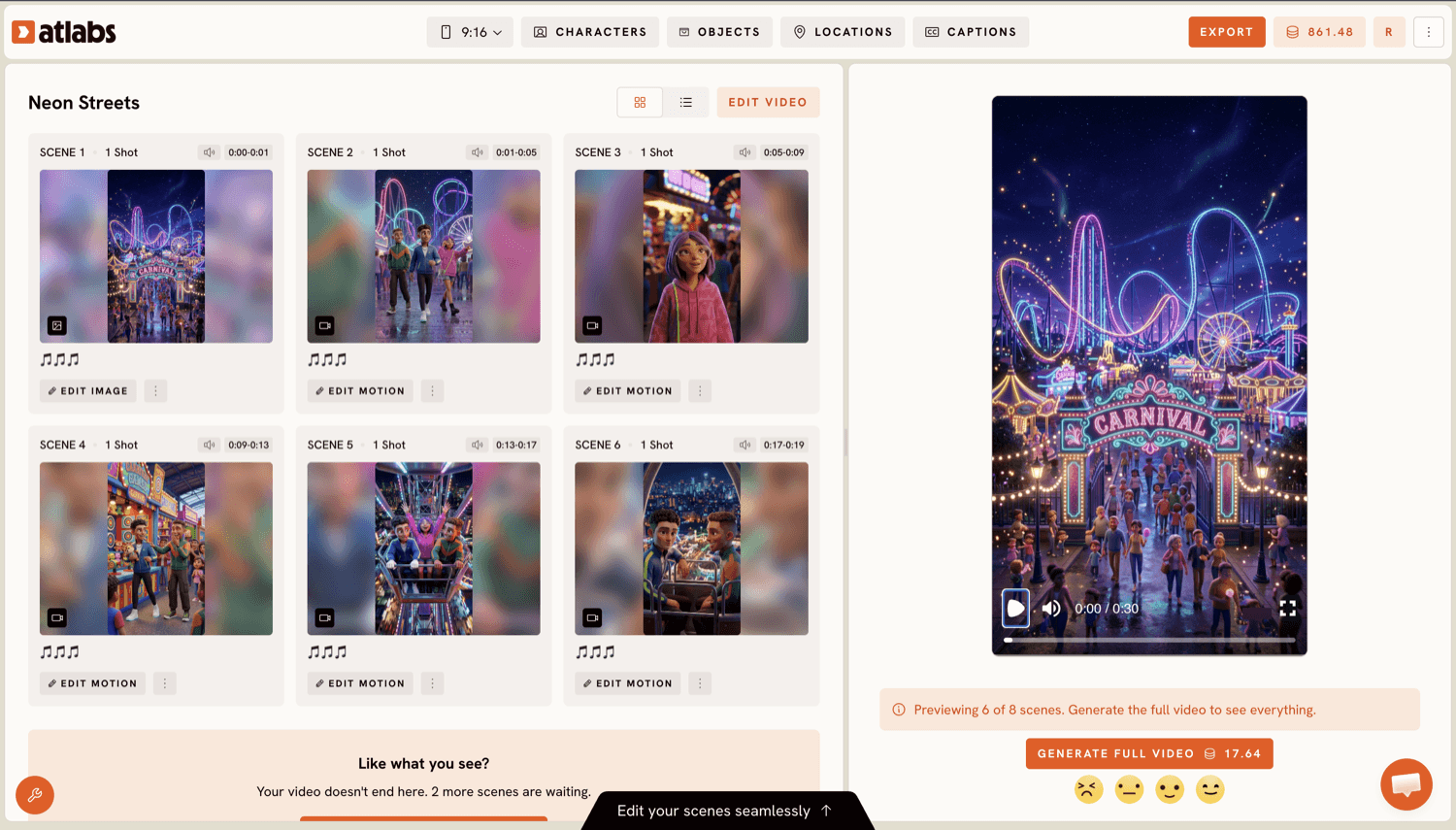
You upload your track and Atlabs automatically detects its characteristics. The platform identifies BPM and lets you confirm or adjust the tempo category: Slow Tempo, Mid Tempo, Fast Tempo, or Very Fast Tempo. It also reads the mood and lets you select from 13 options including Reflective Calm, Melancholic, Euphoric, Dreamy, and Aggressive. Genre is similarly selectable across 16 categories from Ambient and Jazz through to K-Pop and Afrobeats. This is not cosmetic labelling: every selection directly shapes what happens in Step 3 when scene concepts are generated. A Melancholic Folk track and an Aggressive Electronic track will produce fundamentally different creative directions from the same platform.
Step 2: Set Style
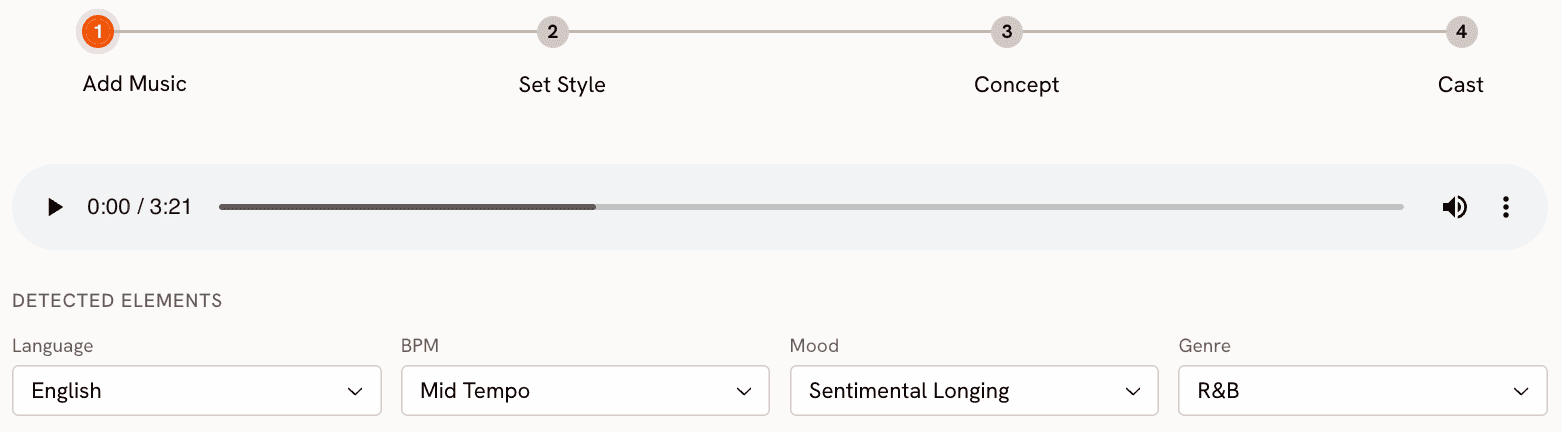
Aspect ratio is the first decision: 9:16 for TikTok and Instagram Stories, 16:9 for YouTube, or 1:1 for LinkedIn, Twitter, Facebook, and Pinterest. This choice happens at the beginning of the workflow, not as an afterthought, so every generation step downstream is optimised for your target platform from the start.
Video Style has two options. AI Video generates a unique narrative video, rendered from scratch. AI Storyboard produces images with motion effects applied. For most music video use cases, AI Video is the stronger choice. The Visual Style library is where Atlabs separates itself from Neural Frames most clearly: 27 options cover the full range of visual languages, from Realistic and Cinematic through Anime, Cyberpunk Anime, Watercolor Ink, Oil Painting, Webtoon, Noir, and Indian Comics. A single track can be visualised in radically different styles by changing this one setting, without re-uploading or re-configuring the rest of the workflow.
Step 3: Creative Direction
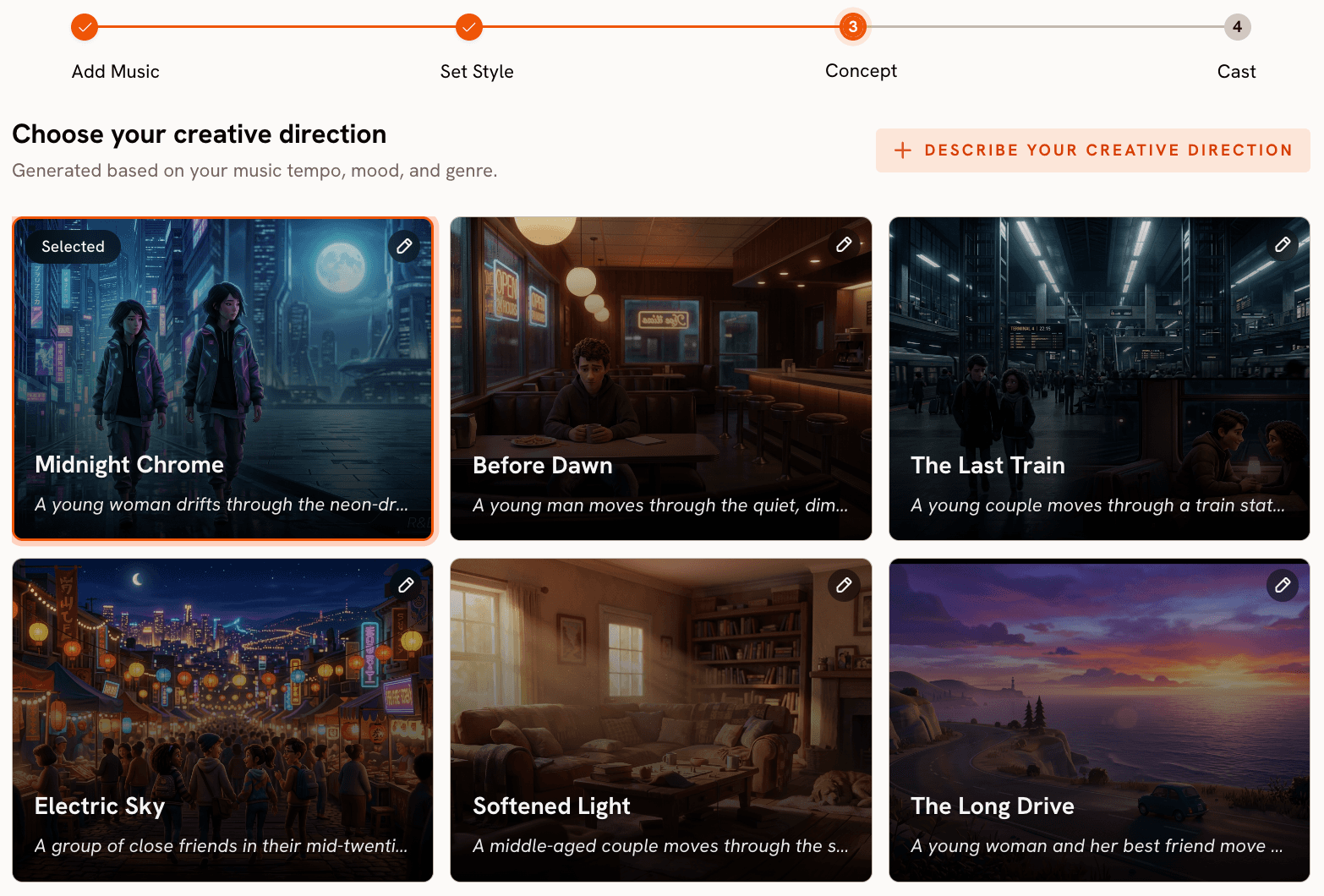
This is where Atlabs provides what Neural Frames cannot. Based on your track's detected tempo, mood, and genre, Atlabs generates 6 scene concepts automatically. Each concept arrives with a title, a description, and mood tags. An example for a Dreamy Ambient track might be "Quiet Winter Window" tagged as Still, Tender, Wistful. Another might be "Neon Drift" tagged as Floating, Electric, Distant. You pick the concept that fits the story you want your track to tell.
If none of the six concepts match your vision, the "Describe your Creative Direction" path lets you write a fully custom concept with your own title, description, tags, and mood markers. An Enhance toggle is available to let the platform expand a brief description into a richer creative brief before generation begins.
Step 4: Finalise Cast
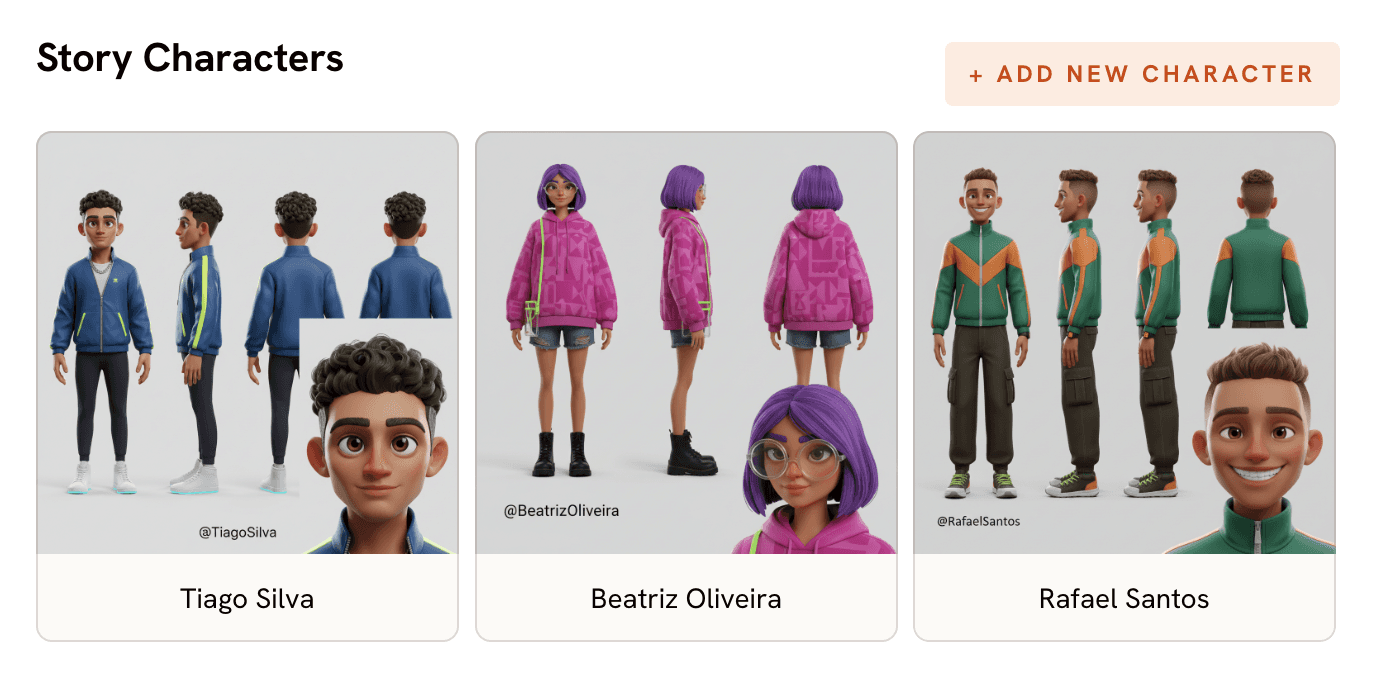
Characters who appear in the video are named and defined in this step. Multiple characters are supported, and each is editable. For music videos with a lead performer or recurring characters, this step grounds the visuals in consistent identities rather than randomly generated faces across scenes.
Model Choice Inside the Workflow
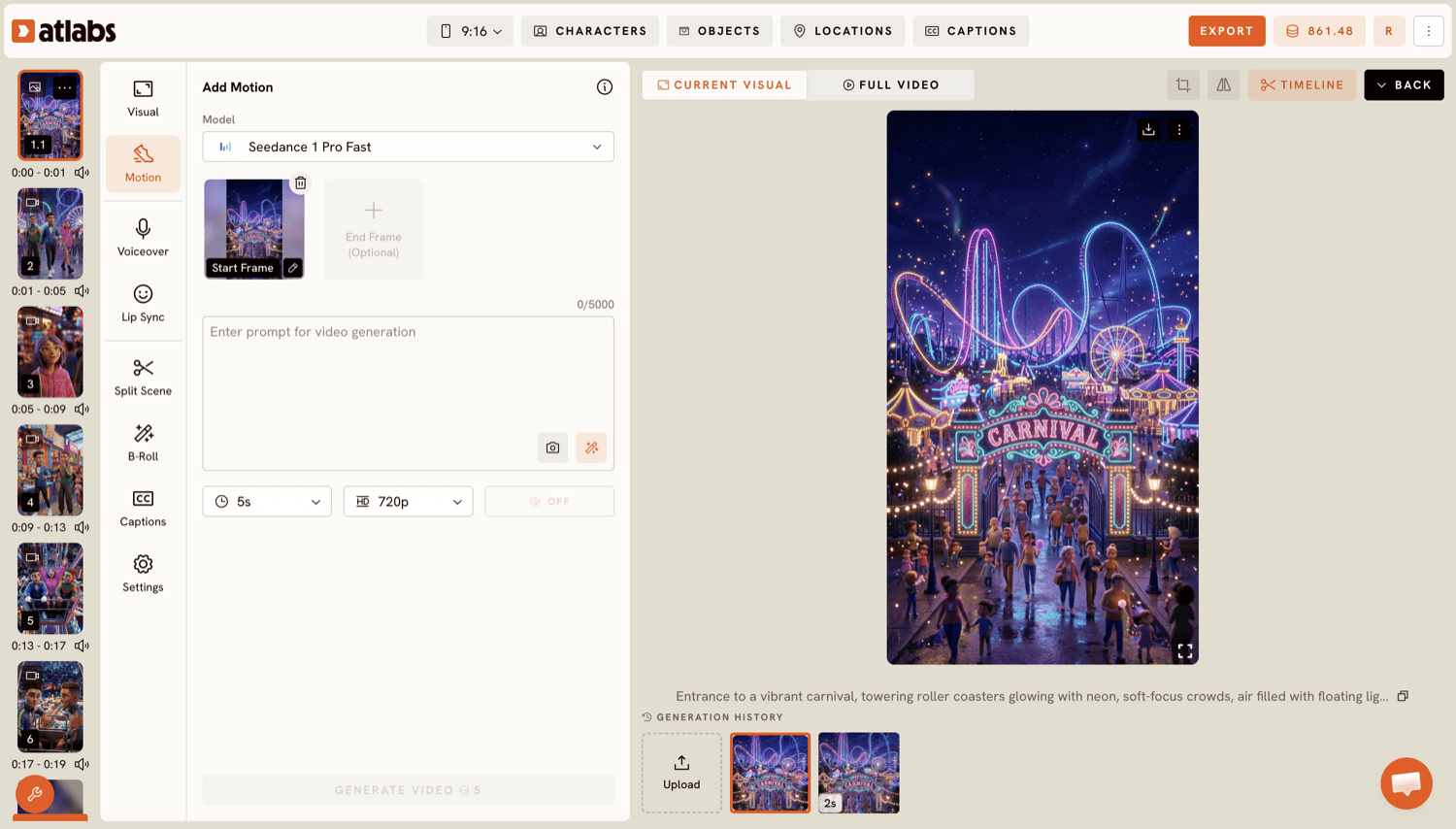
Atlabs runs across six AI video models, and the choice of model shapes the visual character of the output. Kling 3.0 and Kling 2.6 deliver cinematic motion and smooth movement, strong choices for action-driven sequences or live-action-style visuals. Seedance 2.0 handles stylised content and character closeups well, making it the natural fit for Anime or Webtoon style selections. Hailuo 2.3 produces high-motion fluidity suited to faster tempo tracks with anime-adjacent visuals. Google Veo 3.1 excels at photorealistic wide shots and establishing imagery, useful for Cinematic or Realistic style videos. Wan 2.6 brings open-source cinematic quality for creators who prefer that aesthetic. The key difference from Neural Frames is that you are not locked to one model's interpretation of your music. The same track can produce a Kling 3.0 cinematic piece or a Seedance 2.0 stylised character video depending on the mood and visual style you select.
Supporting Apps: Motion Control and Lip Sync
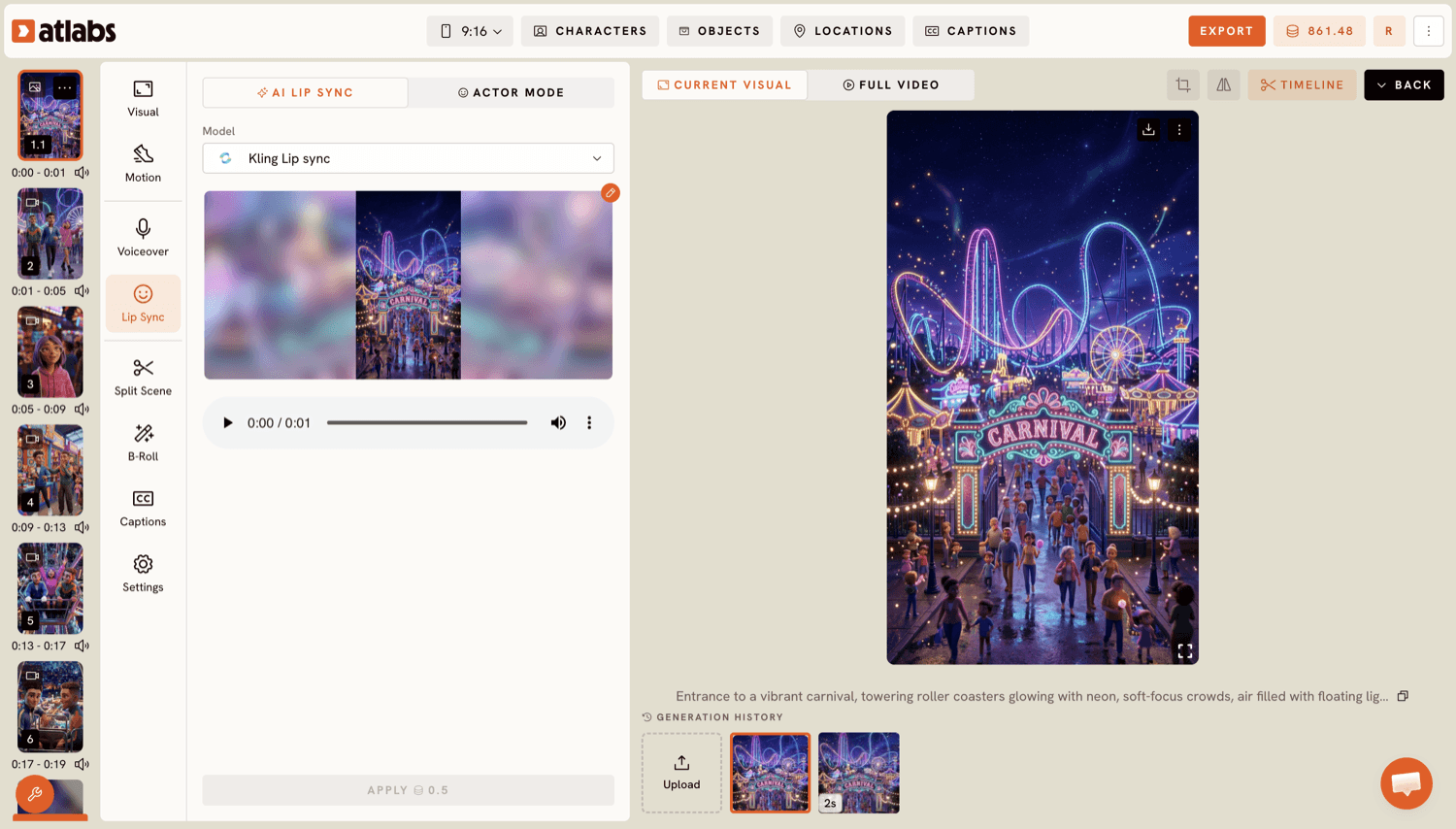
Beyond the core workflow, Atlabs offers Motion Control for transferring movement from a reference video onto a character image. This is useful for choreography-driven music videos where a specific dance or gesture needs to carry through to an AI character. Lip Sync takes any audio file and synchronises lip movements to a character image or video, opening up vocal performance visuals without needing camera time.
When Should You Choose Atlabs?
Atlabs is the right choice when you need more than audio-reactive abstraction. If you want a narrative direction, a specific visual style from a wide library, consistent characters across scenes, and the ability to output for multiple platforms from the same workflow, Atlabs covers that ground in a single tool. Creators who are hitting the aesthetic ceiling of Neural Frames and need control over story, style, and model will find the most to gain here.
Try the full Music Video workflow at Atlabs: Start building your AI music video
2. Kaiber: Best for Audio-Reactive Abstraction
Kaiber is the closest functional equivalent to Neural Frames in this list. Its Audioreactivity mode analyses a track and generates visuals that pulse, morph, and shift in direct response to the audio waveform. The output is fluid and immersive, well suited to ambient electronic music, lo-fi, and experimental genres where the visual should feel inseparable from the sound.
Kaiber also offers a Storyboard mode where you can set a sequence of visual prompts and have the video evolve between them over the track's duration. This adds a layer of narrative shaping that Neural Frames does not offer. You cannot build character-driven stories here, but you can guide the visual journey through distinct scenes or colour palettes.
Where Kaiber falls short is the same place Neural Frames does: it is almost entirely abstract. Photorealistic characters, dialogue-adjacent visuals, and narrative coherence across scenes are not what this tool is built for. Its model options are more limited than Atlabs, and there is no equivalent to the mood-and-genre detection that shapes scene generation automatically. For creators whose music video needs to tell a story, Kaiber is still the wrong tool. For those who want polished audio-reactive abstraction with more creative input than Neural Frames allows, it is a genuine step forward.
3. Pika: Best for Fast, Flexible Short Clips
Pika generates short video clips from text prompts or images, with a strong emphasis on motion quality and speed. The generation turnaround is fast, and the motion applied to still images is among the most natural-looking available. For creators who build music videos by assembling clips manually in a video editor, Pika can accelerate the visual creation stage significantly.
The practical limitation is that Pika has no music video workflow. There is no audio upload, no BPM detection, no mood-based scene suggestion. You bring a text prompt, Pika returns a clip, and the work of matching that clip to your music happens entirely outside the platform. For creators comfortable with traditional editing software, this is manageable. For those who want the platform to understand their track and generate scenes that fit it, Pika does not provide that intelligence.
Pika works best as a component in a larger pipeline rather than an end-to-end music video tool. If you already have a scene plan and need high-quality motion clips to bring it to life, it earns its place. If you are starting from a track and hoping the tool will help you build the visual story, look elsewhere.
4. Runway: Best for Cinematic Visual Quality
Runway's Gen-3 Alpha model produces some of the highest quality video output available in AI generation tools. Camera movement, lighting, and motion physics are rendered with a level of fidelity that stands out in comparisons across the category. For music video creators who prioritise visual quality above all else and are willing to build their workflow around that priority, Runway is the strongest single-model choice.
The tradeoff is a significant one for music video creation specifically. Runway does not have music upload functionality, beat detection, or any mechanism for syncing generated visuals to an audio track. Every scene is generated independently, and the work of assembling those scenes into a music video, timing cuts to the beat, ensuring visual flow across clips, is manual work done in post-production.
Runway is an excellent tool for creators who think of AI generation as one stage in a production pipeline. It is a poor fit for creators who want an end-to-end platform that takes a track as input and produces a finished music video. The absence of music-aware generation means Runway is competing on output quality, not workflow completeness, and for many music video creators, that is the wrong axis to optimise on.
5. Luma Dream Machine: Best for Motion from Still Images
Luma Dream Machine specialises in converting still images into smooth, photorealistic video clips. Its motion quality from a single reference image is among the best available: movement feels physically grounded, and the generation avoids the uncanny artifacts that plague many image-to-video tools. For music video creators who work with photography, illustration, or AI-generated stills, Luma provides a strong path from image to motion clip.
The limitations mirror those of the other single-model tools in this list. There is no music-aware generation, no style library, and no scene-planning workflow. Like Pika and Runway, Luma fits into a manual production pipeline rather than replacing one. Each clip is generated from a prompt and an image, with no understanding of the track it will eventually accompany.
Where Luma earns a place on this list is in its specific competence: if your music video style leans photorealistic and your source assets are strong still images, Luma's motion quality is hard to match at its price point. It is a tool for a specific production approach, not a general-purpose music video platform.
How to Choose the Right Neural Frames Alternative
The choice comes down to what kind of music video creator you are and what stage of the production process you want help with.
If you want a complete workflow that takes your track as input and produces a styled, narrative music video as output, Atlabs is the only tool on this list that provides that end to end. The four-step Music Video workflow handles everything from mood detection through scene concept generation to character finalisation, and the 27 visual styles and six AI models give you the range to make each video look distinct.
If your music is abstract and electronic and your visual instinct runs toward audio-reactive psychedelia, Kaiber is the most direct upgrade from Neural Frames. It does a similar thing with more creative input available to you.
If you have existing stills or a clear scene plan and want to add motion, Pika and Luma are strong options depending on your quality requirements and budget. Runway fits the same pattern with a higher quality ceiling and a steeper learning curve.
Creators who need their music video to work across TikTok, YouTube, and LinkedIn from the same project will find that Atlabs is the only tool here that bakes platform-specific aspect ratio into the workflow from the start, which saves significant time in post-production.
Example Prompts for AI Music Videos in Atlabs
These prompts are built for the Atlabs Music Video workflow. Each specifies visual style, mood, setting, and character details to get a strong result on the first generation.
A young woman walks through a neon-lit rain-soaked city street at night, her reflection breaking apart in puddles, slow deliberate steps matching a mid-tempo R&B beat. Streetlights flicker. Steam rises from grates. The camera follows at eye level, drifting slightly to the right. Mood: Melancholic. Visual Style: Cyberpunk Anime. (Best routed through Seedance 2.0)
Try this prompt in Atlabs Music Video Workflow
A lone figure stands at the edge of a wheat field at golden hour, arms outstretched, the camera pulling back slowly as the field sways in a warm wind. Soft haze on the horizon. Visual Style: Cinematic. Mood: Nostalgic. BPM: Slow Tempo. (Best routed through Google Veo 3.1)
Try this prompt in Atlabs Music Video Workflow
An anime warrior leaps between rooftops in a storm-lit feudal city, each landing sending ripples of light across the wet stone. Lanterns swing violently in the wind. The sequence builds in intensity with the track tempo. Visual Style: Anime. Mood: Powerful. BPM: Fast Tempo. (Best routed through Hailuo 2.3)
Try this prompt in Atlabs Music Video Workflow
A couple dances in a warmly lit kitchen at 2am, no particular occasion, just moving together to a slow jazz track. Shadows long on the wall. The camera holds a medium wide shot that slowly zooms in over 30 seconds. Visual Style: Realistic. Mood: Romantic. BPM: Slow Tempo. (Best routed through Kling 3.0)
Try this prompt in Atlabs Music Video Workflow
A protest march through a grey industrial city, signs raised, faces determined, the camera tracking alongside at ground level before lifting to an aerial shot as the chorus hits. Rain begins mid-sequence. Visual Style: Noir. Mood: Aggressive. BPM: Mid Tempo. (Best routed through Google Veo 3.1)
Try this prompt in Atlabs Music Video Workflow
Floating islands drift above an amber ocean at twilight, small figures moving across rope bridges between them, the camera gliding in a slow arc. Bioluminescent plants line the paths. Visual Style: Fantasy Horror. Mood: Mysterious. BPM: Mid Tempo. (Best routed through Seedance 2.0)
Try this prompt in Atlabs Music Video Workflow
FAQ
Is Neural Frames free to use?
Neural Frames has a free tier with limited generation credits and watermarked output. Paid plans unlock higher resolution, faster generation, and watermark removal. If budget is a constraint, Atlabs also offers a starting tier that covers the full Music Video workflow so you can compare output quality before committing.
Can I sync AI-generated visuals to specific moments in my track?
Atlabs detects BPM and mood automatically and uses those signals to shape scene generation, but precise beat-level sync at specific timestamps is handled in your video editor after export. For creators who want frame-precise audio-visual sync, the standard practice is to generate scenes in Atlabs and then cut to the beat in software like DaVinci Resolve or Premiere.
Which tool is best for an anime-style music video?
Atlabs with the Anime or Cyberpunk Anime visual style and Seedance 2.0 as the model is the strongest combination for anime-style music video output. Hailuo 2.3 is also a strong choice for high-motion anime-adjacent visuals, particularly for fast-tempo tracks with action-oriented scene concepts.
Do I need video editing skills to use any of these tools?
Atlabs produces a complete music video from your track without requiring external editing. Pika, Runway, and Luma Dream Machine generate clips that you assemble yourself in a video editor. Kaiber produces a continuous video from the full track like Atlabs, so no editing is needed to get a finished output.
Can I use these tools for commercial music releases?
Each platform has its own commercial licensing terms. Atlabs, Kaiber, Pika, Runway, and Luma Dream Machine all offer plans that include commercial use rights for generated content, typically on paid tiers. Always review the specific platform terms before releasing AI-generated video as part of a commercial music project.
Final Verdict
Neural Frames fills a specific creative niche and fills it well. But creators who need more than audio-reactive abstraction will find its walls quickly. The five alternatives in this list each address a different part of what Neural Frames cannot do. For the creator who wants a complete end-to-end music video studio, Atlabs is the most fully formed option: a four-step workflow that takes your track as input, understands its mood and tempo, generates scene concepts that match its character, lets you choose from 27 visual styles and six AI models, and outputs at the correct aspect ratio for your target platform. The other tools on this list are genuinely useful for specific production approaches, but none of them replace the need for a workflow that starts with music and ends with a video.
Ready to build your AI music video? Try the Atlabs Music Video workflow