
TL;DR, Read this first
Sora's text-to-video output lives or dies by your prompt structure.
This guide breaks down the exact formula Scene → Subject → Action → Camera → Mood
with copy-paste ready prompts across 8 video use cases, plus mistakes to avoid and pro
tips that actually move the needle.
Why Most Sora Prompts Fail (And How to Fix Them)
Most people type something like: "A man running through a forest at night."
Sora generates something. It moves. But it looks forgettable, flat lighting, generic motion, no cinematic weight.
The problem isn't Sora. It's the prompt.
Sora is a world-simulation model. It doesn't just render a scene, it predicts how a scene would look if shot by a real camera. Feed it thin instructions, and it fills the gaps with averages. Feed it specific, layered instructions, and it fills the gaps with cinema.
This guide fixes that. After running hundreds of test generations, we've mapped exactly what Sora responds to, and what it ignores.
The Sora Prompt Formula
Every high-output Sora prompt follows one structure:
|
Miss any layer and the output degrades. Here's what each layer does:
Layer 1: Scene: The World Anchor
Set the physical environment before anything else. Sora uses this to establish lighting, spatial depth, and atmospheric texture.
Location: indoor/outdoor, time of day, geography
Lighting source: golden hour, neon, candlelight, overcast
Atmosphere: weather, air quality, season
Example | |
|---|---|
Weak | "A city street" |
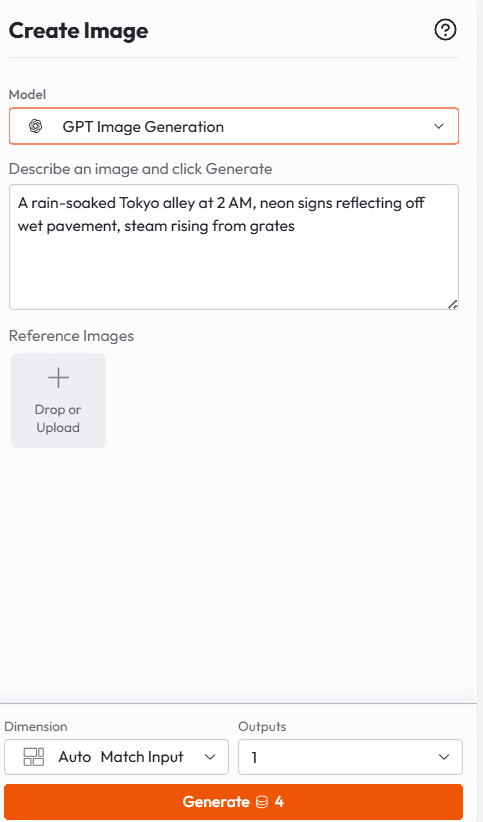
Strong | "A rain-soaked Tokyo alley at 2 AM, neon signs reflecting off wet pavement, steam rising from grates" |
Layer 2: Subject: The Visual Anchor
Define your subject clearly and reuse the same descriptor throughout. Sora maintains visual consistency better when you give it a locked reference.
Use specific visual tags: "woman in an oversized cream blazer," "vintage red Ferrari 308," "labrador with a torn yellow bandana"
Avoid pronouns like "she," "it," or "the car , repeat the full descriptor every time
Layer 3: Action: The Timeline
Break action into sequential steps. Don't stack everything in one sentence. Sora handles temporal flow better when actions are ordered.
Structure: Beginning → middle → end
Use transition words: "then," "as," "suddenly," "slowly"
For 20-second clips, use time codes: "(0–5s)," "(5–12s)," "(12–20s)"
Layer 4: Camera: The Cinematic Layer
This is the most underused layer in most Sora prompts, and the one that makes the biggest difference.
Shot type: wide, medium, close-up, extreme close-up, POV
Movement: dolly push, tracking shot, orbit, pan, crane, handheld
Transitions: rack focus, speed ramp, whip pan, cut
Key insight Without camera direction, Sora defaults to a static shot or slow zoom, every time. Name the movement and you get intentional cinematography. |
Layer 5: Mood & Style, The Tonal Finish
Lock in the visual and emotional register of the clip.
Film stock: "35mm grain," "Super 8 warmth," "digital cinema, anamorphic"
Colour tone: "desaturated teal," "warm amber," "cool blue haze"
Emotional temperature: "anxious," "peaceful," "kinetic," "melancholic"
Complete Formula in Action
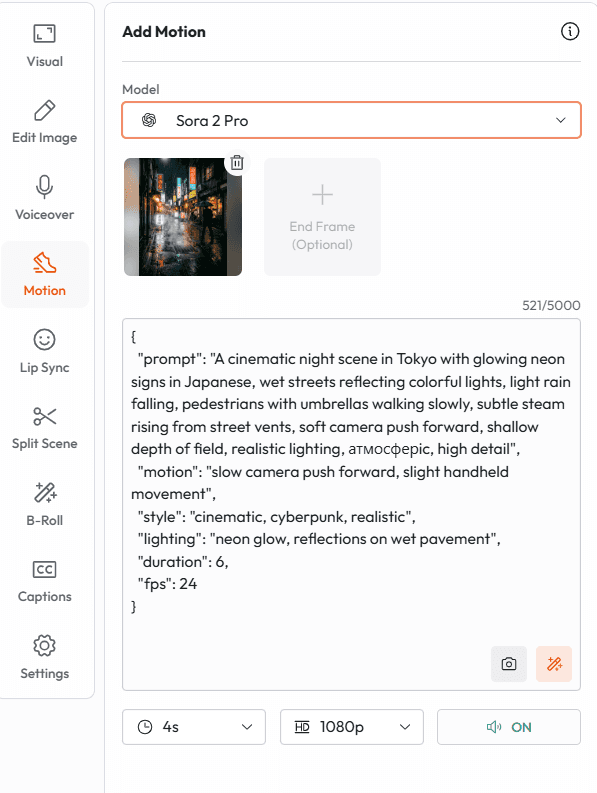
Full Prompt Example Narrow Tokyo alley at 2 AM, wet pavement reflecting neon signs [Scene]. A woman in an oversized cream blazer stands at the mouth of the alley, holding an unopened umbrella [Subject]. She tilts her head up toward the rain, closes her eyes for a moment, then turns and walks away from the camera [Action]. Slow dolly push into her back as she walks, rack focus from foreground rain droplets to her figure [Camera]. Desaturated teal grade, 35mm film grain, melancholic and quiet [Style]. |
8 Sora Prompt Templates: Copy, Paste, Create
Each template below is structured to the 5-layer formula and ready to paste directly into Sora on Atlabs.
1. Cinematic Short Film
Use case: Story-driven content, emotional reels, festival submissions
|
2. Product Ad (Beauty / Lifestyle)
Use case: E-commerce ads, Instagram Reels, brand content
|
3. Urban / Street Style Editorial
Use case: Fashion content, brand lookbooks, social editorial
|
4. Nature / Wildlife Documentary Style
Use case: YouTube long-form content, B-roll libraries, travel brands
|
5. Tech / SaaS Product Demo Explainer
Use case: Landing pages, product launch videos, startup decks
|
6. Music Video / Abstract Visual
Use case: Artists, ambient creators, Instagram art content
|
7. Sports / Action
Use case: Athletic brands, highlight content, Nike/Adidas-style ads
|
8. Horror / Psychological Thriller
Use case: Short films, social horror content, genre storytelling
|
Weak vs. Strong Prompts, Side-by-Side
Element | ❌ Weak | ✅ Strong |
|---|---|---|
Scene | "In a coffee shop" | "Narrow Parisian café, morning light through rain-streaked windows, espresso steam rising" |
Subject | "A woman" | "Woman in a faded red linen jacket, hair pinned up, reading glasses on" |
Action | "She walks away" | "She closes the book slowly, sets it face down, and walks toward the door without looking back" |
Camera | "Camera follows her" | "Handheld track slightly behind, losing her in soft bokeh as she passes the window light" |
Style | "Cinematic look" | "Shot on 16mm, warm grain, golden morning tones, natural sound, no score" |
5 Sora Prompting Rules That Change Your Output
Rule 1: Name your light source. Don't say "dramatic lighting." Say "flickering sodium lamp," "diffused overcast," or "golden hour hitting at 15 degrees." Real light sources produce real results. |
Rule 2: Describe texture, not quality. Don't say "realistic" or "high quality." Say "condensation on glass," "dust caught in sunbeam," "fabric creasing under weight." Tactile language makes Sora render detail. |
Rule 3: Give the camera a personality. A "tracking shot" is different from "shaky handheld tracking shot with a slight lag on subject." One is a direction. The other is a cinematographer. |
Rule 4: Use motion to tell time. Sora interprets motion as temporal flow. Slow-motion reads as importance. Speed ramps signal shift. A static hold at the end reads as weight. Use this intentionally. |
Rule 5: End with silence. Add an ambient sound layer even if it's empty space: "complete silence except distant highway" or "nothing but the hum of the refrigerator." It locks the emotional register. |
Common Sora Mistakes to Avoid
❌ Mistakes that kill your output "A cinematic video of,cinematic' is not a descriptor. It tells Sora nothing about lens, lighting, or movement. Stacking everything in one sentence, Sora handles layered action better when it's sequential, not simultaneous. No camera directions, Without it, you get a slow zoom or a static cut. Every time. Vague subjects "A person" gives Sora permission to hallucinate. Lock in specifics. Forgetting the audio layer, Sora generates ambient sound based on your description. No description = no atmosphere. |
✅ The correct sequence Specific scene → specific subject → ordered action → named camera movement → locked style |
Sora 2 on Atlabs: What You Get
Atlabs is where Sora 2's text-to-video lives alongside the rest of your production workflow, without the API overhead or the prompt-to-export guesswork.
Run Sora 2 alongside Kling 3.0, Runway, and other top models in one workspace
Use AI script writing to go from concept to prompt in one step
Add AI voiceovers, captions, and lip-sync to finished Sora clips
Upscale output to 4K without quality loss
Translate your final video into 40+ languages with one click
You're not just generating a clip. You're building a production pipeline.








