Studio lighting is the single most misunderstood variable in AI image and video generation. Most people describe what they want the scene to feel like. They write 'dramatic' or 'professional' or 'cinematic.' The AI gets something generic every time.
The photographers and filmmakers getting genuinely professional results are writing something completely different. They are not describing moods. They are describing physics. They name the light source, its position, its quality, its color temperature, and how it falls off across the frame. That specificity is the entire difference between a stock-photo look and a cover-shoot look.
This guide gives you 30 professional studio lighting setups in copy-paste prompt format. Each one covers a specific photographic or cinematic use case. Every prompt has been structured using the lighting vocabulary that AI models like Veo 3.1, Kling 2.1 Master, Sora 2, Flux Kontext, Nano Banana Pro, and Seedance respond to most reliably. All of them are available inside Atlabs.
You do not need lighting equipment. You do not need a studio. You need the right words.
All 30 prompts in this guide work across Atlabs models including Veo 3.1, Kling 2.1 Master, Nano Banana Pro, Flux Kontext, and Seedance. Start at atlabs.ai, pick your model, paste, generate. |
Why Lighting Prompts Are the Most Powerful Variable in AI Generation
Before the 30 setups, the reason this works.
AI video and image models are trained on enormous datasets of real-world photography and film. That training data is organized by visual patterns, and lighting patterns are among the most dominant. When you name a specific lighting setup precisely, you are triggering a pattern match to thousands or millions of examples of that exact type of photography in the training data.
Saying 'dramatic lighting' tells the model almost nothing. It could mean rim lighting, chiaroscuro, a single overhead source, neon-soaked street photography, or a dozen other things. Saying 'single Fresnel spotlight from above right at 45 degrees, casting a hard shadow to the lower left, black background, high contrast ratio of approximately 8:1' tells the model exactly which visual pattern cluster to draw from.
The results are not just better. They are consistent. They are controllable. And they look like they were lit by a professional.
That is what these 30 setups give you.
The Lighting Prompt Formula
Every prompt in this guide follows the same underlying structure. You do not have to memorize it, but understanding it helps you modify any prompt for your specific project.
[Shot Type and Camera] + [Subject] + [Primary Light Source and Position] + [Secondary and Fill Light] + [Quality and Color Temperature] + [Background and Contrast] + [Style Reference]
Each element earns its place. Cut one and you lose control over that variable. Add all of them and the model has everything it needs to replicate a real lighting setup.
Portrait and Character Setups (Setups 1 to 8)
Portrait lighting is the most searched lighting category for AI generation and the most inconsistent when prompts are vague. These eight setups cover the foundational configurations used in every professional portrait context.
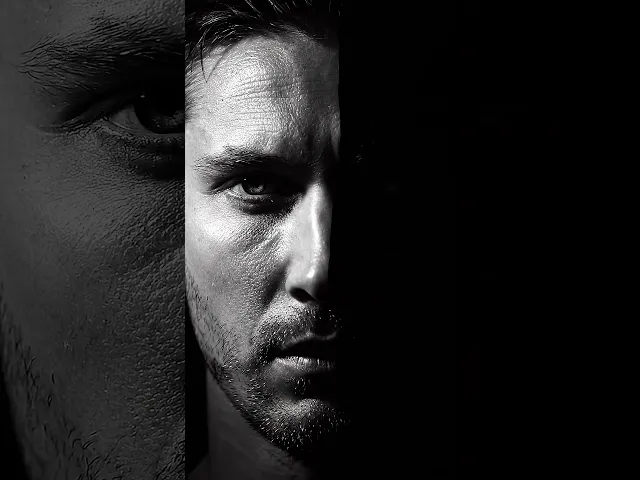
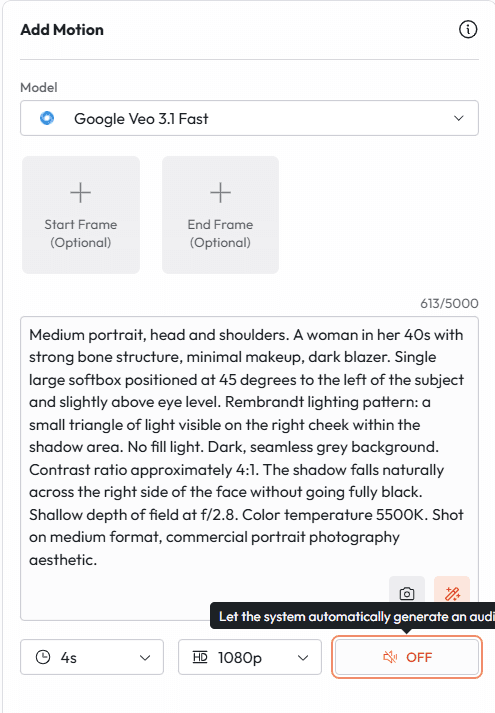
Setup 1: Rembrandt Lighting (The Classic Portrait)
Named for the Dutch master's signature technique. A triangle of light appears on the shadow-side cheek. Universally used in editorial, biographical, and executive portraiture.
PROMPT 1
|
Setup 2: Butterfly Lighting (Fashion and Beauty)
Named for the butterfly shadow it creates under the nose. A Hollywood Golden Age staple. Flattering for high cheekbones and symmetrical faces. Dominant in beauty, cosmetics, and fashion editorial.
PROMPT 2
|
Setup 3: Split Lighting (High Drama)
The light source is placed exactly 90 degrees to one side. Half the face is fully lit, half is in complete shadow. High contrast, high drama. Used in music photography, villain characters, psychological portraiture.
PROMPT 3
|
Setup 4: Loop Lighting (Commercial Headshot)
The workhorse of commercial photography. The light creates a small loop shadow from the nose that drops at a slight angle. Natural, approachable, professional. Used in corporate headshots, LinkedIn photography, business profiles.
PROMPT 4
|
Setup 5: Broad Lighting (Warm and Inviting)
The lit side of the face is the side facing camera. Widens the face optically. Warm, open, non-threatening. Used for lifestyle portraits, wellness content, influencer photography.
PROMPT 5
|
Setup 6: Short Lighting (Slim and Refined)
The lit side of the face is the side turned away from camera. Narrows the face, adds mystery and depth. Favored in fine art portraiture and editorial work.
PROMPT 6
|
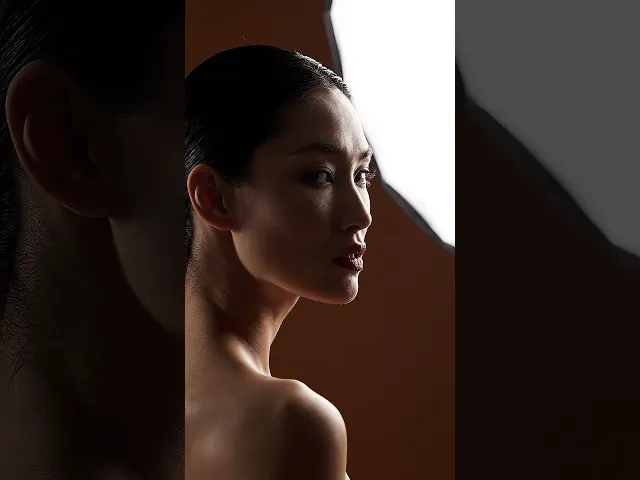
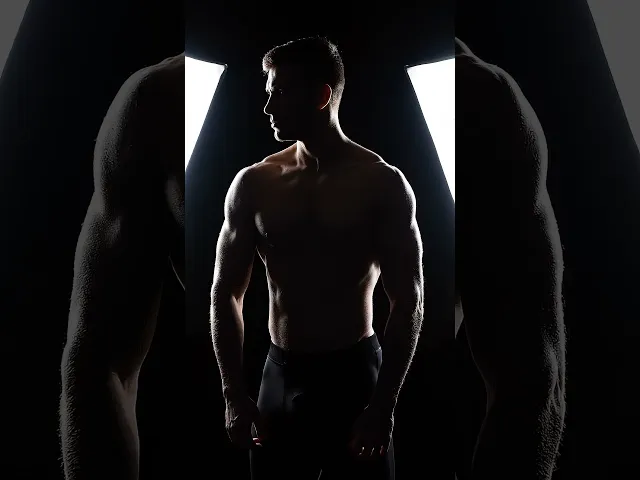
Setup 7: Rim Lighting and Separation (Hero Shot)
One or two lights placed behind the subject to create a glowing edge that separates them from the background. Creates volume and presence. Used for product heroes, athletes, keynote speakers, dramatic characters.
PROMPT 7
|
Setup 8: Practical Light Only (Ambient Authenticity)
No studio lights. The only illumination comes from light sources that exist within the scene: lamps, windows, candles, screens. The most naturalistic approach. Used in documentary portraiture, editorial, lifestyle.
PROMPT 8
|
Product Photography Setups (Setups 9 to 16)
Product lighting requires precision that portrait lighting does not. The subject cannot collaborate. It does not blink when the light is wrong. Every surface, material, reflection, and shadow has to be engineered through the prompt. These eight setups cover the most commercially important product contexts.
Setup 9: Classic White Sweep (Clean Commercial)
The industry standard for e-commerce and catalog photography. A pure white background with no horizon line, achieved with a seamless paper sweep. Clean and professional.
PROMPT 9
|
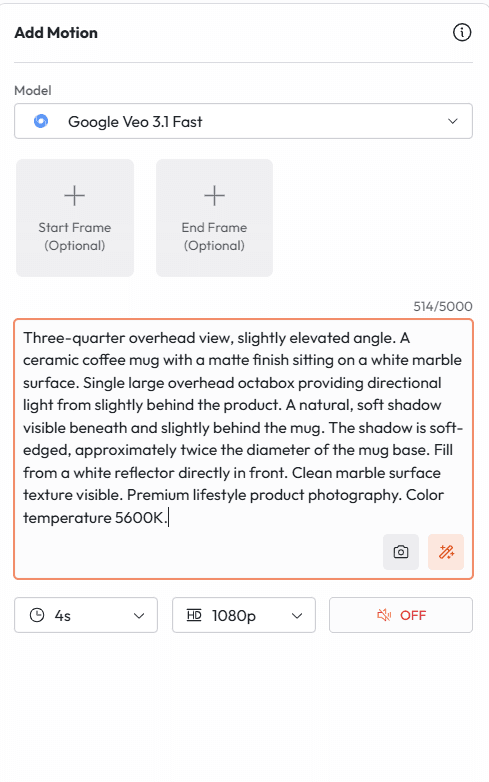
Setup 10: Floating Shadow (Editorial Product)
A soft shadow drops directly below or slightly behind the product on a white surface, creating the illusion of weightlessness. A step up from flat e-commerce. Used in editorial and premium brand contexts.
PROMPT 10
|
Setup 11: Dark Drama (Luxury Product)
A black or dark background with controlled lighting that isolates the product in darkness. High-end spirits, fragrances, jewelry, and premium electronics all use this treatment.
PROMPT 11
|
Setup 12: In-Situ Lifestyle (Contextual Product)
The product is shown in its natural use environment. No seamless backdrop. Props, surfaces, and ambient light work together to tell a story about who uses the product and how.
PROMPT 12
|
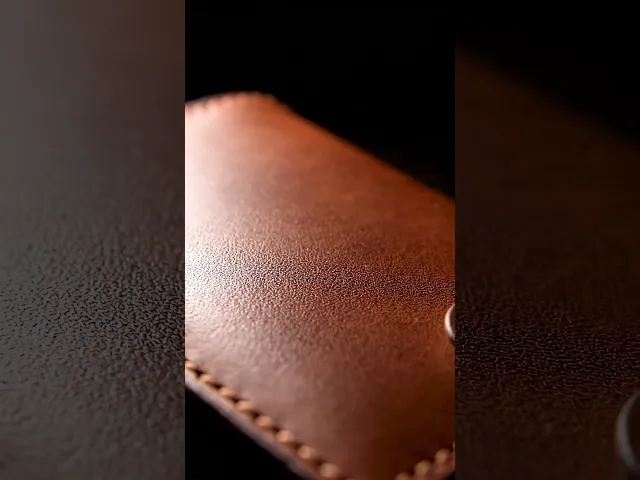
Setup 13: The Material Study (Macro Product)
Extreme close-up to showcase material, texture, and craft. Used for textiles, leather goods, ceramics, artisan food, and premium hardware. The camera gets as close as the texture of the material.
PROMPT 13
|
Setup 14: The Pour and Splash (Beverage Drama)
A motion capture frozen in time. A liquid pour, a splash, a crown impact. Used in premium beverage, spirits, and food photography to suggest freshness, energy, and indulgence.
PROMPT 14
|
Setup 15: The Jewel Light (Jewelry and Gems)
Jewelry requires controlled sparkle points rather than diffuse light. This setup uses multiple small hard light sources to create the maximum number of facet reflections simultaneously.
PROMPT 15
|
Setup 16: The Gradient Background (Social Media Product)
A colored gradient background with centered, clean product placement. Dominant on social media advertising and app store imagery. The gradient creates depth without a real environment.
PROMPT 16
|
Cinematic and Film Lighting Setups (Setups 17 to 22)
Cinema lighting is not about making things look good. It is about making things feel true. Each of these six setups replicates a specific emotional register from professional film production.
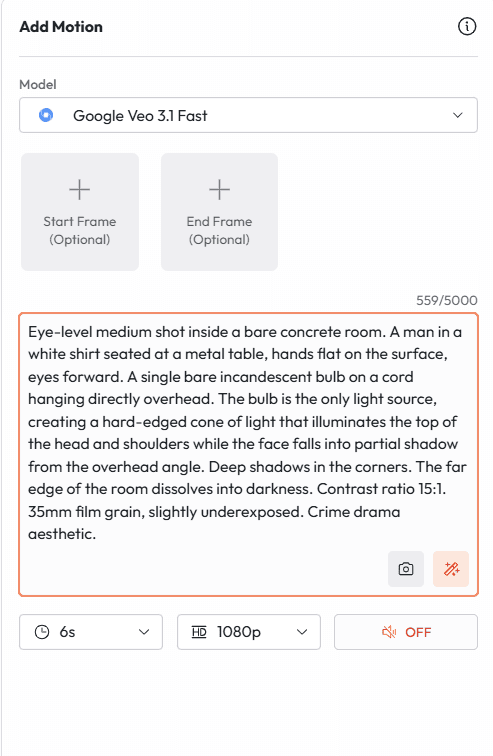
Setup 17: The Interrogation Room (Pressure and Isolation)
One bare overhead light. Harsh. Unforgiving. The subject cannot hide. Used in crime drama, psychological thriller, and any scene involving confrontation and power.
PROMPT 17
|
Setup 18: Magic Hour (Golden Warmth)
The twenty-minute window after sunrise or before sunset when sunlight is diffused, warm, and low-angled. Every surface catches a golden glow. Universally beloved. Used in romance, coming-of-age stories, nostalgia, and aspirational advertising.
PROMPT 18
|
Setup 19: The Neon City (Urban Night)
The artificial lights of an urban night scene become the lighting rig. Neon signs, car headlights, street lamps, and shop windows create a multi-colored, high-contrast canvas. Used in action films, neo-noir, music videos, and street fashion.
PROMPT 19
|
Setup 20: The Candlelight Scene (Intimacy and Danger)
A single candle or small group of candles. The most instinctive human light source. Warm, flickering, directional, intimate. Used in period drama, romantic scenes, horror, and ritual sequences.
PROMPT 20
|
Setup 21: The Cold Procedural (Clinical Realism)
Flat, cool overhead fluorescent light. No shadows. No poetry. The visual language of hospitals, laboratories, government buildings, and surveillance. Used in procedural drama, dystopian settings, and thriller contexts.
PROMPT 21
|
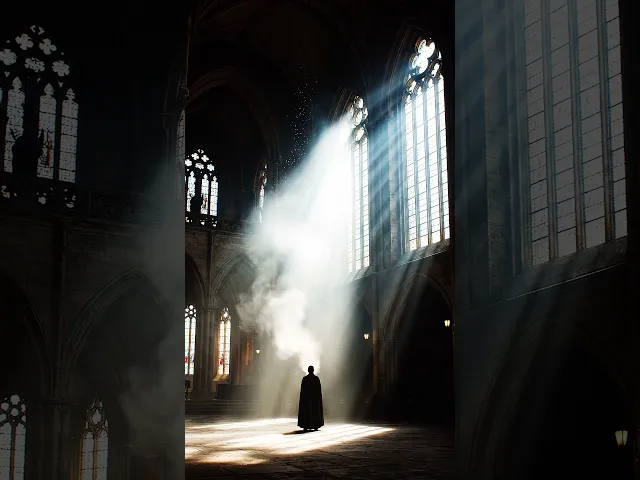
Setup 22: The God Rays (Spiritual and Monumental)
Visible beams of light cutting through atmospheric haze, smoke, or mist. The effect occurs naturally when dust or moisture particles scatter a directional light source. Used in epic drama, religious and spiritual contexts, and awe-inspiring reveals.
PROMPT 22
|
Technical and Specialized Setups (Setups 23 to 30)
The final eight setups cover specific technical lighting scenarios that appear frequently in AI generation requests but are rarely explained in practical prompt terms.
Setup 23: The Chiaroscuro Study (Fine Art)
Pure chiaroscuro: extreme contrast between light and shadow with no midrange. A technique with roots in Renaissance painting, central to Caravaggio and Rembrandt. Used in fine art portraiture and conceptual photography.
PROMPT 23
|
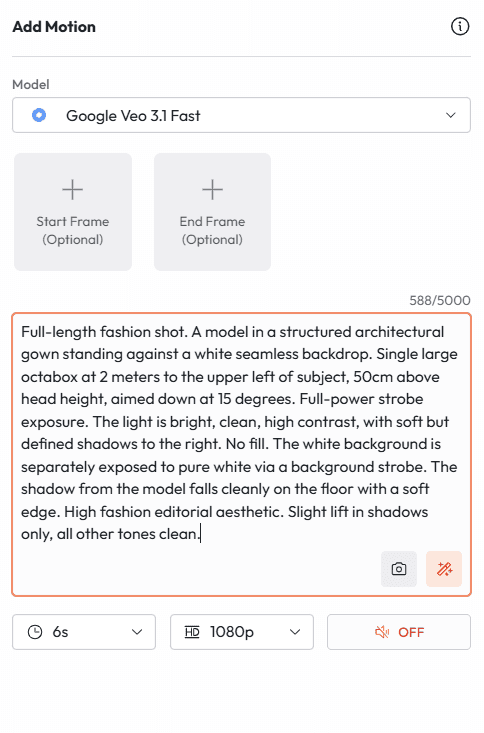
Setup 24: The Fashion Strobe (Editorial Power)
High-powered strobe at full power, typically from a large octabox or beauty dish. The signature look of major fashion editorials and high-impact commercial campaigns.
PROMPT 24
|
Setup 25: The Screen Glow (Tech and Digital)
The blue-white light of a monitor illuminating a face in a dark room. The signature visual of tech, gaming, coding, and surveillance culture.
PROMPT 25
|
Setup 26: The Environmental Silhouette (Composition)
A subject placed in front of a bright background so that they appear as a dark silhouette against light. Pure shape, no detail. Used for dramatic reveals, epic scale, conceptual work.
PROMPT 26
|
Setup 27: The Flat Light Product Softbox Grid (Studio Precision)
Using a grid modifier on softboxes to create controlled, directional soft light with no spill. This is the most technically precise product lighting setup in studio photography.
PROMPT 27
|
Setup 28: The Motion Blur Light Trail (Abstract)
Long exposure light painting or light trails from moving sources. The camera stays still while lights move, creating abstract streaks. Used in automotive photography, event coverage, and conceptual art.
PROMPT 28
|
Setup 29: The Subsurface Scatter (Organic Materials)
Light passing through translucent organic materials such as skin, petals, leaves, or food, creating an inner glow effect. Used in beauty, food, nature, and fine art photography.
PROMPT 29
|
Setup 30: The Hybrid Practical and Studio (The Most Versatile)
The most commercially useful setup: a professional studio key light that is designed to look as if it could be a window or practical light in the scene. The subject looks naturally lit while the lighting is fully controlled.
PROMPT 30
|
Weak vs. Strong Prompts: What Actually Changes
Here is the exact difference between a prompt that produces a generic output and one that produces a professional result. Same subject. Same intent. Different level of lighting specification.
Weak Prompt | Strong Prompt |
A portrait of a woman with dramatic lighting on a dark background. | Medium portrait, head and shoulders. A woman in her early 40s, dark hair, minimal styling. Single large softbox from camera left at 45 degrees, 30cm above eye level. Rembrandt pattern: light triangle on shadow cheek. No fill. Dark seamless charcoal background. Contrast ratio 5:1. Shot on 85mm at f/2.2. Color temperature 5500K. Editorial portrait aesthetic. |
Weak Prompt | Strong Prompt |
A product photo of a watch on a dark background with good lighting. | Eye-level close-up. A stainless steel chronograph on a rotating black marble platform. Single Fresnel spot from upper right illuminating the dial face. A thin strip light from directly behind traces the case edge as a rim highlight. No fill. Black velvet background. Contrast ratio 12:1. Watch dial and hands fully legible. Slight anamorphic lens compression. Commercial watch photography aesthetic. |
Weak Prompt | Strong Prompt |
A cinematic scene of someone standing in a dark room with a single light. | Medium shot. A woman in her 30s standing still in the center of an empty concrete room. A single practical incandescent bulb on a cord hangs from the ceiling 30cm above and in front of her. The bulb creates a sharp-edged cone of warm light (2800K) illuminating her face and shoulders, fading rapidly to darkness at the edges. Contrast ratio 18:1. Deep shadow behind her. The cord casts a thin shadow up the wall. Psychological thriller aesthetic. 35mm film grain, slightly underexposed. |
Pro Tips for Consistent Lighting Results on Atlabs
Getting a great result once is not the goal. Getting consistent results across multiple generations, multiple shots, and multiple projects is the goal. Here is what the professional users of Atlabs are doing differently.
01 | Name the color temperature precisely 2800K for tungsten, 3200K for warm studio, 4000K for fluorescent, 5500K for daylight balanced, 6500K for overcast sky. Do not write 'warm light' or 'cool light.' Write the Kelvin number. The model responds to this specificity. |
02 | State the contrast ratio The ratio between the lit side and the shadow side of the subject. 2:1 is flat and even. 4:1 is natural and professional. 8:1 is dramatic. 12:1 and above is extreme. Adding this single number changes the entire emotional register of the output. |
03 | Describe the shadow quality, not just the shadow A hard-edged shadow reads as a bare flash or hard spot. A soft shadow with gradual fall-off reads as a large diffused source. Specify which you want. 'Hard shadow with a defined edge' versus 'soft shadow with a gradual 2cm transition zone' produce very different results. |
04 | Position the light like a clock face Instead of 'light from the left,' say 'light from the 9 o'clock position' or 'from 45 degrees above at 10 o'clock.' This is the positioning system that cinematographers and photographers actually use and that the model responds to most precisely. |
05 | Use Atlabs multi-model workflow Generate your reference still image with Nano Banana Pro or Flux Kontext using the image version of your lighting prompt. Then take that image into Veo 3.1 or Kling 2.1 Master as a reference frame for your video. You carry the lighting setup from still to motion. |
06 | Specify what the background does The background is not passive. It receives or blocks light, creates separation, and affects the depth of the whole image. 'Dark grey seamless, 2 stops underexposed relative to subject' tells the model something very specific about how the background should behave. |
How to Use These Setups on Atlabs
Every prompt in this guide is ready to use on Atlabs right now. Here is the workflow.
01 | Go to atlabs.ai and open your project Log in or create a free account. Open a new project or navigate to the generation workspace. |
02 | Select your model For images: Nano Banana Pro (photorealistic, consistent characters) or Flux Kontext (maximum prompt adherence, fast iteration). For video: Veo 3.1 (cinematic with native audio), Kling 2.1 Master (motion consistency), or Seedance (stylized motion). |
03 | Paste the prompt Take any of the 30 setups from this guide. Modify the subject description to match your project while keeping the lighting parameters intact. That is where all the value is. |
04 | Iterate one variable at a time If the output is close but not right, change one element of the lighting description. Move the position by one clock position. Change the contrast ratio by 2 stops. Adjust the color temperature by 500K. Isolating variables is how you converge on the exact result you want. |
05 | Transfer to video Once you have the right still image, use Atlabs Ingredients to Video to feed it into Veo 3.1 or Kling 2.1 as a first-frame reference. Your lighting setup carries through from still to motion. |
06 | Use Atlabs' full production stack AI Script Writer for your concept, Nano Banana Pro for character consistency, Veo 3.1 for hero video, Sync 2.0 for lip sync, AI Voiceovers for narration, all in the same platform without switching tools. |
Access All 30 Setups. Try Every Model. Start Free on Atlabs. https://atlabs.ai |
Quick Reference: All 30 Setups at a Glance
# | Setup Name | Primary Use Case | Contrast Ratio |
1 | Rembrandt Lighting | Editorial Portrait | 4:1 |
2 | Butterfly Lighting | Fashion and Beauty | 2:1 |
3 | Split Lighting | Drama and Music Photography | 10:1 |
4 | Loop Lighting | Corporate Headshot | 3:1 |
5 | Broad Lighting | Lifestyle Portrait | 3:1 |
6 | Short Lighting | Fine Art Editorial | 6:1 |
7 | Rim Lighting | Hero and Athlete Shots | High |
8 | Practical Only | Documentary Portraiture | Variable |
9 | White Sweep | E-commerce Catalog | Flat |
10 | Floating Shadow | Editorial Product | 3:1 |
11 | Dark Drama | Luxury Product | 12:1 |
12 | In-Situ Lifestyle | Contextual Product | Natural |
13 | Material Study Macro | Craftsmanship Detail | 4:1 |
14 | Pour and Splash | Beverage Photography | 8:1 |
15 | Jewel Light | Jewelry and Gems | High sparkle |
16 | Gradient Background | Social Media Advertising | Low |
17 | Interrogation Room | Crime Drama | 15:1 |
18 | Magic Hour | Romance and Nostalgia | Natural warm |
19 | Neon City | Urban Night, Neo-Noir | High multi-color |
20 | Candlelight | Period Drama, Intimacy | 12:1 |
21 | Cold Procedural | Thriller, Dystopian | Flat |
22 | God Rays | Epic, Spiritual | High volumetric |
23 | Chiaroscuro | Fine Art Portrait | 20:1 |
24 | Fashion Strobe | High Fashion Editorial | 5:1 |
25 | Screen Glow | Tech and Gaming | 15:1 |
26 | Environmental Silhouette | Epic Conceptual | Pure silhouette |
27 | Softbox Grid Product | Studio Precision | 6:1 |
28 | Motion Blur Trails | Automotive and Abstract | Motion-based |
29 | Subsurface Scatter | Botanical and Beauty | Translucent |
30 | Hybrid Practical | Commercial Lifestyle | 4:1 |
Start Using These Setups Right Now
Every setup in this guide exists to close the gap between what you have in your head and what appears on screen. The 30 prompts here represent the core vocabulary of professional lighting, translated into the language that AI models respond to.
The models available on Atlabs, including Veo 3.1, Kling 2.1 Master, Nano Banana Pro, Flux Kontext, and Seedance, respond to precise lighting direction more than almost any other prompt variable. Use this guide as your starting library. Modify the subjects and contexts to match your projects. Keep the lighting parameters intact.
Professional results in AI generation are not about which model you use. They are about the quality of the instructions you give it. You now have 30 professional setups. The only thing left to do is generate.
Try All 30 Studio Lighting Setups on Atlabs Today. Access 100+ AI Models. https://atlabs.ai |
About Atlabs
Atlabs is the all-in-one AI video and image platform giving creators, marketers, and brands access to the world's best AI models in a single workflow. With Veo 3.1, Kling 2.1 Master, Sora 2, Nano Banana Pro, Flux Kontext, Seedance, and 100+ other models available in one place, Atlabs removes the technical barriers between an idea and a finished piece of content. No API keys. No switching platforms. No prompt guesswork.
Learn more and start free at atlabs.ai








