

The best Canva alternative for kids animated videos in 2026 is Atlabs. Canva is a design platform with AI video features layered on top, so a kids story built there is a set of short clips and templates assembled by hand, with characters that can change face between scenes. Atlabs takes a script, casts the characters once, and generates a complete animated video where the same bunny, teacher or robot looks identical in every scene and every episode. This guide compares five tools on animation quality for young viewers, character consistency, finished video output, ease of use and price, so a kids channel can pick the right one and start publishing this week.
Top 5 Tools Ranked:
Atlabs – Best for complete animated kids videos with a consistent cast
Runway – Best for single high quality animated shots
Pika – Best for fast, playful social clips on a budget
Kling AI – Best motion quality for action heavy kids scenes
Animaker – Best for hand built 2D cartoon characters
Why Kids Creators Are Looking Past Canva in 2026
Kids content is one of the most demanding categories on YouTube. A channel needs to ship several animated videos a week, every video needs a recurring cast that young viewers recognise instantly, and every scene needs to look like it belongs to the same show. Canva is excellent at the pieces of that job it was designed for: thumbnails, channel art, end screens and quick template edits. It was not designed to read a kids story and direct an animated video from it.
The first gap is clip length. Canva's AI text to video generations run in short bursts, so a three minute story about a lost kitten becomes a dozen separate generations stitched together on a timeline. The second gap is consistency. Each clip generates on its own, so the kitten's colour, size and face can drift from scene to scene, which is the single fastest way to lose a preschool audience. The third gap is the absence of a cast, voice and screenplay layer. There is no place in Canva to define who the characters are, which one speaks, and what happens scene by scene before generation begins. The fourth gap is credits: a narrative project with several scenes and a few retries per scene drains a shared monthly allowance far faster than routine design work.
None of that makes Canva a bad tool. It makes it the wrong shape of tool for an animated kids series, which is exactly what the five options below are built for.
Comparison Table
Feature | Atlabs | Runway | Pika | Kling AI | Animaker |
Best For | Full animated kids episodes from a script | Single cinematic animated shots | Quick effects driven social clips | Motion heavy kids scenes | Custom 2D cartoon characters |
Creation Method | Generative AI, script driven, scene by scene | Generative AI, prompt per shot | Generative AI, prompt per clip | Generative AI, prompt per clip | Manual drag and drop |
Longest Video | Up to 15 minutes on the top plan | Clip level, around 10 seconds | Around 5 to 10 seconds | Clip level, longer takes on Kling 3.0 | Timeline length, built by hand |
Character Consistency | High, cast once and reuse across scenes and episodes | Partial, using reference images | Limited, per clip only | Partial | High, saved character builder |
Voice, Lip Sync and Subtitles | Built in, 300+ voices, 40+ languages | No, separate audio workflow | No | Native audio on newer models | Built in text to speech and auto lip sync |
Learning Curve | Very low | Medium | Low | Low | Medium |
Starting Price | Free, then from $19 per month | Free credits, then low cost entry tier | Free 80 credits monthly, then $8 per month | Free daily credits, then low cost entry tier | Paid only, around $19 per month |
Prices are 2026 list rates and change often. Check each provider before subscribing.
1. Atlabs – Best Canva Alternative for Kids Animated Videos Overall
Best For: Kids YouTube channels, parents, teachers and storybook creators who want a complete animated video with the same characters in every scene, without learning animation software or hiring an animator.
Atlabs is an agent led AI video studio built for people who want a finished animated video rather than a clip. The Animated Video workflow runs in three steps, Script, Cast and Screenplay, and every step exists to solve a problem Canva leaves on the creator's desk.
Key Features
Step 1: Script
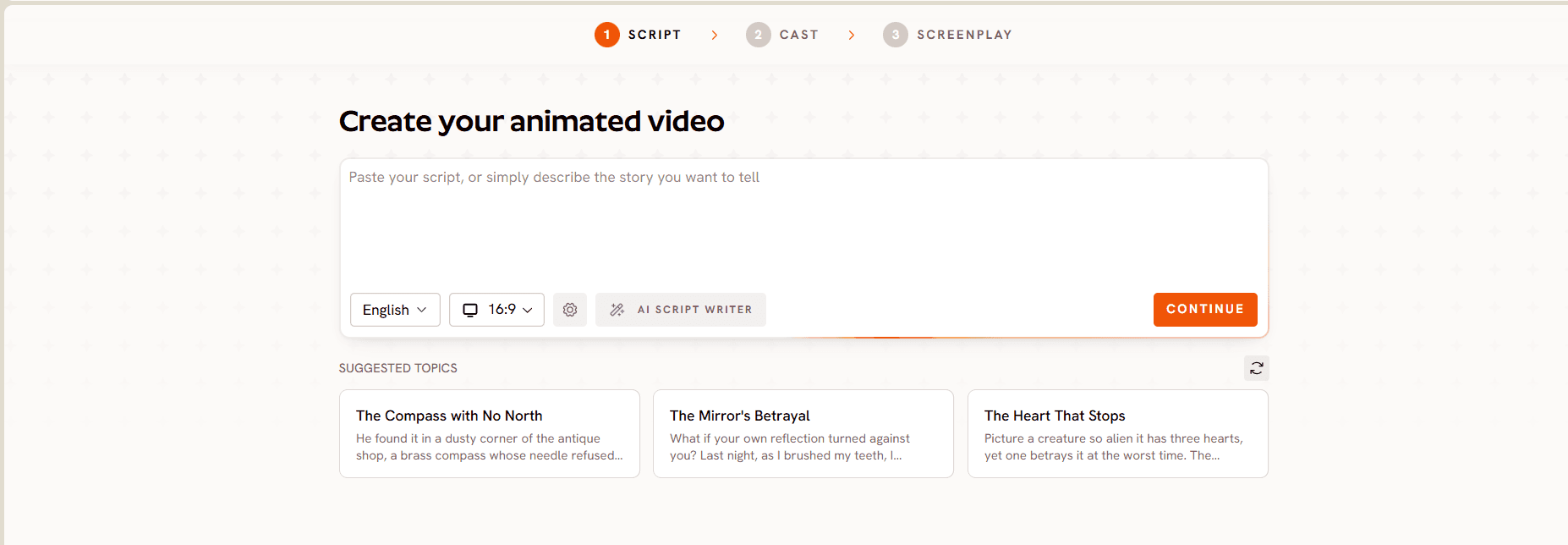
Open the Animated Video workflow and paste the kids story, rhyme or lesson exactly as it was written. If there is only an idea, the built in AI Script Writer expands a sentence or two into a full scene by scene script for a young audience. A language selector sits on the same screen, so a counting song written in English can be produced for a Hindi or Spanish channel without rewriting anything. Where Canva starts from a template, Atlabs starts from the story.
Step 2: Cast
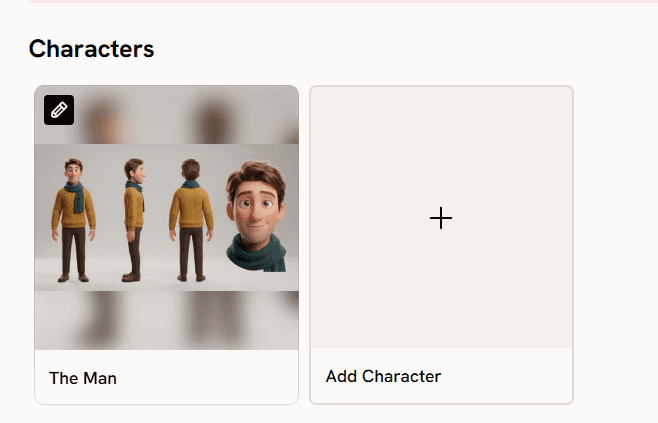
This is the step with no Canva equivalent. A Narrator section sets a country accent and a narrator voice from a library of more than 300 voices. A Characters section shows a card for every character found in the script. Cast a character once and their face, outfit and proportions are locked, so the same fox appears identically in scene two and scene twenty, and again in next week's episode. Creators with an existing mascot can upload their own cast instead of generating a new one, which keeps a channel's branding intact through the switch. An Objects section handles recurring props, the red balloon or the magic pencil, so they look the same every time they appear.
Step 3: Screenplay
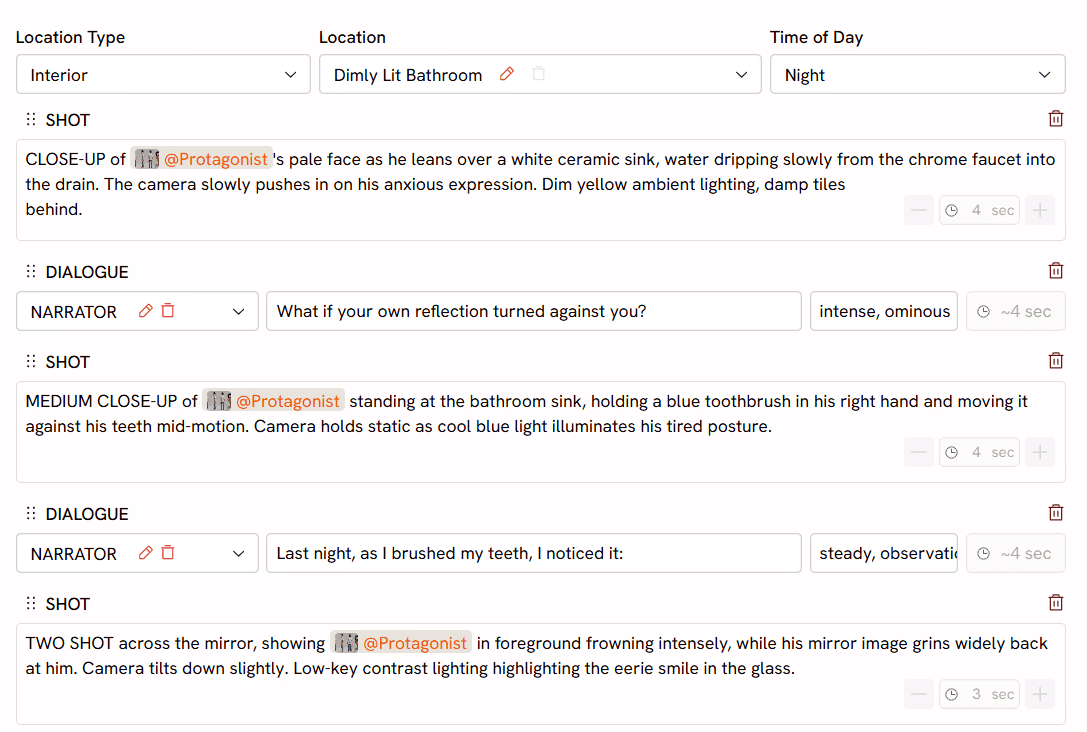
The screenplay step lays the story out scene by scene before generation, so the creator directs the video rather than hoping a prompt lands. Each scene carries its own visual direction, and dialogue is lip synced automatically. For educational content Atlabs can make only the teaching character lip sync while the rest of the class stays quiet, or let the whole room sing along for a group song. Atlabs cuts on the beat and adds motion graphics as it generates, so there is no post production pass afterwards. After the video is generated, any single scene can be regenerated, retimed or given a new voice without touching the rest.
Pricing
Pricing starts free, with paid plans from $15 per month. Atlabs holds a Trustpilot rating of 4.5 out of 5, and every plan includes commercial use.
Verdict: For a kids channel the problem is never a single scene, it is thirty scenes that need to look like one show. Atlabs is the only tool on this list that starts from a script, casts characters once, directs the story scene by scene, adds voices, lip sync and subtitles, and returns a full episode. That is precisely the part of the job Canva was never built for.
2. Runway – Best for Single High Quality Animated Shots
Best For: Kids creators with editing experience who want maximum control over one shot at a time and are comfortable assembling a longer video elsewhere.
Key Features
Gen 4.5 Generation and Control Tools
Runway is the most established name in AI video and the closest thing here to professional creative software. Gen 4.5 produces clean, coherent motion, and tools such as motion brush and director style camera control give a creator precise say over how a scene moves. An animated intro sequence for a kids channel, generated once and reused every episode, is a strong fit.
Multi Model Access
Paid plans include third party models such as Veo 3.1, Kling 3.0 Pro and Seedance 2.0 inside the same subscription, along with watermark removal.
Reference Image Consistency
Characters can be steered with reference images, which helps over a handful of clips but does not replace a cast system across a full episode.
Pricing
Free trial credits, then low cost entry tiers, with higher plans priced by credit volume. Retries consume credits whether or not the result is kept.
Verdict: Pick Runway when the video is a few beautifully controlled shots. For a weekly kids series with recurring characters, most of the time goes into stitching and re prompting rather than storytelling.
3. Pika – Best for Fast, Playful Social Clips
Best For: Kids creators making Shorts, Reels and TikTok clips who want quick, funny, effects led visuals on a small budget.
Key Features
Prompt to Clip in Seconds
Describe a scene and Pika returns a short animated clip, usually in under ninety seconds, in 3D animated, anime or illustrated styles that all suit young audiences.
Pikaffects
Effects such as melt, inflate and explode are unique to Pika and land well in a feed. A dinosaur that inflates like a balloon is exactly the kind of clip a kids Shorts channel can build around.
Image to Video
Upload a character illustration and Pika animates it, which is handy for creators who already have a mascot drawn elsewhere.
Pricing
Free tier with 80 credits a month at 480p with a watermark, then Standard from $8 per month, billed yearly.
Verdict: Pika is the cheapest and quickest way to make a short animated clip, and a good companion for social teasers. It has no cast system, no voices and no subtitle layer, so it does not replace a tool that builds a full kids story.
Make Your Kids Animated Video with Atlabs
4. Kling AI – Best Motion Quality for Action Heavy Kids Scenes
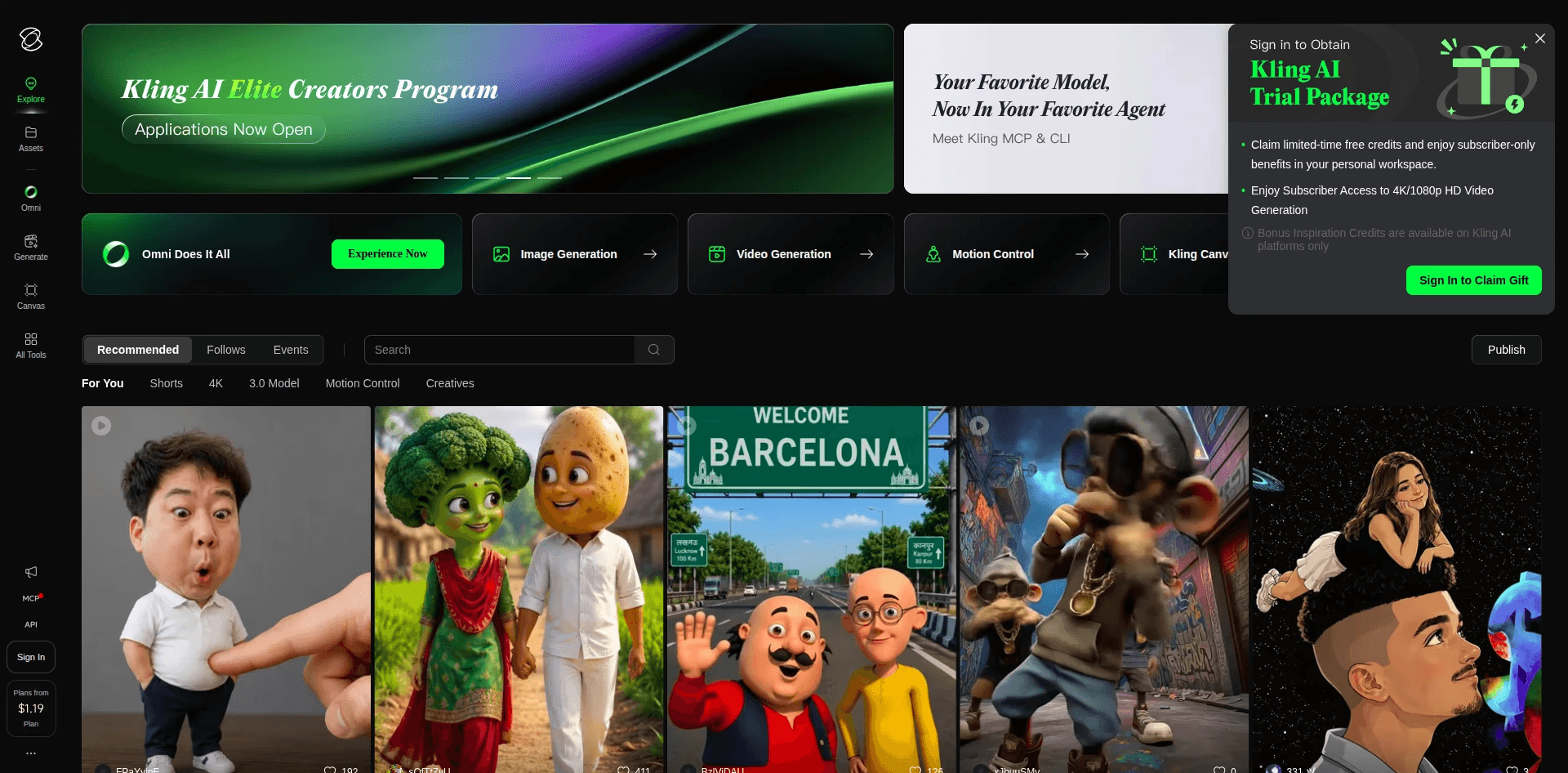
Best For: Kids creators whose stories lean on movement, a race, a dance, a chase through the jungle, and who are happy to edit the pieces together elsewhere.
Key Features
Physics and Character Motion
Kling, built by Kuaishou, is the motion specialist of the group. Characters run, jump and tumble believably, which pays off in action driven kids scenes where other generators stiffen up.
Longer Takes and Native Audio
Kling 3.0 added longer single takes and native audio generation on newer models, with 4K output available at a higher credit rate.
Generous Free Tier
Free credits refresh daily rather than arriving as a one time trial, which makes it the easiest tool here to test before paying.
Pricing
Free daily credits, then low cost entry tiers, with Pro and Premier plans priced by credit volume. Unused credits expire at the end of each month.
Verdict: Pick Kling when raw motion quality per dollar matters most. It is a generation engine rather than a studio, so the assembly, voices and character consistency across an episode still fall to the creator.
5. Animaker – Best for Hand Built 2D Cartoon Characters
Best For: Kids creators who want to design a custom 2D mascot and animate it manually with frame level control, and who have the time to build every scene by hand.
Key Features
Character Builder
Combine hair, expressions, clothing and accessories from Animaker's library to create a unique character, then save it for reuse across every video. For a channel with a recognisable mascot this is a real strength.
Auto Lip Sync
Upload a voiceover or use built in text to speech, and mouth movement matches the audio automatically. Singing characters are one of the better implementations at this price point.
Action+
Chain animation sequences so a character walks, stops and waves in one smooth flow, useful for longer narrative scenes.
Pricing
Paid only, with plans starting around $19 per month.
Verdict: Animaker gives manual control that no generative tool matches, but every scene is built by hand and there is no script driven generation, so a single kids episode takes hours rather than minutes. It is closer to Canva's workflow than to an AI animation studio. For tools that generate the animation for you, see the best AI animated video tools that are free to start.
Try the Atlabs Animated Video Workflow
How to Migrate a Kids Channel from Canva to Atlabs
Moving over does not mean starting from nothing. Take the story, rhyme or lesson script already written, whether it lives in Canva's Magic Write, a Google Doc or a notebook, and paste it into the Script step of the Animated Video workflow. Next, cast each recurring character once in the Cast step, using the same names and descriptions the audience already knows, or upload the existing mascot artwork so the channel's look carries across. Then pick a visual style and aspect ratio that match where the video is headed, 16:9 for YouTube uploads or 9:16 for Shorts. Finally, review the screenplay scene by scene, generate the full video, and fix any single scene in the editor before publishing. Canva can stay in the stack for thumbnails, channel banners and end screens. It simply no longer has to carry the animation.
Watch the Atlabs Animated Video Tutorial (Step by Step)
For creators who would rather watch than read, the Atlabs tutorial library walks through building an animated video from a blank script to a finished export, including casting characters, choosing a visual style and editing individual scenes. Open a project in a second tab and copy each move as it happens.
Final Verdict
For most kids creators the frustration with Canva is the same: the story exists, and the animated video does not. Runway and Kling produce excellent individual shots, Pika produces quick social clips, and Animaker offers manual control over a hand built character, but each one leaves the assembly, the voices and the consistency problem with the creator. Atlabs is the only tool on this list that starts from a script, locks the cast, directs the screenplay scene by scene, and returns a full animated episode with voices, lip sync and subtitles. For a kids channel that has to ship every week, that removes the biggest bottleneck without asking anyone to learn animation.
Start Creating with Atlabs – Free to Start
Frequently Asked Questions
Is Canva good for making kids animated videos?
Canva works well for thumbnails, channel art and quick template edits, but it was not built to read a kids story and generate animated scenes from it. Its AI clips run short and have to be stitched by hand, and there is no cast system to keep a character looking the same across a longer video.
What is the best free Canva alternative for kids animated videos?
Atlabs, Pika and Kling AI all offer a free starting point. Atlabs starts free with access to the full Animated Video workflow, which makes it the most complete free entry option for a script driven kids video with consistent characters.
Can I keep the same characters across every episode of my kids channel?
Yes. In the Atlabs Cast step each character is defined once and reused in every scene and every episode. Creators can also upload their own existing mascot so the channel's look carries over from Canva unchanged.
Do I need animation or editing skills to switch from Canva to Atlabs?
No. The Animated Video workflow is three steps, Script, Cast and Screenplay, and Atlabs handles generation, lip sync, subtitles and beat matched cuts. Any single scene can be edited afterwards without rebuilding the video.
Which Canva alternative works best for a kids YouTube channel?
Atlabs is the strongest fit for a kids YouTube channel. It supports 16:9 for standard uploads and 9:16 for Shorts, offers kids appropriate styles such as 3D Cartoon and Cozy Plush, and produces full length episodes rather than clips.








