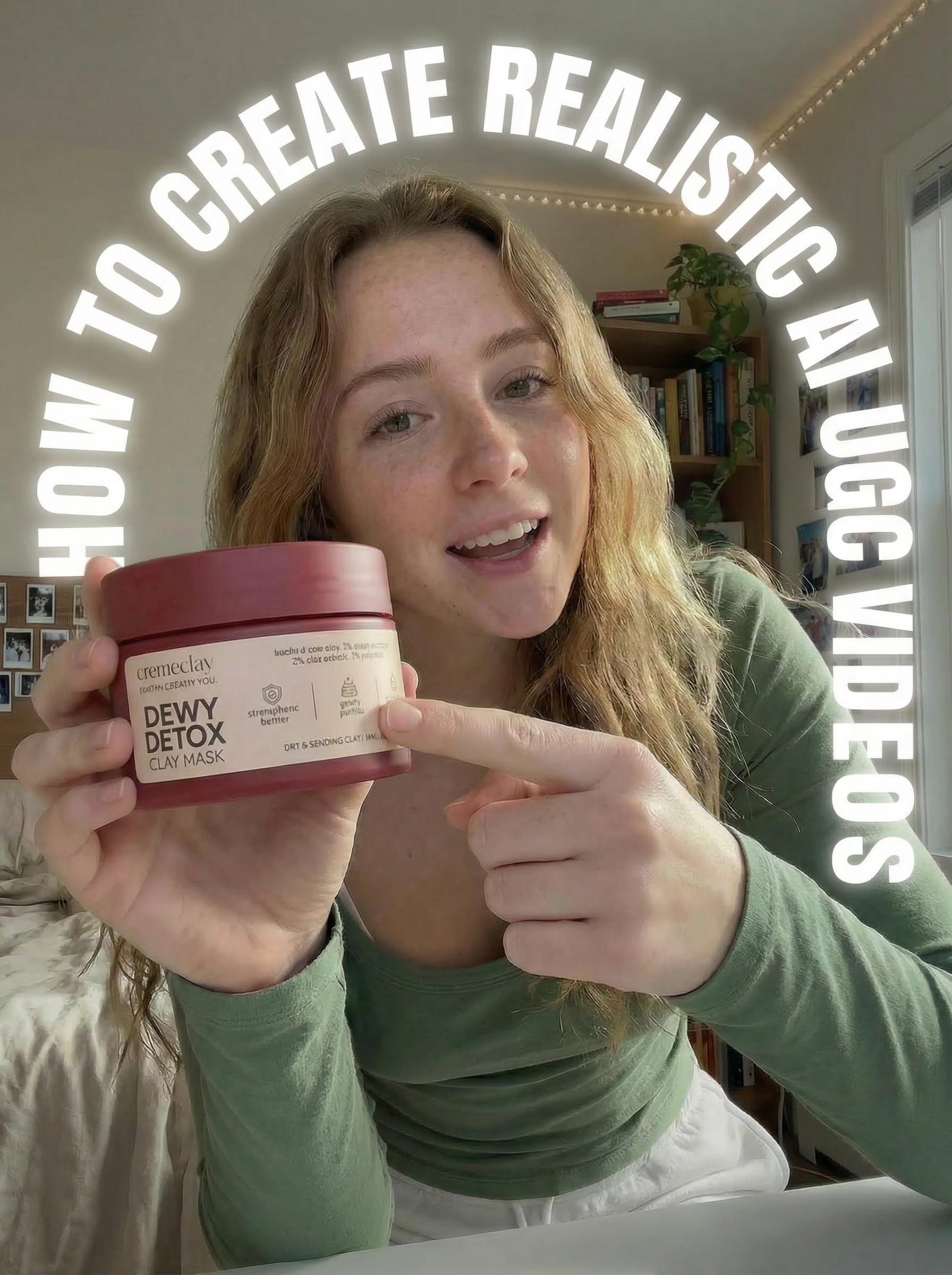
TL;DR
Learn the exact workflow to create realistic, long-form AI UGC (User Generated Content) videos that avoid the "uncanny valley." This complete tutorial uses Atlabs AI's Nanobanana Pro + Veo 3.1 to generate authentic-looking product videos with consistent characters, natural dialogue, and seamless transitions up to 90+ seconds.
The UGC Revolution (And Its Bottleneck)
User Generated Content (UGC) is the most trusted form of advertising.
According to recent studies:
79% of consumers trust UGC more than brand content
UGC drives 5x higher engagement than brand-created content
Conversion rates increase by 161% when consumers interact with UGC
But there's a massive problem:
The Traditional UGC Process Is Broken
Step | Time | Cost | Pain Point |
|---|---|---|---|
1. Find creators | 3-7 days | $50-200 | Inconsistent quality |
2. Ship products | 5-10 days | $20-50 | International delays |
3. Wait for footage | 7-14 days | - | No creative control |
4. Request edits | 3-7 days | $100+ | Limited revisions |
Total | 3-5 weeks | $170-350 | Per creator |
What if you need 50 different product variations? Or test 10 different angles? Or localize for 5 different markets?
The math becomes impossible.
The AI UGC Promise (And Why It Failed Until Now)
The dream of automated UGC has existed for years. But early attempts faced critical failures:
The "Uncanny Valley" Problem
What went wrong with early AI UGC:
❌ Short Duration: Videos capped at 10-12 seconds (unusable for storytelling)
❌ Character Morphing: Faces changed between clips, breaking continuity
❌ Robotic Aesthetics: Over-smoothed skin and unnatural movements screamed "AI"
❌ No Product Control: Impossible to make AI hold specific branded items
❌ Generic Voices: No regional accents or personality
❌ Stiff Movement: Unrealistic body language and facial expressions
The result? Viewers instantly recognized AI content and scrolled past.
The Breakthrough: The First Frame / Last Frame Method
The solution isn't a magic button it's a specific workflow.
By combining Atlabs AI's Nanobanana Pro (image generation) with Veo 3.1 (video generation), you can create long-form, narrative-driven UGC that feels genuinely real.
The Secret Sauce: Two Critical Techniques
1. "Everyday Imperfections" Prompting
Instead of prompting for perfection, you deliberately ask for messy rooms, mixed lighting, minor skin texture, casual clothing wrinkles,the visual markers of authentic amateur content.
2. First Frame / Last Frame Generation
By defining both the start and end of your video, you force the AI to follow a strict path, preventing character morphing and ensuring consistency.
What You'll Learn
✓ How to create hyper-realistic character images that avoid the "AI look"
✓ The First Frame / Last Frame technique for character consistency
✓ Exact prompts for natural dialogue with regional accents
✓ How to seamlessly integrate branded products
✓ Chaining clips for 30-90 second long-form videos
✓ Advanced techniques for emotive body language and facial expressions
The Complete Workflow: 4 Essential Steps
Step 1: Character Design (The Hero Shot)
Step 2: Product Integration (The Variation Shot)
Step 3: Video Generation (The Bridge)
Step 4: Long-Form Extension (The Chain)
Step 1: Character Design (The Hero Shot)
Tool: Nano banana Pro (via Atlabs AI)
The foundation of a realistic video is a hyper-realistic starting image. You aren't just generating a person—you're designing a character, a location, and a vibe.
Why Generic Prompts Fail
❌ Generic: "A young woman holding coffee"
✅ Realistic: "A young woman with freckles in a messy bedroom, holding Starbucks coffee, rumpled bedding, string lights, natural iPhone lighting"
The difference? Specificity creates authenticity.
The Anatomy of Authentic UGC Imagery
Essential Elements for Realism:
Element | Purpose | Example |
|---|---|---|
Imperfect Setting | Prevents sterile "studio look" | Rumpled bedding, cluttered bookshelf |
Natural Lighting | Mimics iPhone/smartphone quality | "Natural bright light," not "professional studio" |
Skin Texture | Avoids over-smoothing | Freckles, slight blemishes, natural pores |
Clothing Details | Adds lived-in realism | Wrinkled fabric, visible bra strap, casual wear |
Camera Angle | Matches UGC conventions | Low angle (phone propped on desk) |
Environmental Clues | Creates authentic backstory | Personal photos on wall, plush toys, books |
The Complete Character Prompt
Copy-Paste This Into Atlabs AI (Nanobanana Pro):
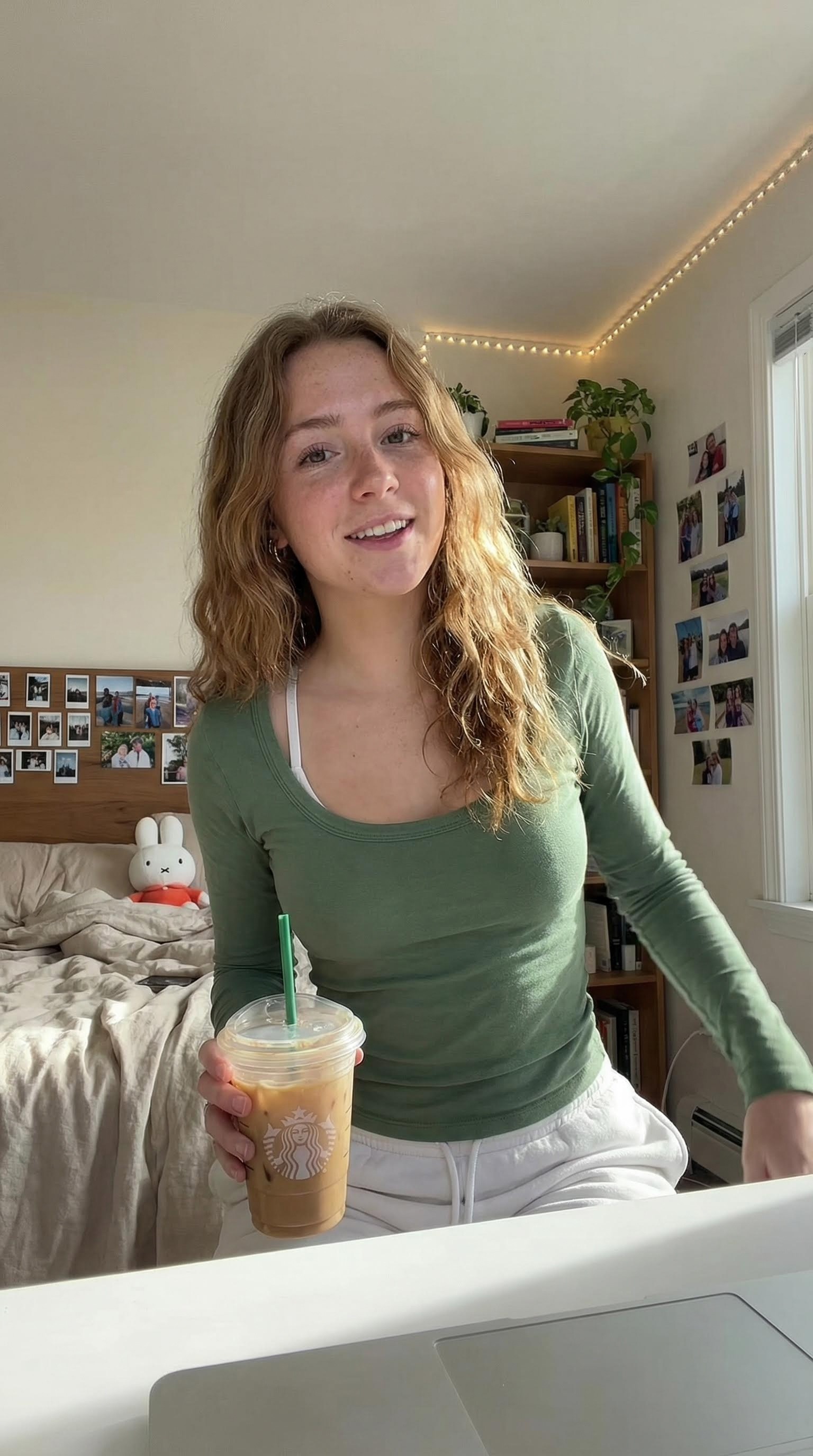
Breaking Down The Prompt Strategy
Why each element matters:
"Light brown hair and freckles"
→ Creates distinctive, memorable features that AI can maintain consistency with
"Starbucks iced coffee...green straw"
→ Specific brand details make the scene feel real and lived-in
"Rumpled beige bedding"
→ Imperfection signals authenticity, not staged photography
"iPhone UGC style photo"
→ Triggers AI's understanding of amateur smartphone photography aesthetic
"Low angle shot...camera propped up on her desk"
→ Matches actual TikTok/Instagram filming setups
"Photos stuck to wall in random layout, not organized"
→ Deliberately imperfect = believably real
"One bra strap visible"
→ Casual, unposed detail that signals authentic at-home content
"Miffy plush toy on bed"
→ Specific branded item adds personality and GenZ authenticity
Technical Tips for This Step
Recommended Settings in Atlabs:
Model: Nanobanana Pro
Aspect Ratio: 9:16 (vertical, TikTok/Instagram Reels format)
Style: Photorealistic
Quality: High (for maximum skin texture detail)
Pro Tip: Generate 3-4 variations and pick the one with the most natural facial expression. You'll use this as your "Start Frame."
Step 2: Product Integration (The Variation Shot)
Tool: Nanobanana Pro (via Atlabs AI)
To create a video where your character performs a specific action (like showing off a product), you need to define the End Frame.
This step generates a second image that maintains character consistency while introducing your branded product.
Why This Step Is Critical
Without a defined end frame:
The AI will randomly decide where the video goes
Character features may shift or morph
Product placement becomes unpredictable
Continuity breaks, destroying realism
By defining both start AND end, you create guardrails for perfect consistency.
The Product Integration Workflow
1. Upload Your Product Image
Before writing your variation prompt, upload a clean product photo:
White or transparent background
Multiple angles if possible
High resolution (minimum 1024x1024)
Save as
[image2]in Atlabs
2. Reference Your Character Image
Your generated image from Step 1 = [image1]
3. Use the Variation/Edit Feature
In Atlabs AI, select your [image1] and choose "Edit" or "Create Variation"
The Complete Variation Prompt
Copy-Paste This Into Atlabs AI:
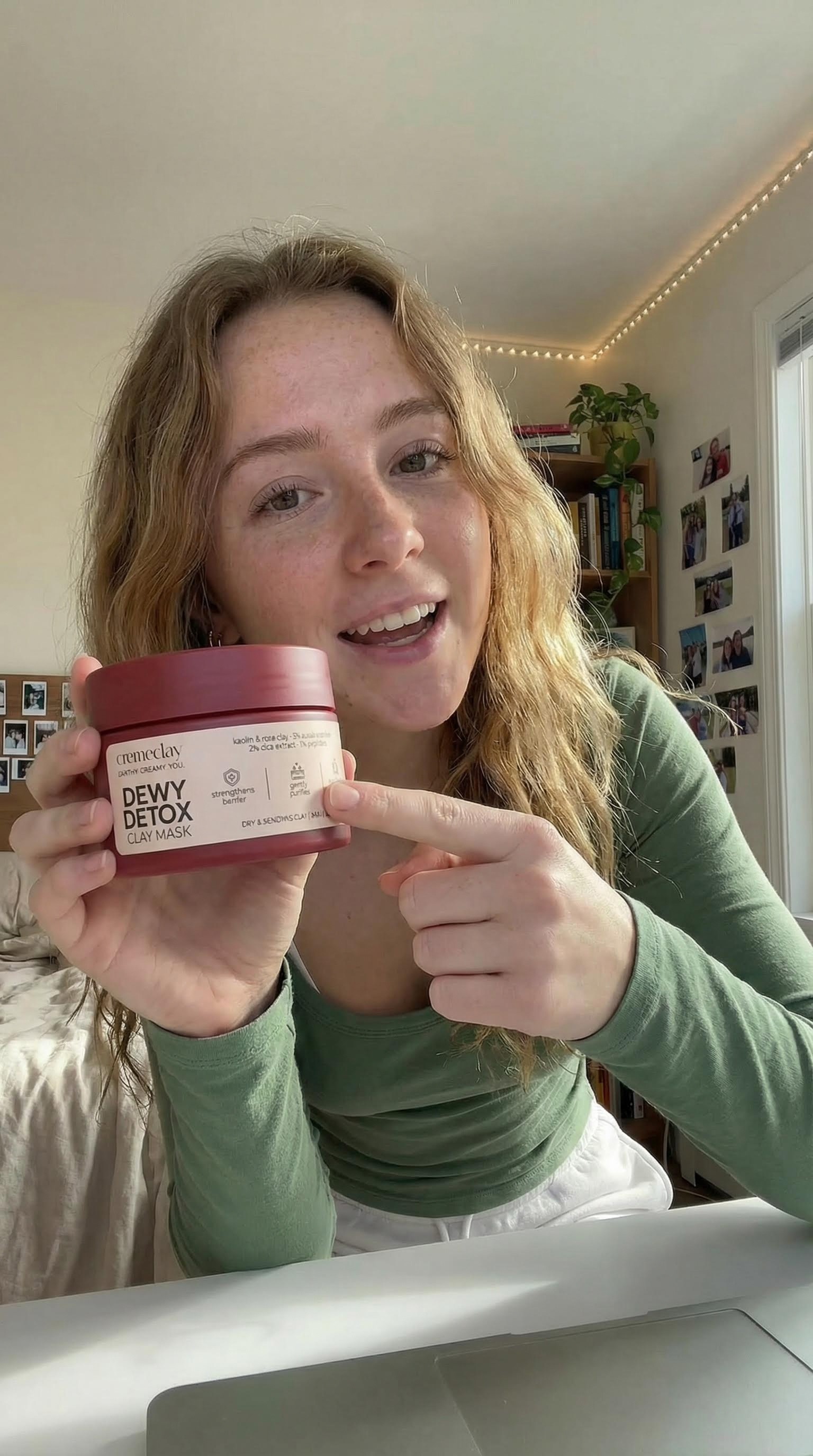
Customize for your product:
Replace "toothpaste" with your product name
Adjust which hand holds what based on your needs
Modify the action ("pointing," "showing the label," "applying," etc.)
Understanding the Variation Strategy
What stays the same:
Character's face and features
Hair color and style
Clothing and accessories
Background environment
Lighting conditions
Camera angle and position
What changes:
Coffee → Product
Hand position (natural transition)
Body language (leaning in = engagement)
Why this works: The AI maintains all core visual elements while only changing the specified details, ensuring seamless transition potential.
Advanced Product Integration Tips
For Different Product Types:
Skincare/Beauty:
Food/Beverage:
Tech/Gadgets:
Fashion/Accessories:
Step 3: Video Generation (The Bridge)
Tool: Veo 3.1 (via Atlabs AI)
Now comes the magic. We'll use Veo 3.1 to bridge the gap between your "Coffee Image" (Start Frame) and your "Product Image" (End Frame).
This First Frame / Last Frame technique forces the AI to maintain strict visual continuity while animating natural movement and dialogue.
Why First Frame / Last Frame Changes Everything
Traditional AI Video Generation:
Result: Unpredictable, inconsistent, often unusable
First Frame / Last Frame Method:
Result: Predictable, consistent, professional quality
The AI must create a logical visual path from Point A to Point B, preventing morphing and maintaining character integrity.
The Complete Video Generation Workflow
1. Navigate to Veo 3.1 in Atlabs
Dashboard → Video → Veo 3.1
2. Upload Your Frames
Start Frame: Upload result from Step 1 (coffee image)
End Frame: Upload result from Step 2 (product image)
3. Set Duration
Recommended: 5-8 seconds for this clip
Minimum: 3 seconds (too short feels rushed)
Maximum: 10 seconds (too long risks consistency issues)
The Master Dialogue Prompt
Copy-Paste This Into Veo 3.1:
The girl is filming a UGC style TikTok, talking naturally as if she is speaking to her close friends on social media. She is 21 years old, subtle American accent, and is talking excitedly as if she is gossiping with her friends. Very emotive body language and facial expressions. She says "okay I'm just gonna say it... I'm an AI UGC actress! which still feels weird to say out loud, but yeah... I can literally hold, like, any product you want." She says this with lots of facial expressions, whilst putting the coffee out of shot, and picking up the cream tube that was out of shot. Her mannerisms are that of an excited 21 year old girl, she occasionally covers her mouth, and rolls her eyes when she talks too. No cuts in the video. One long continuous video. She maintains eye contact with the camera as she says this, with excitement. She uses filler words to sound more natural.
Customizing the Dialogue for Your Product
The Template Structure:
Example 1: Skincare Product
The girl is filming a UGC style TikTok, talking naturally to her followers. She is 23 years old, slight British accent, speaking enthusiastically about her skincare routine. Very natural body language and facial expressions. She says "Okay so I know I'm late to this but like... this cream literally changed my skin? I was so skeptical at first but after using it for two weeks... just look at this glow!" She says this while putting the coffee down and picking up the serum bottle, examining it with genuine excitement. Her mannerisms are authentic and relatable, she touches her face to show her skin, makes "wow" expressions, and uses filler words like "literally" and "like" to sound natural. No cuts. One continuous take. Maintains camera eye contact.
Example 2: Food/Snack Product
The girl is filming a casual TikTok review, talking to viewers like friends. She is 20 years old, American accent, speaking excitedly about trying new snacks. Very animated facial expressions and hand gestures. She says "Wait, okay so I need to tell you about these protein bars because I'm actually obsessed? Like I've tried so many and they all taste like cardboard but THESE... game changer." She says this while setting down her coffee and unwrapping the protein bar, taking a small bite with an expression of pleasant surprise. Her mannerisms are energetic and genuine, she covers her mouth while chewing, widens her eyes in surprise, uses hand gestures for emphasis. No cuts. Continuous video. Natural eye contact with camera.
The Psychology of Natural Dialogue
Why this prompt structure works:
"Talking naturally as if speaking to close friends"
→ Triggers conversational, not scripted, speech patterns
"Subtle American accent" (or British, Australian, etc.)
→ Adds regional authenticity and personality
"Excited...as if gossiping"
→ Creates genuine emotional energy, not robotic delivery
"Very emotive body language and facial expressions"
→ Prevents stiff, unnatural movement
"Occasionally covers her mouth, rolls her eyes"
→ Specific micro-expressions that signal authenticity
"Uses filler words to sound more natural"
→ "Like," "literally," "um" make speech believable
"No cuts in the video. One long continuous video."
→ Prevents jarring transitions, maintains realism
"Maintains eye contact with the camera"
→ Creates connection with viewer, standard UGC technique
Advanced Dialogue Techniques
For Different Tones:
Excited Discovery:
Skeptical Conversion:
Expert Recommendation:
Personal Story:
Step 4: Long-Form Extension (The Chain)
The true power of Atlabs AI is the ability to chain these clips together into seamless, long-form content.
The Chaining Method
How to extend beyond 8 seconds:
The Step-by-Step Chaining Process
1. Extract the Last Frame
After generating your first video (Step 3):
Download the video
Extract the final frame as a still image
This becomes your new "Start Frame"
2. Create the Next End Frame
In Nanobanana Pro, generate the next action:
Keep the character from [image1] the same, but now she is applying the cream to her cheek, smiling at the camera with anticipation.
3. Generate the Next Video Segment
In Veo 3.1:
Start Frame: Last frame from previous clip
End Frame: New application image
Prompt: Next dialogue segment
She continues talking enthusiastically: "And the best part? It actually tastes good, which like... never happens with natural toothpaste, right?" She demonstrates by applying it to her toothbrush, showing the camera the minty paste with an approving nod.
4. Repeat for Extended Length
Continue this loop:
Clip 3: Application → Brushing
Clip 4: Brushing → Reaction
Clip 5: Reaction → Call-to-action
Sample 60-Second UGC Sequence
Clip 1 (0:00-0:08) - Introduction
Clip 2 (0:08-0:16) - Product Features
Clip 3 (0:16-0:24) - Application
Clip 4 (0:24-0:32) - Demonstration
Clip 5 (0:32-0:40) - Results
Clip 6 (0:40-0:48) - Social Proof
Total Duration: 48 seconds of seamless UGC
Advanced Techniques for Pro-Level Results
Technique 1: Film Stock References
Add cinematic quality by referencing specific film stocks:
Technique 2: Multiple Camera Angles
Create dynamic sequences by varying angles across clips:
Clip 1: Low angle (phone on desk)
Clip 2: Eye level (phone held out)
Clip 3: Slight high angle (phone above)
Technique 3: Emotional Arc
Structure your sequence with a clear emotional progression:
Technique 4: Regional Customization
Create localized versions for different markets:
US Market:
UK Market:
Australian Market:
Common Mistakes to Avoid
Mistake #1: Over-Polished Settings
❌ Wrong: "Professional studio, perfect lighting, flawless makeup"
✅ Right: "Bedroom with natural light, casual setting, lived-in space"
Why it matters: Perfection screams "ad," not authentic UGC.
Mistake #2: Scripted Dialogue
❌ Wrong: "This product features advanced whitening technology with natural ingredients"
✅ Right: "Okay so this actually whitens your teeth AND it's all natural? Like how is that even possible"
Why it matters: UGC should sound like a friend talking, not a commercial.
Mistake #3: Skipping the End Frame
❌ Wrong: Only defining start frame, letting AI decide the ending
✅ Right: Defining both start and end frames for controlled path
Why it matters: Without an end frame, consistency breaks down rapidly.
Mistake #4: Static Body Language
❌ Wrong: "She stands still and talks about the product"
✅ Right: "She gestures with her hands, leans in, covers her mouth when surprised, uses natural movements"
Why it matters: Movement creates authenticity—real people don't freeze.
Mistake #5: Generic Products
❌ Wrong: "A toothpaste tube"
✅ Right: Upload actual product image with branding visible
Why it matters: Brand recognition requires specific, accurate product rendering.
Frequently Asked Questions
How long can I make the final video?
Using the chaining method, you can create videos of 30-90+ seconds. Beyond 90 seconds, consider breaking into multiple scenes or using different characters to maintain viewer engagement.
Can I use real brand products?
Yes! Upload actual product photos as reference images. The AI will render them accurately. For commercial use, ensure you have rights to represent the brand.
How do I avoid the "AI look"?
Five critical factors:
Prompt for imperfections (freckles, wrinkles, messy backgrounds)
Reference authentic media ("iPhone UGC style," "TikTok aesthetic")
Use specific film stocks ("Kodak Portra 400")
Add natural light (not "professional studio lighting")
Include filler words in dialogue ("like," "literally," "um")
Can I change the character's appearance?
Absolutely! Modify the base prompt in Step 1:
Different ethnicities: "Asian woman," "Black woman," "Hispanic woman"
Different ages: "19 years old," "25 years old," "30 years old"
Different styles: "athletic," "bohemian," "professional"
How do I add my own voiceover?
Generate the video with dialogue prompts first (lip-sync will match). Then in post-production, you can:
Mute the AI-generated audio
Record your own voiceover
Use Atlabs' audio tools to mix
Or use the AI-generated voice as a guide track.
What if characters morph between clips?
Troubleshooting checklist:
✓ Always use First Frame / Last Frame method
✓ Keep character description identical across all prompts
✓ Avoid generating individual clips separately
✓ Extract exact last frame from previous clip as next start frame
✓ Don't change lighting or camera angle mid-sequence
Can I create male characters or multiple people?
Yes! Simply adjust Step 1 prompt:
Male character:
Multiple people:
More complex, requires careful positioning in both start and end frames to prevent morphing.
Time & Cost Breakdown
Traditional UGC Production
Task | Time | Cost |
|---|---|---|
Creator sourcing | 3-7 days | $50-200 |
Product shipping | 5-10 days | $20-50 |
Content creation | 7-14 days | - |
Revisions | 3-7 days | $100+ |
Total | 18-38 days | $170-350 |
AI UGC with Atlabs
Task | Time | Cost |
|---|---|---|
Character design | 1 minute | 2 credits |
Product integration | 1 minutes | 2 credits |
Video generation | 5 -10 minutes | 16 credits |
Chaining for long-form | 10 - 15 minutes | 64 credits |
Total | 15 - 30 minutes | ~$8 |
ROI: Create 50+ variations in the time it takes to brief one human creator.
Use Cases Beyond Product Reviews
1. Educational Content
2. Testimonials
3. Unboxing Videos
4. Comparison Content
5. Behind-the-Scenes
Quick Reference: Complete Prompt Library
Character Base Prompt
Product Variation Prompt
Video Generation Prompt
The Future Is Here: Start Creating Today
The era of robotic AI avatars is over. The "uncanny valley" has been crossed. By leveraging the specific workflow inside Atlabs AI, you can:
✓ Curate specific film aesthetics with precise prompting
✓ Direct complex acting performances with natural dialogue
✓ Maintain character consistency across long-form content
✓ Scale UGC production to hundreds of variations
✓ Test messaging without expensive creator contracts
✓ Localize content for global markets instantly
What You Get with Atlabs AI
✓ Nanobanana Pro for hyper-realistic character generation
✓ Veo 3.1 for advanced video synthesis with First Frame / Last Frame
✓ Integrated workflow from image to final video in one platform
✓ No expensive creator fees or shipping logistics
✓ Unlimited iterations to perfect your messaging
✓ Complete creative control over every frame
Ready to revolutionize your content creation?
Start Creating AI UGC on Atlabs Now – Free Trial Available
Related Tutorials
Tags: AI UGC videos, realistic AI actors, UGC content creation, Atlabs AI, Nanobanana Pro, Veo 3.1, First Frame Last Frame method, AI influencer marketing, authentic AI content, AI video generation
Author: Atlabs Team | Category: AI Video Tutorials | UGC Marketing
Pro Tips Summary
💡 Prompt for imperfections to avoid the glossy "AI look"
💡 Always use First Frame / Last Frame for character consistency
💡 Write dialogue like a friend texting not a corporate script
💡 Include filler words ("like," "literally") for natural speech
💡 Chain clips by extracting last frames for long-form content
💡 Reference film stocks (Kodak Portra 400) for cinematic quality
💡 Add specific mannerisms (covers mouth, rolls eyes) for authenticity
Create authentic AI UGC. Build trust. Scale infinitely.








