
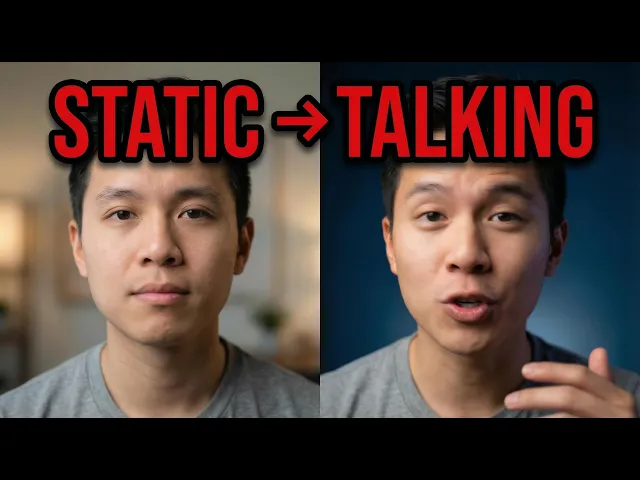
To make a lip sync music video with AI, you upload your vocal track to Atlabs, choose a Performance video type, pick a visual style and character, and the system matches an on-screen performer's mouth movements to your audio. AI lip sync reads the sound of each word, predicts the mouth shape that produces it, and animates a face frame by frame so the character looks like it is actually singing your song. No camera, no actor, and no editing timeline required.
How AI lip sync actually works
AI lip sync starts with the audio, not the picture. The model listens to your vocal track and breaks it into tiny slices of sound called phonemes, the individual units that make up speech and singing. Each phoneme has a mouth position that produces it, an open jaw for an ah, pressed lips for an m, rounded lips for an oo. The model has learned these mappings from large amounts of footage of people talking and singing.
Once it knows which sound is happening at each moment, it predicts the matching mouth shape and redraws the lower face for every frame of video. Modern systems go past the lips alone. They move the jaw, shift the cheeks, and adjust the chin so the whole lower face behaves the way a real singer's would. The result is a character whose mouth tracks your vocal line closely enough that a viewer reads it as a genuine performance rather than a puppet.
For a music video, two things make this harder than basic talking-head sync. Singing stretches vowels far longer than speech, and the timing has to stay locked to the beat across the whole clip. Atlabs handles this inside the Music Video workflow by treating your uploaded track as the master timing reference, so the mouth movement and the audio never drift apart.
What you'll need
Three things, and about ten minutes. You need a free Atlabs account, one vocal track as an mp3 or a Suno link, and a rough idea of the look you want, cinematic and moody, bright and pop, neon and urban. You do not need a camera, an actor, lip sync practice, or any editing software. If your song has clear vocals, it is ready to sync.
Watch the full video on YouTube
How to make a lip sync music video, step by step
The whole process lives in the Music Video workflow. Here is the full walkthrough from upload to finished performance video.
Step 1
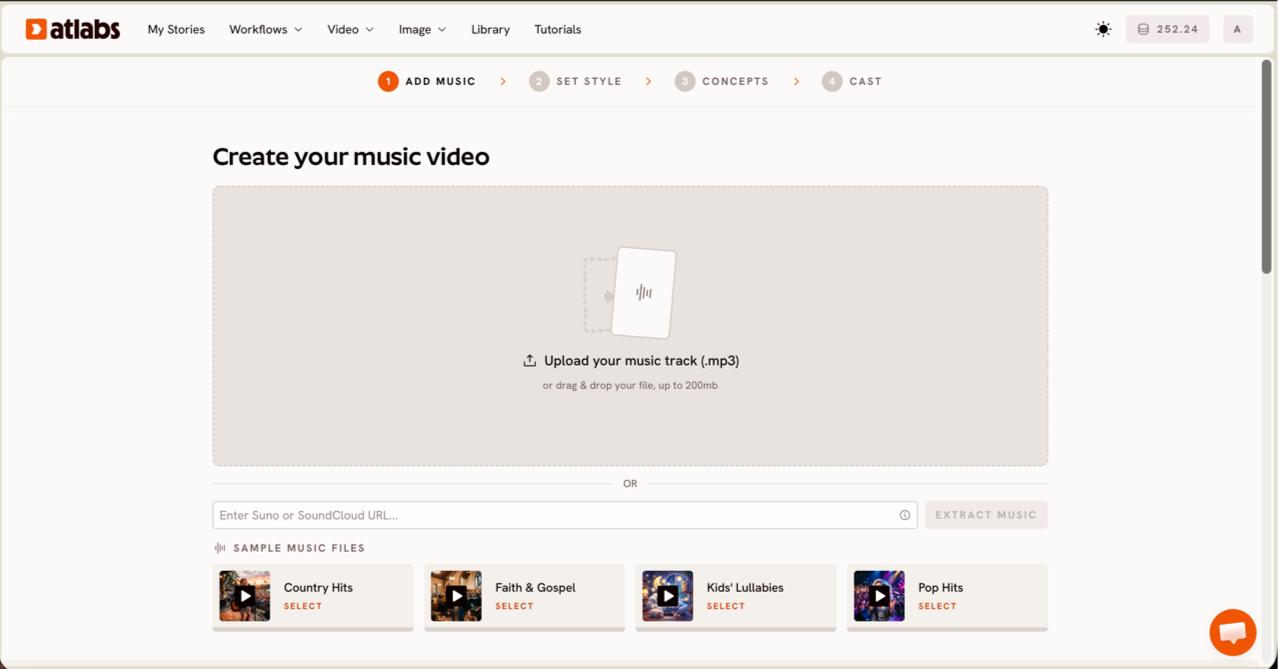
Open the Music Video workflow and upload your track. On the Add Music screen, upload an mp3 up to 200MB or paste a Suno music URL and click EXTRACT MUSIC. Atlabs auto-detects the tempo, mood, and genre of your song so the rest of the flow can match it.
Step 2
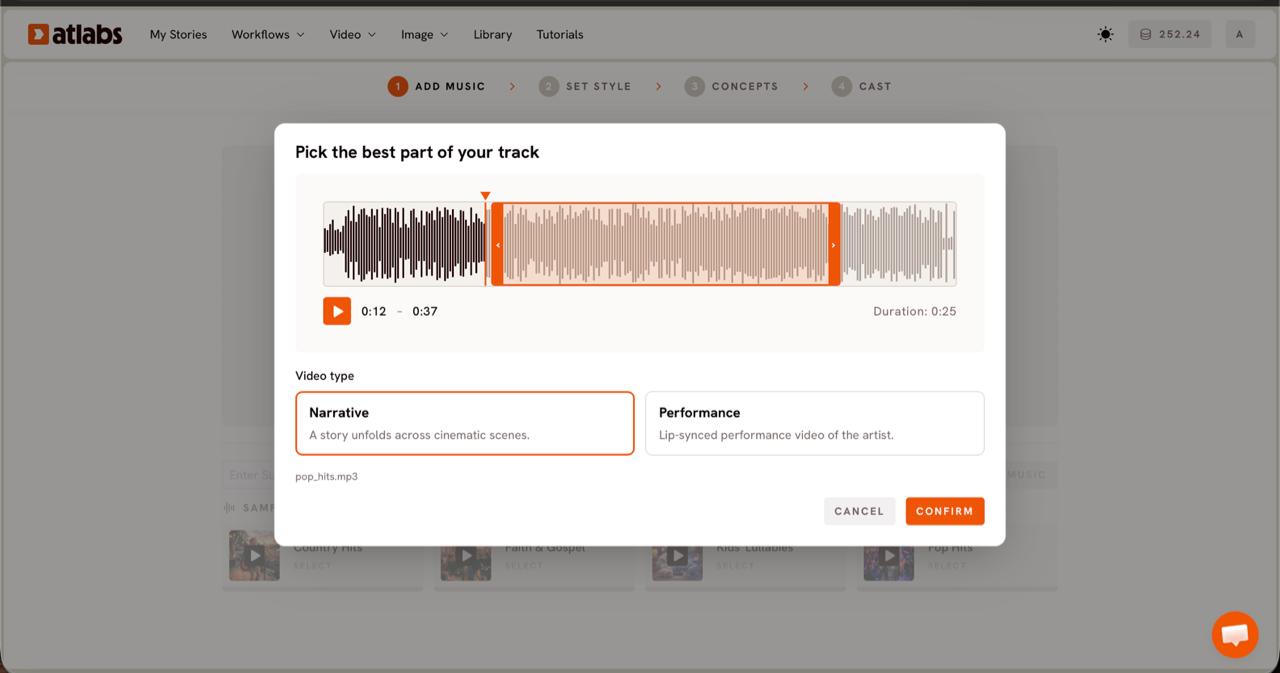
Pick your segment and choose Performance as the Video Type. The Pick the best part of your track modal opens. Drag the green selection window across the waveform to the section you want to feature, usually up to about 25 seconds. Choose Performance, the option built for a lip-synced performance video when your song has vocals and you want an artist on screen.
Step 3
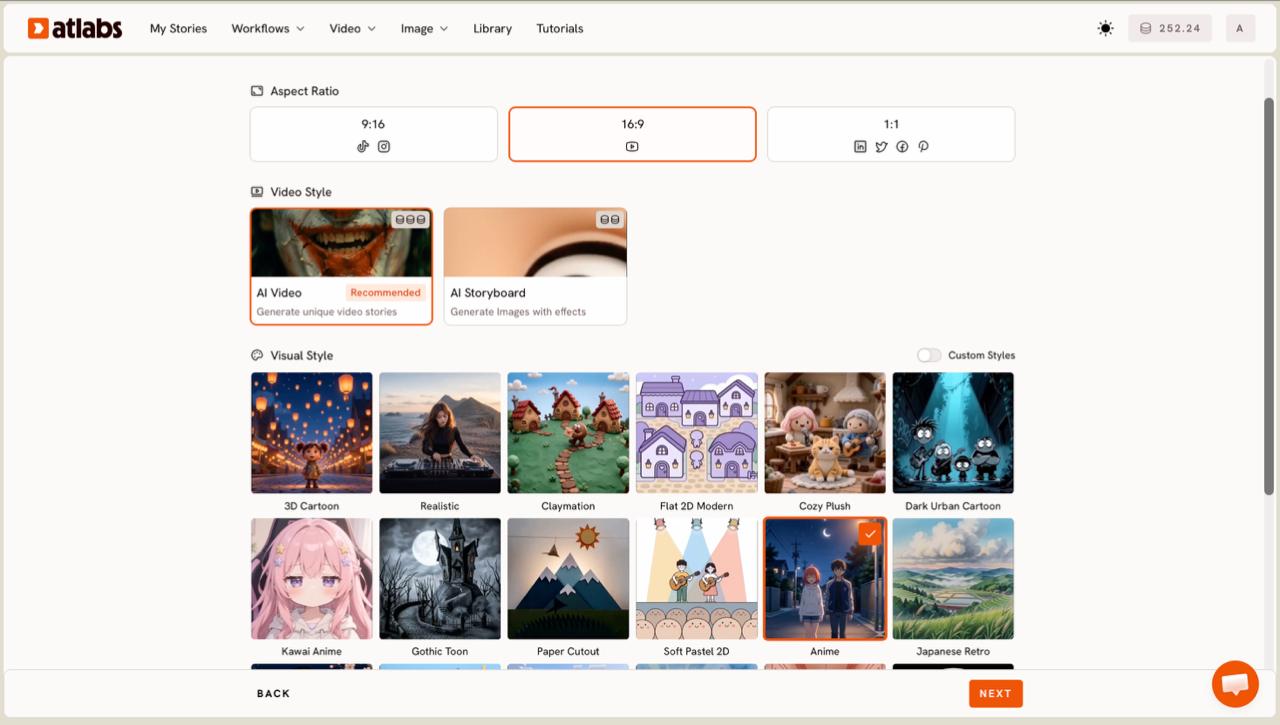
Set the style. Choose your Aspect Ratio, 9:16 for TikTok and Instagram, 16:9 for YouTube, or 1:1 for Facebook and Pinterest. Keep Video Style on AI Video for unique generated scenes, then pick a Visual Style such as Realistic for a live-action feel or Dark Urban Cartoon for a stylized look.
Step 4
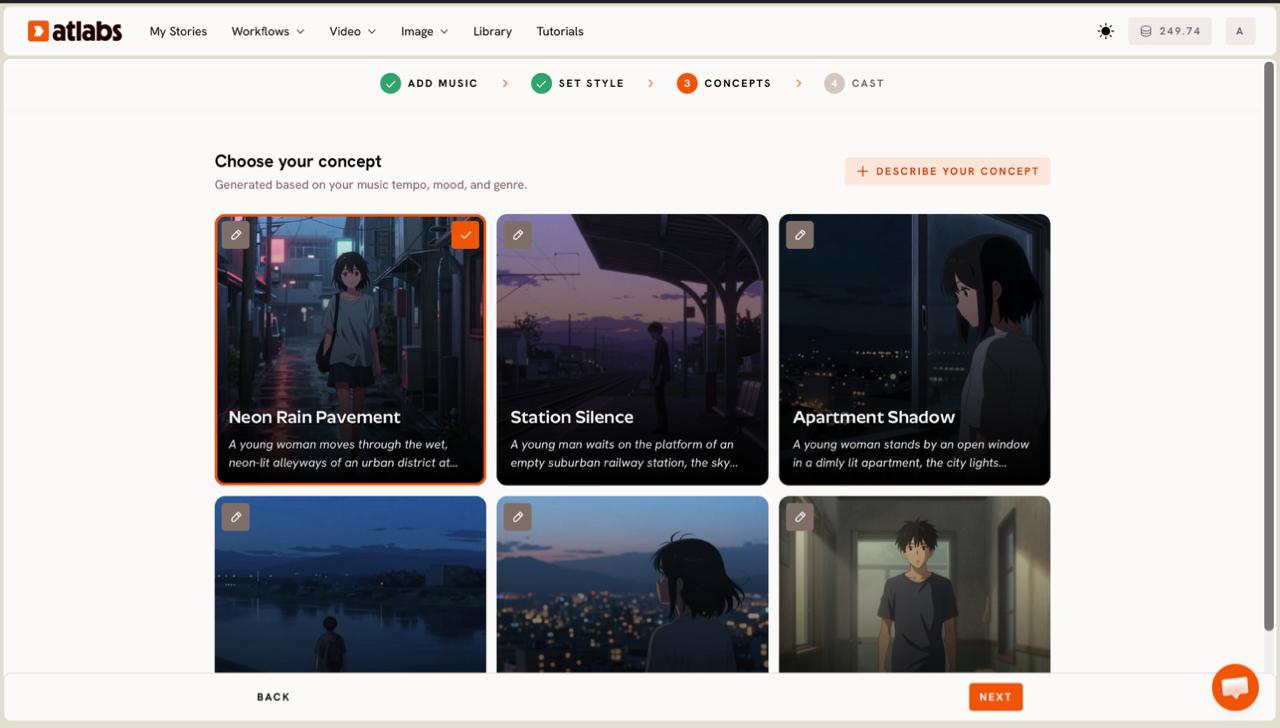
Choose your concept. Atlabs shows six scene concepts generated from your track's tempo, mood, and genre, each as a card with an edit pencil. Select the one that fits your song, or click DESCRIBE YOUR CONCEPT to write your own direction in full.
Step 5
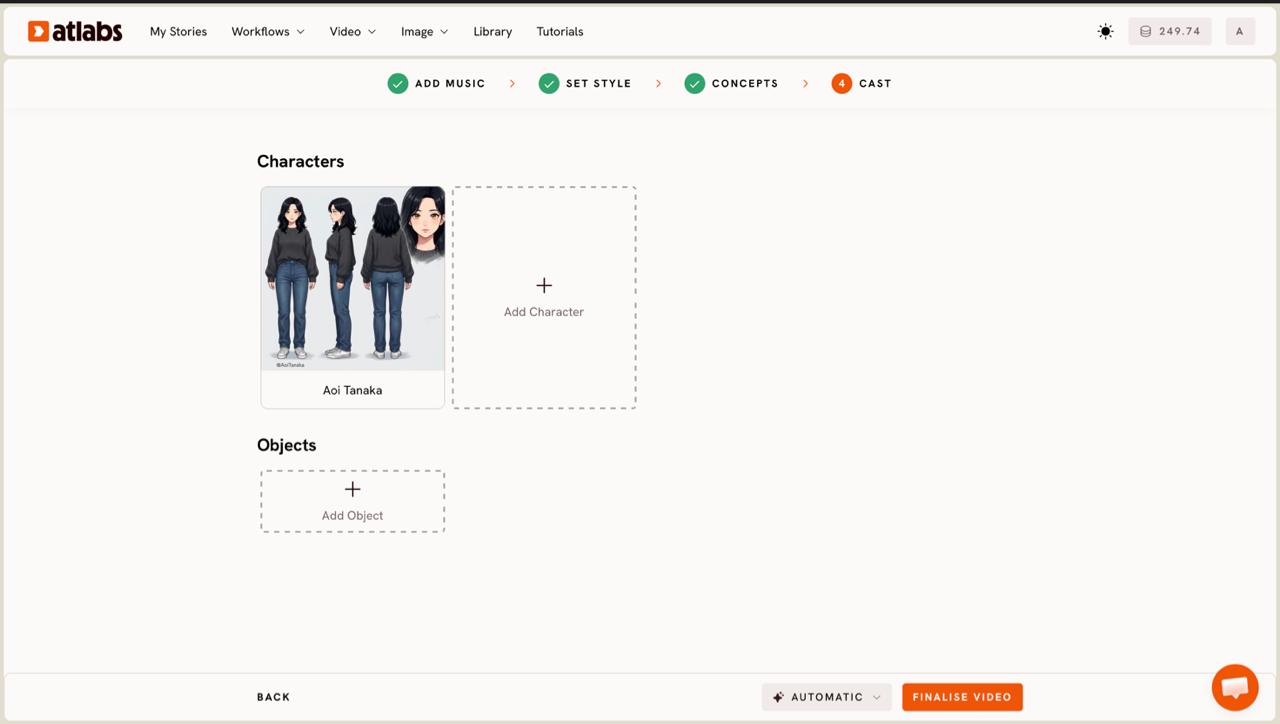
Cast your performer and generate. In the Cast step, define the character who will sing on screen. Each character card shows a generated reference sheet with multiple angles, which keeps the same face consistent across every scene. Click an empty slot to Add Character, or open Click to edit to refine the look, then generate. Atlabs builds the performance and syncs the character's mouth to your vocal track.
Tips for a cleaner lip sync
Start with a clean vocal mix. The model reads the vocal line, so a track where the voice sits clearly above the instrumental will sync tighter than one where the vocal is buried. If you have an a cappella or vocal-forward version, that is the best input. Pick a segment with strong, clearly enunciated lines rather than a long instrumental run, since the mouth movement has the most to work with when the words are distinct. Choose the Realistic visual style when you want the performance to feel live-action, and keep one character cast across the video so the same face carries every scene. If your first generation drifts on a fast passage, trim your segment to the tighter section and regenerate.
Prompts you can copy
If you write your own concept in Step 4, these give the generator clear performance direction. Paste one into DESCRIBE YOUR CONCEPT and adjust the details to your song.
A solo singer performing in a dim studio lit by a single warm lamp, slow push-in on the face during the chorus, shallow depth of field, film grain, the performer singing directly to camera in close-up so the lip sync reads clearly.
Try this in Atlabs Music Video
A rooftop performance at dusk with city lights behind, the artist singing toward camera in medium close-up, gentle handheld motion, cool blue sky against warm skin tones, cuts that land on the beat of the track.
Try this in Atlabs Music Video
FAQ
How long does it take to make a lip sync music video?
Most of the work is in the five-step setup, which takes around ten minutes. Generation runs after that, with the exact time depending on the length of the segment you selected and the visual style you chose.
Do I need editing or animation skills?
No. You upload a vocal track, make a few choices, and Atlabs handles the lip sync and scene generation. There is no editing timeline to learn and no animation work to do by hand.
What audio files can I use?
You can upload an mp3 up to 200MB or paste a Suno music URL on the Add Music screen. A vocal-forward mix gives the cleanest sync because the model reads the voice directly.
Can the same singer appear across the whole video?
Yes. In the Cast step, each character card carries a reference sheet with multiple angles, which keeps the same face consistent across every scene in the video.
Get started
Upload a vocal track, pick Performance, and watch your song become a lip-synced video.
Open Atlabs








