The fastest way to make an explainer video in 2026 is an AI script to video workflow: paste your script, pick an animation style, cast a narrator, and let the platform generate every scene, voiceover, and animation in one pass. What used to take a studio three weeks and a five figure invoice now takes about ten minutes in the Atlabs Animated Video workflow, and this guide walks through every step, from writing the script to publishing in 40+ languages.
This works for business explainers, SaaS product walkthroughs, onboarding videos, concept breakdowns, animated educational videos, and science or history overviews. No editing or animation experience required.
→ Start Your First Explainer Video Free
Why Teams Are Switching to AI Explainer Videos in 2026
The traditional explainer pipeline has a cost problem and a consistency problem. Hiring a studio means weeks of back and forth over storyboards, and every revision bills separately. Hiring a freelancer is cheaper but risky, because when they move on, your brand's visual style leaves with them. And if you produce episodic content, keeping the same mascot, narrator, and art style identical across video 1 and video 14 is where most productions quietly fall apart.
AI animated explainer video generators solve all three at once. The script is the only input you need, the style library replaces the storyboard debate, and character locking means your cast looks the same in every scene of every future release. For educators, B2B marketing teams, and creators running educational channels, the bottleneck shifts from production to ideas, which is exactly where it should be. Educators can follow a version of this built for teaching, in our guide to lecture explainer videos with AI.
What You Need Before You Start
Just two things: a script (or even a rough idea, since the AI Script Writer can draft one for you) and a free Atlabs account. The free tier lets you create one complete video up to 25 seconds with no credit card, which is enough to test the full workflow before committing. Paid plans start at $15 per month, and the platform holds a 4.5/5 rating on Trustpilot.
Step-by-Step: Make an Explainer Video with AI in 10 Minutes
The whole process lives inside the Explainer workflow, which runs in three labeled stages: Script, Style, and Cast.
Step 1: Add Your Script
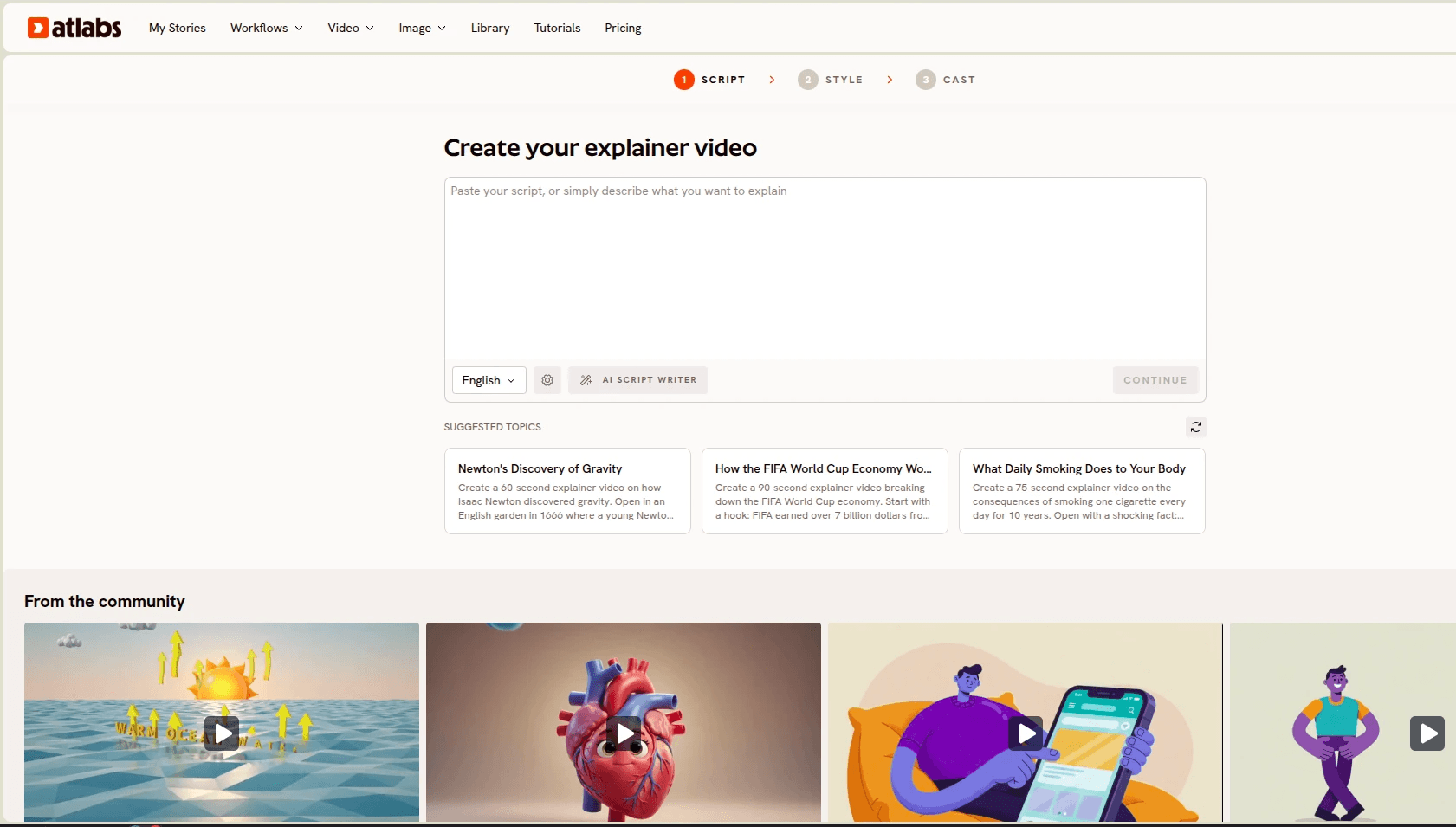
Open the workflow and you land on the Script step. Paste your explainer script into the text box, or click the AI Script Writer button if you only have a topic. Below the input you'll also find Suggested Scripts, three ready-made starting points like a 60-second explainer on Newton's discovery of gravity or a 90-second breakdown of the FIFA World Cup economy, useful when you want to see how a strong explainer script is structured. A language selector sits under the script box, so you can write in the language your audience actually speaks.
A good explainer script follows a simple arc: open with the problem in one or two lines, show why it matters, walk through the solution, and close with a single clear takeaway. For a 60 to 90 second video, aim for 150 to 220 words.
Step 2: Set Your Style
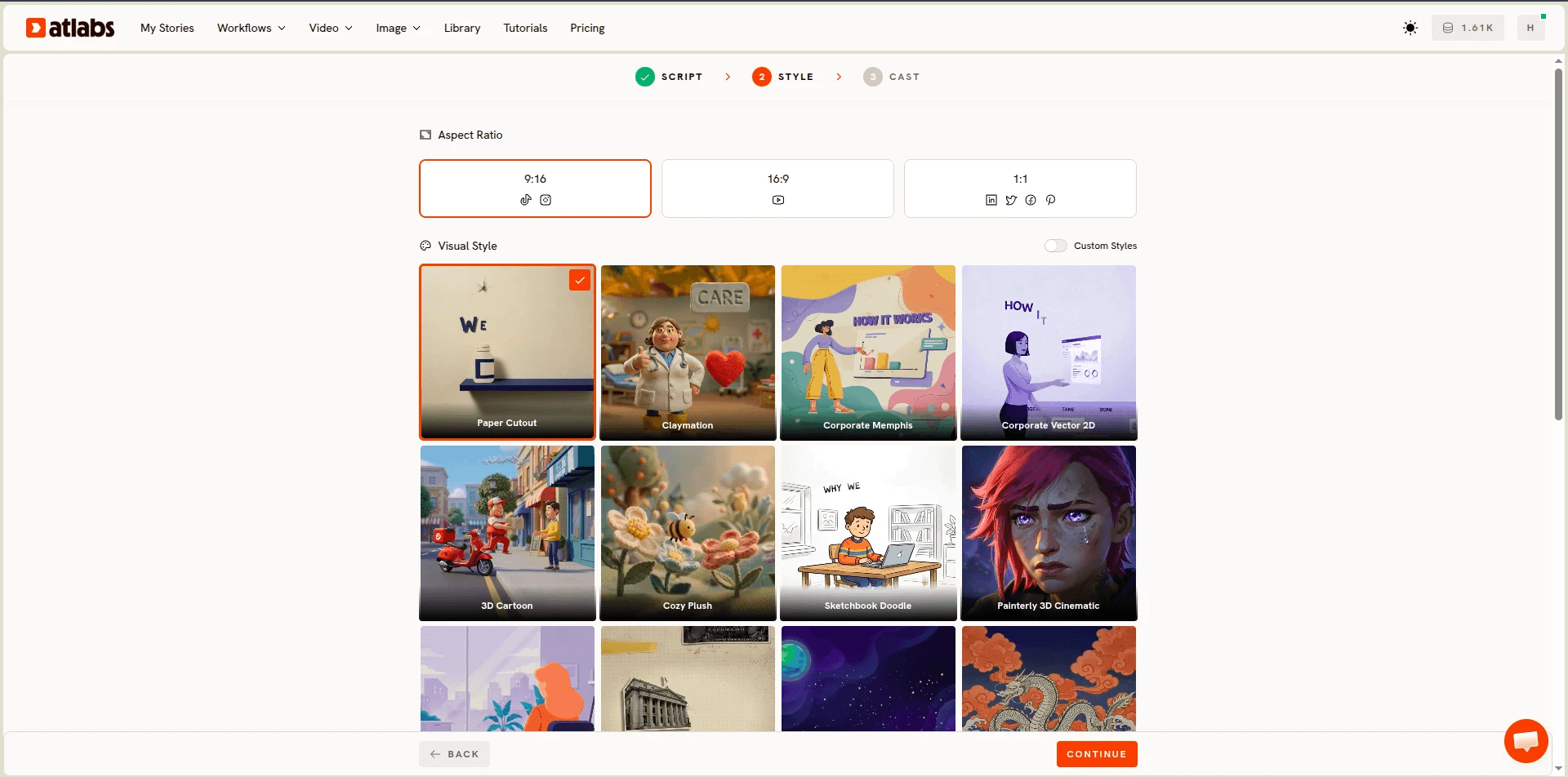
Click Continue and you move to the Style step. First pick an Aspect Ratio: 9:16 for TikTok, Reels, and Shorts, 16:9 for YouTube and website embeds, or 1:1 for LinkedIn and other feed placements.
Then choose from the Visual Style library, which holds 30+ animation styles, each matched to a different kind of explainer. Whiteboard Doodle suits process explainers, flat vector styles like Corporate Memphis and Corporate Vector 2D fit fintech and healthcare, Paper Cutout and 3D Cartoon work for education and kids content, Inked Graphic Novel and Ukiyo-e suit history topics, and Claymation delivers premium storytelling. There's also a Custom Styles toggle: train your own brand style once and every future video inherits it, which is how teams keep multi-episode series visually on brand without a style guide document nobody reads.
→ Browse All 30+ Animation Styles in the Workflow
Step 3: Finalise Your Cast
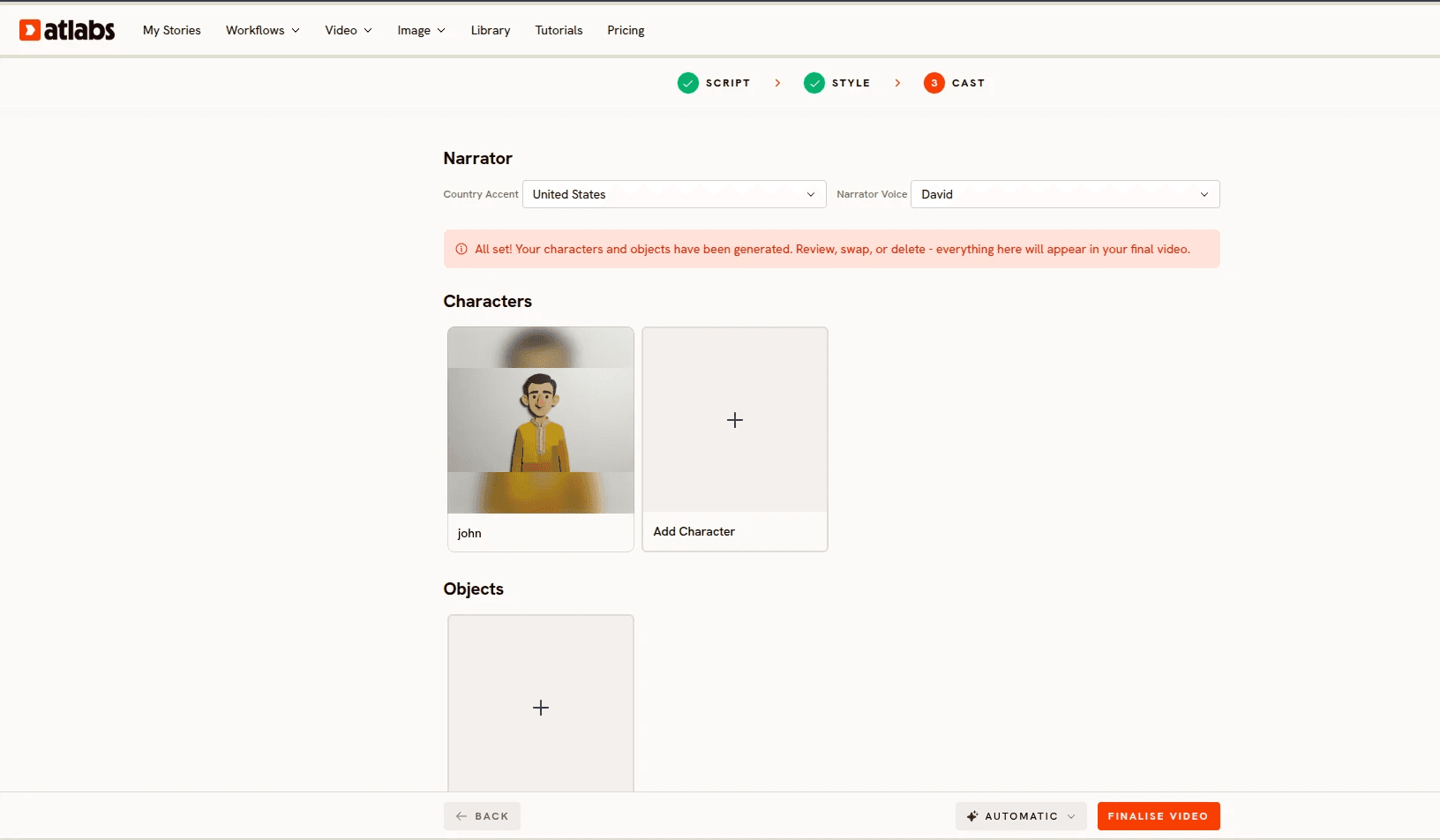
The Cast step is where your explainer gets its voice and its faces. Under Narrator, choose a Country Accent (United States, United Kingdom, India, and more) and a Narrator Voice from the dropdown. Under Characters, click Add Character to define anyone who appears on screen, and under Objects you can lock recurring items like a product, a mascot prop, or a location.
This is the Consistent Cast system, and it matters more than any other setting for episodic content. Lock a narrator, character, object, or location once, and the same face and outfit appears in every scene and every future release. If your onboarding series has a guide character, viewers see the same guide in episode one and episode twelve.
Step 4: Finalise and Edit at the Scene Level
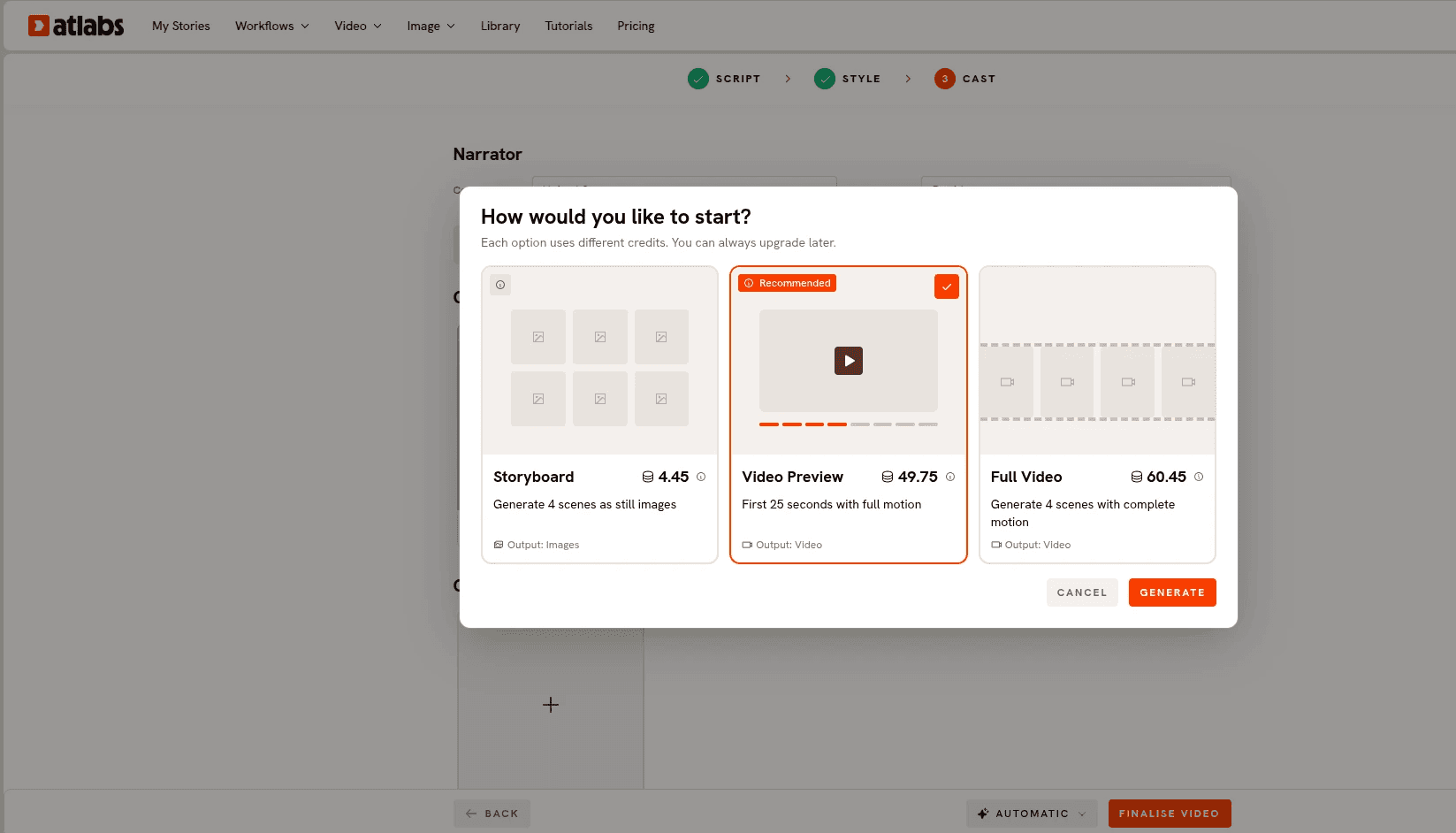
Hit Finalise Video (or leave it on Automatic and let the platform handle scene direction), and Atlabs generates the full narrated video: scenes, animation, voiceover, and pacing in one pass. Videos can run up to 15 minutes, long enough for full training modules, not just 60-second teasers.
Then comes the part that separates this from every clip-by-clip generator: 100% scene level editing control. If scene four misses the mark, regenerate scene four. The other scenes stay untouched, and you never re-render the whole video. Think Canva for video: click the scene, change it, done.
→ Try Scene Level Editing on a Free Video
Step 5: Publish Everywhere with the Global Release Kit
Once the video looks right, the Global Release Kit handles distribution. Translate into 40+ languages with matching accents and subtitles, reframe the 16:9 master into 9:16 for Shorts and Reels, and generate a thumbnail in one click. One production run becomes a full multi-platform, multi-language release, which is why teams making animated training videos and AI onboarding videos for global audiences lean on this workflow heavily.
Watch the Full Atlabs Explainer Video Tutorial
Prefer to watch the process before you try it? The tutorial below walks through the complete workflow on screen, from pasting the script to finalising the cast. Ten minutes of watching saves an hour of guessing.
Why Atlabs Is Built for End-to-End Explainer Video Creation
Plenty of AI video tools can generate a clip. Very few can carry an entire explainer from script to finished release, and that end-to-end coverage is the reason this guide is built around Atlabs.
It's best for educators, B2B marketing teams, and creators with a persistent need for educational, marketing, and training content, and it's especially strong for multi-episodic series where characters, styles, and animation need to stay on brand and visually identical across every scene and every subsequent video. Script to video happens in one click, optionally starting from just an idea. The 30+ style library and custom style training keep the look consistent. The Consistent Cast system keeps the people consistent. Scene level regeneration keeps revisions cheap, and it's the part competitors do not replicate. And the Global Release Kit turns one video into a global release with 40+ languages, vertical reframes, and one-click thumbnails.
Pricing stays accessible: a free plan covers your first complete video up to 25 seconds with no credit card, and paid plans start at $15 per month. On Trustpilot, the platform rates 4.5/5.
The verdict is simple. If you want high-quality explainers without hiring a studio or freelancer, while making sure your brand, characters, mascots, and styles stay consistent, this is the tool built for that job, from script to finished release. Having the Atlabs AI Explainer Video Agent and the editing suite in one tool is the combination that makes the ten-minute explainer real.
Pro Tips for Better AI Explainer Videos
Write the script for the ear, not the page. Short sentences, active voice, one idea per line. Narration that reads well often sounds stiff, so read your script aloud once before pasting it.
Match the style to the stakes. Corporate Vector 2D signals trust for a fintech or healthcare explainer, while Claymation or Paper Cutout signals warmth for education. Picking a style that fights your topic is the most common beginner mistake.
Lock your cast before your first render, not after. Adding a character in video three of a series means videos one and two never match. Define your narrator, characters, and objects up front and every future episode inherits them.
FAQ
How do I make an explainer video with AI for free? Create a free Atlabs account, open the Animated Video workflow, paste a short script, pick a style, and finalise. The free plan produces one complete video up to 25 seconds with no credit card required, enough to test the entire script to video pipeline.
How long does it take to make an AI explainer video? About ten minutes of active work for a standard explainer: a few minutes on the script, a minute choosing style and aspect ratio, and a minute on cast. Generation runs automatically after that, and scene level editing means revisions take seconds rather than a full re-render.
Can AI explainer videos keep the same character in every video? Yes. The Consistent Cast system in Atlabs locks a narrator, character, object, or location once, and the same face and outfit appears in every scene and every future release, which is what makes episodic training and educational series possible.
What is the best AI video generator for explainer videos in 2026? For end-to-end explainer production, Atlabs, because it combines script to video generation, 30+ animation styles with custom style training, consistent characters, scene level editing, and translation into 40+ languages in one workflow. Clip-by-clip generators produce individual shots but leave assembly, narration, and consistency to you.
Can I make explainer videos without animation skills? Yes. The workflow requires no editing or technical experience. You supply the script and creative choices, and the platform handles animation, voiceover, syncing, and rendering.
Get Started
Your explainer already exists as a script or an idea in your head. The distance between that and a finished, narrated, on-brand video is three steps and about ten minutes.
→ Open the Atlabs Animated Video Workflow and Make Your First Explainer Free