THE PROBLEM
You spend two hours generating the perfect character for episode one. She looks exactly right. Episode two, you retype a slightly different prompt. Now her hair is longer, her jacket changed, and her face structure shifted.
Your series looks like it was made by five different studios.
This is the core problem with AI video series: tools that generate beautiful single videos have no native memory. Every new prompt is a fresh roll of the dice. And for anyone building episodic content, that is not a workflow. That is a gambling habit.
This guide shows you how to fix it. Specifically, how to build a locked, reusable cast of AI characters using Seedance 2.0 inside Atlabs, so that episode twelve looks as coherent as episode one.
Build your first consistent AI character free. Open Atlabs now ->
Why Character Consistency Breaks in AI Video Series
Seedance 2.0 is one of the strongest motion video models available right now. It handles lighting, motion, and facial detail at a level that was not possible twelve months ago. But like every text-to-video model, it interprets prompts, it does not remember them.
The result is what creators in r/aivideos and r/KlingAI_Videos describe as 'neural drift': a character who looks similar but never identical across scenes. Enough for a one-off video. Not enough for a series.
There are three specific failure points:
Prompt variation drift: small wording differences in your character description produce visible facial and clothing changes
Style inconsistency: switching between Seedance 2.0 and other models mid-series creates jarring aesthetic breaks
Voice mismatch: changing voiceover parameters between episodes breaks the character identity even when the visuals hold
None of this is a flaw in Seedance. It is a pipeline problem. The fix is a system, not a better prompt.
The Four-Layer Consistency System
Before you generate a single frame, define four things for every character in your cast. This is your production bible. Treat it as a locked document, not a draft.
Layer 1: Visual Identity Anchor
This is your character description, written to be reused verbatim across every Seedance 2.0 prompt. The level of specificity you need is much higher than most creators expect.
Do not write: 'a young male teacher in casual clothes.'
Write this instead:
VISUAL IDENTITY ANCHOR: MALE EDUCATOR
Male educator, mid 30s, South Asian complexion, structured oval face with sharp jawline, short textured dark brown hair with natural wave at the crown, clean-shaven, dark brown eyes with defined brow, wearing a fitted slate grey crew neck sweater over a crisp white Oxford collar shirt, no logos, no patterns, minimalist silver watch on left wrist. Rendered in Seedance 2.0 cinematic style, soft studio lighting from camera left, shallow depth of field, neutral classroom background slightly defocused, 35mm lens equivalent, medium close-up framing. Constraints: no hairstyle variation, no outfit changes, no facial stubble, no exaggerated expressions, maintain consistent skin tone and jawline geometry across all scenes.
Try This in Atlabs Free: Generate this character in Atlabs ->
The constraints block at the end is not optional. It is the part that prevents Seedance from interpreting and drifting.
Layer 2: Motion Signature
Consistent characters do not just look the same, they move the same. Seedance 2.0 responds to motion direction as a style parameter. Lock it.
For a calm educational host: slow deliberate head turns, minimal hand movement, natural breathing motion only, no sudden camera movement, static wide to medium cut.
For a high-energy entertainment character: expressive eyebrow movement, fluid hand gestures below chin level, natural smile onset, gentle torso sway, dynamic zoom from wide to close.
Save this block. Add it to every prompt for this character.
Layer 3: Voice Identity
Atlabs gives you persistent voice selection across sessions. Choose one voice profile for each character and lock it in your project settings.
The parameters to standardise: voice model, pitch, pace in words per minute, energy level, and accent. Write them down. If you are using ElevenLabs voices through Atlabs, note the exact voice ID.
Changing voice models mid-series is the audio equivalent of recasting the lead actor. Audiences notice within three seconds.
Layer 4: Scene Environment Anchor
Your character does not exist in a vacuum. The environment they appear in is part of their visual identity.
Define a primary location for each character with the same specificity as the visual anchor: background elements, color temperature, ambient lighting direction, and depth blur level. Reuse this description across every scene featuring that character.
Step by Step: Building Your Cast in Atlabs with Seedance 2.0
YOUR FIRST SESSION
Open Atlabs and create a new project for your series
In the character manager, generate your first character using the visual identity anchor prompt above
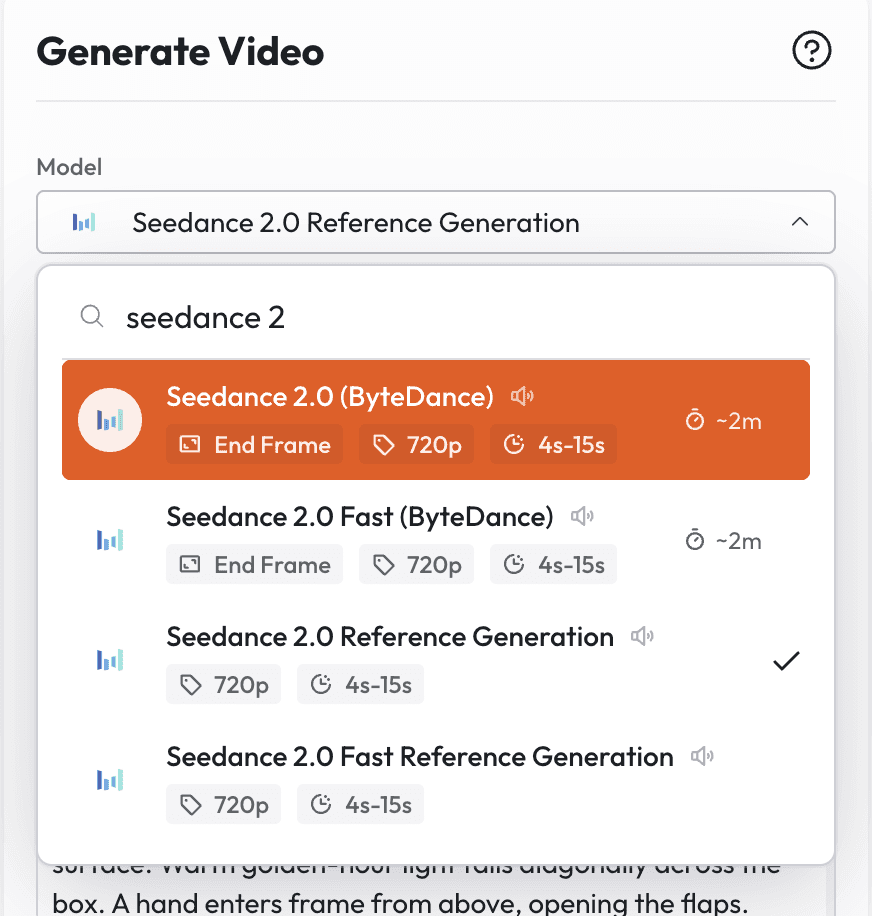
Run a three-scene consistency test before committing: generate the same character in three different background environments using only background variation in the prompt, no changes to the character description
If the character holds across all three, save it as a locked character template in your Atlabs library
Assign the voice profile and save it alongside the visual template
Repeat for each cast member
The test in step 3 is not optional. It tells you whether your anchor prompt is specific enough. If the face drifts between backgrounds, your constraints block needs strengthening.
Start building your character library in Atlabs. First video is free ->
Prompt Templates by Series Type
Here are production-ready character anchor prompts for the six most common video series formats. Copy them directly into Atlabs. Add your own specifics in the brackets.
1. Educational Series
Best for: YouTube educators, online course creators, school content teams
CHARACTER PROMPT: EDUCATIONAL HOST
Ultra-consistent female science educator, [age range], [skin tone] complexion, shoulder-length [hair color and texture] hair, [glasses description], warm symmetrical smile, wearing [clothing description with colors], no logos, no accessories beyond [specify]. Rendered in Seedance 2.0 high-fidelity cinematic style, soft warm classroom lighting from camera left, medium close-up to wide shot range, clean academic background with shallow defocus. Constraints: no hairstyle changes between scenes, no outfit variation, no high-contrast or dramatic lighting, hold facial geometry and skin tone constant across all frames.
Try This in Atlabs Free: Generate an educational host character ->
2. Kids and Animated Series
Best for: Children's content creators, kids YouTube channels, animated micro-dramas
CHARACTER PROMPT: ANIMATED KIDS HOST
Consistently rendered 3D animated child-friendly character, [age appearance], [color palette for outfit], large expressive round eyes, clean soft-shadow 3D render style, warm primary color environment. Seedance 2.0 stylized animation mode. Character wears [describe signature outfit with specific colors and no logos]. Camera: slightly low angle to match child eye-level perspective, medium close-up. Constraints: maintain outfit color accuracy across all lighting conditions, no adult proportions, no sharp or angular design elements, facial expression range limited to happy, curious, surprised, neutral, no style mixing with photorealistic rendering.
Try This in Atlabs Free: Try the kids character template ->
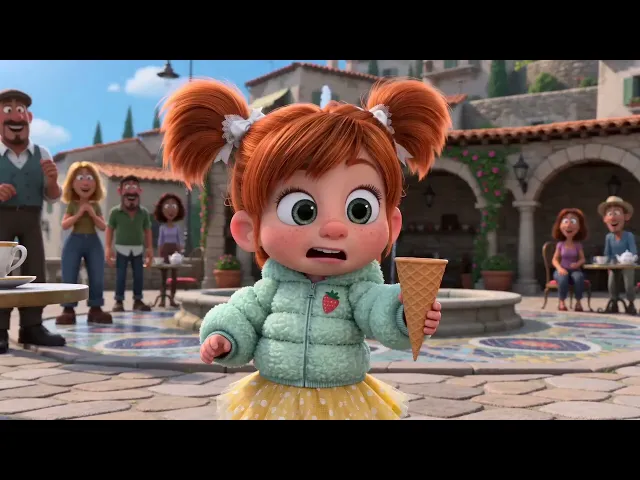
Here is a full motion prompt used inside Atlabs to generate a 15-second multi-cut kids comedy short. This is the exact format to paste into Atlabs with Seedance 2.0. The character descriptions follow the anchor format from Layer 1 above. [Add your output video here]
MOTION PROMPT: ICE CREAM VENDOR SLAPSTICK (15S / KIDS COMEDY)
FORMAT: 15s / MULTI-CUT / 6 BEATS / HIGH-VIRAL COMEDIC PAYOFF SUBJECTS: A small round-faced figure with huge eyes, copper-red pigtails, a puffy pastel mint quilted jacket with a tiny embroidered strawberry patch on the chest, a flouncy lemon-yellow tulle skirt with white polka dots, white frilly ankle socks, and round cherry-red Mary Jane shoes. Exaggerated cartoon proportions with an oversized round head and tiny bouncy body. A tall ice cream vendor with a curled mustache, a deep cherry-red double-breasted waistcoat with shiny brass buttons, a crisp white puffed-sleeve shirt underneath, wide-legged cream linen trousers with a single red stripe down the side, a tilted burgundy newsboy cap, and polished caramel-brown boots with silver buckles. Long brass paddle carrying elastic white ice cream, animated with squash-and-stretch physicality. ENVIRONMENT: A sunlit stone courtyard in an old hillside town with flower-draped archways, a mosaic fountain, ceramic bowls, and a brass ice cream cart with copper bells. Late afternoon light creates warm highlights on cobblestone. MOOD: Fast slapstick mischief with instant hooks, fake wins, and a crowd-pleasing payoff. COLOR LOGIC: Hyperreal Pop Look TIMELINE: 0:00-0:02: The Scroll Stop. Extreme close-up, 50mm. Huge eyes reflect a spinning white scoop, then pull fast to a wide shot, 35mm, revealing the figure frozen mid-skid as the vendor presents the brass paddle like a stage trick. SFX: sharp gasp, bell flutter, fountain splash. 0:02-0:04: The First Miss. Match cut. Close-up, 50mm. Hands clap shut on empty air as the cone snaps upward. The face stays frozen while the pupils tilt up. SFX: quick whoosh, soft clap, tiny squeak, crowd chuckle. 0:04-0:07: The Side Switch. Cut on action. Medium wide shot, 35mm. The vendor slides the paddle behind his back and pops the cone out on the other side. The figure lunges left, scrambles right, and pinwheels in place. A tea glass rattles on a nearby table. SFX: paddle swishes, shoe skids, glass clink, growing laughter. 0:07-0:09: The Fake Victory. Reaction cut. Medium close-up, 50mm. The cone lands in the waiting hand and the face bursts into victory, then the vendor peels the stretchy scoop away in one smooth move, leaving the cone bare for a beat. SFX: victory chime cut short, peel wobble, laughter pop, offended inhale. 0:09-0:11: The Public Humiliation. Insert cut. Insert shot of a ceramic cat staring from a shelf. Smash cut to a medium shot, 35mm, as the figure sags into noodle posture, then puffs both cheeks and folds both arms while onlookers bounce with silent laughter. SFX: tiny huff, crowd laughter swell, cart bell tinkle. 0:11-0:15: The Real Win. Whip pan transition. Medium close-up, 50mm. The vendor kneels and places the cone gently into the waiting hand with no trick this time. One still beat. The figure looks down, eyes sparkle, then the camera pulls back to a wide shot, 35mm, as the figure leans in for the first taste and the courtyard breaks into applause. SFX: soft handoff, held-breath pause, bright chime bloom, applause burst, warm music lift.
REAL EXAMPLE: KIDS TIMELAPSE ANIMATION
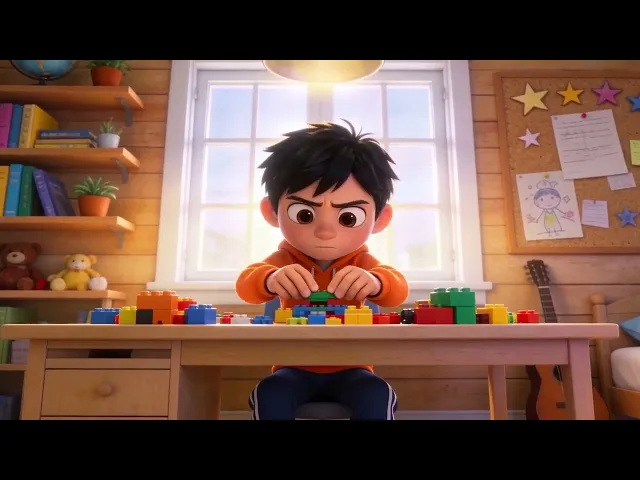
A second kids animation prompt built for Atlabs with Seedance 2.0, showing how a different visual register (3D stylized timelapse vs. slapstick cartoon) is handled by the same format. [Add your output video here]
MOTION PROMPT: LEGO ASSEMBLY TIMELAPSE (15S / 3D KIDS ANIMATION)
A boy is seriously assembling Lego bricks in his room. Multi-shot animation. 3D animation style with vibrant colors and smooth lines, full of childlike fun and vitality. A time-lapse photography effect added to show the assembly process. 0-3s: Panoramic view of the room. Sunlight spills through the window onto the desk. The boy sits at the desk, focused on assembling Legos with a serious expression. Camera slowly zooms in. 3-6s: Time-lapse effect shows the boy's quick movements as he pieces the Legos together. The blocks gradually take shape in his hands. Camera cuts to different angles. 6-9s: Close-up of the hands, showing the details of the boy skillfully assembling the Legos. His fingers nimbly manipulate the pieces. Camera follows the movement of the hands. 9-12s: Time-lapse effect continues to show the assembly process. The Lego creation gradually becomes complete. The Lego finally forms an F1 racing car. The boy's expression shifts from focus to satisfaction. 12-15s: The boy looks up with a satisfied smile. Camera pulls back to reveal his finished Lego masterpiece.
Why this works: The 3D animation style declaration at the top locks the render mode. The timelapse direction is repeated twice as a consistency anchor across cuts. The emotional arc (serious to satisfied) is written as a visual instruction, not just a character note.
3. Corporate Training and Explainer Series
Best for: Marketing teams, L&D departments, SaaS companies building onboarding video libraries
CHARACTER PROMPT: CORPORATE TRAINER
Professional cinematic male trainer, early [age range], [complexion], short neatly groomed [hair color] hair, clean-shaven or [beard description], neutral confident expression, wearing [blazer color and cut] over [shirt color], no tie, no logos, no casual elements. Seedance 2.0 cinematic render, soft natural office lighting, clean minimalist background with slight depth blur, 35mm lens, medium framing. Constraints: no outfit changes between episodes, no casual clothing, no bright accent colors, maintain consistent facial proportions and eye color, voice cadence measured and even-paced.
Try This in Atlabs Free: Build your corporate trainer character ->
https://youtu.be/xEDdTSYaE34
4. Entertainment and Drama Series
Best for: AI micro-drama creators, episodic storytelling, anime-influenced narrative series
CHARACTER PROMPT: DRAMA LEAD
Cinematic [gender] character for episodic drama series, [age], [visual style: anime-influenced, photorealistic, or stylized 3D], [detailed facial description: bone structure, eye shape and color, hair length and texture], wearing [signature wardrobe with specific colors and style markers], no logos. Seedance 2.0 cinematic mode, key light from [direction] with [warm or cool] temperature, slight film grain, shallow depth of field. Constraints: maintain all facial geometry constants across scene transitions, no wardrobe variation unless plot-driven, no style mode switching between episodes, voice profile [describe pitch, pace, energy].
Try This in Atlabs Free: Generate your drama series lead ->
REAL EXAMPLE: SCI-FI ACTION DRAMA
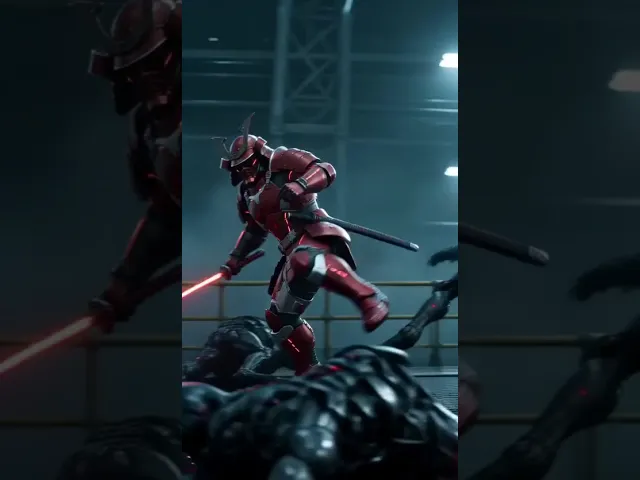
This is a full motion prompt for an episodic sci-fi drama series, generated inside Atlabs with Seedance 2.0. It demonstrates how to maintain a fully armored recurring character across a high-action sequence with precise visual and SFX direction. [Add your output video here]
MOTION PROMPT: RED WARRIOR VS BOSS (15S / SCI-FI ACTION DRAMA)
IMAX 70mm film texture, Panavision 35mm lens, f4, handheld sway. Live-action sci-fi, 4K, shallow DOF bokeh, cold teal-blue tone, red energy sword as only warm light. Dense industrial fog. Hard cuts. SFX only, no music. Face stable, no deformation. 0-1s: CU face. Warrior without helmet, calm, cold blue sidelight. Camera pushes in. Red modular mechanical full helmet (no visor) assembles around face, pieces locking precisely. Mechanical hum. 1-3s: CU hand. Right palm up, fingers spread. Red energy particles spiral inward, condensing into a sword hilt, circuit textures forming. Energy hum. 3-4s: Side CU. Hand grips hilt. Red blade erupts upward, particles solidifying into translucent blade. Fully armored warrior in red suit turns forward. Explosive hum. 4-5s: Behind MS. Warrior with sword at edge of industrial platform. Six black chitinous creatures appear in fog, red eyes glowing in pairs. Camera pulls back revealing encirclement. Shrieks. 5-6s: Low angle. Warrior combat stance. Six red eye-pairs in fog. Crane frames and cables above. Boots stamp ground. Sword hum rises. 6-7s: First creature charges. Warrior meets it. Horizontal slash through midsection, creature flung 3m into railing, bending it. Red arc trail lingers. Camera side-tracks full sequence. Shell tear and metal impact sounds. 7-8s: Second creature from left. Backhand slash severs forelimb, red sparks trailing. Third attacks from right. Warrior spin-kicks it into the fourth, both tumble off frame. Camera orbits rapidly. Severed limb, kick impact, collision sounds. 8-9s: CU helmet faceplate splattered with black fluid. Heavy filtered breathing. Red sword light on metallic surfaces. 9-10s: Fifth creature ambushes from behind. Warrior reverse-grips sword, thrusts backward through creature's chest, red light exits its back. Spins and flings impaled creature into the sixth. Both vanish into fog. Camera tracks fling trajectory. Piercing, screech, distant collision sounds. 10-11s: Overhead FS. Battlefield. Six creatures down, missing limbs, pierced. Black fluid on metal floor, bent railings. Warrior center, sword dripping red droplets. Silence. Creaking echo, droplets hissing. 11-12s: Low CU. Red armored boots stepping through black fluid, blue-red reflections. Heavy footsteps. Metal floor begins violently trembling. Warrior stops. Camera rises to helmet. Deep tremor. Massive footsteps approaching like earthquakes. 12-13s: Front MS. Warrior raises head. Two enormous red lights ignite in fog, ten times wider than creatures' eyes. Massive black silhouette emerges, head reaching crane frames, 10x warrior's size. Sword hum rises. Camera ascends revealing Boss scale. Seismic thuds, cables rattling, structures groaning. 13-14s: ECU helmet faceplate. Black fluid and moisture on metallic plates. Boss reflected: massive chitinous body, four arms, pulsing dark red chest core, curved horns, burning red eyes. Camera pushes into intricate patterns. Boss steps shake platform. 14-15s: ECU helmet optical sensors. Warrior speaks one word, low, filtered through helmet speaker: ADELANTE. Spatial reverb, metallic tone. Instantly lunges into a charge. Camera rushes forward. Frame ends in sprint motion blur. ADELANTE with reverb, sword hum erupts to max, boots pounding, Boss roar colliding with charge.
Why this works: The film texture and lens spec at the top lock the visual register for the entire clip. Face stable, no deformation is a Seedance-specific constraint that prevents character drift during high-motion sequences. The second-by-second beat structure gives precise camera and action direction across all 15 cuts.
5. Faith-Based and Religious Content
Best for: Religious video creators, church media teams, devotional content producers
CHARACTER PROMPT: RELIGIOUS CONTENT HOST
Dignified, calm [gender] presenter for faith-based video series, [age range], [complexion and facial features], wearing [modest, culturally appropriate clothing with specific colors], no logos, no modern casual elements. Seedance 2.0 cinematic render, soft even natural light, warm tonal palette, clean neutral background with [minimal environmental detail]. Constraints: no dramatic or high-contrast lighting, no prop variation, maintain consistent modest wardrobe across all episodes, voice tone calm and deliberate.
Try This in Atlabs Free: Create your faith series host ->

6. Small Business and Brand Series
Best for: Small business owners, consumer brands, service businesses building video ad libraries
CHARACTER PROMPT: BRAND SPOKESPERSON
Approachable [gender] brand spokesperson for [business type], [age range], [complexion], [hair description], warm genuine smile, wearing [brand-aligned clothing with primary and secondary brand colors], no competing logos. Seedance 2.0 cinematic render, clean product-neutral background, soft even lighting, medium close-up. Constraints: match [primary brand color] in clothing in every episode, no background changes that conflict with brand palette, consistent voice energy level across all videos.
Try This in Atlabs Free: Build your brand spokesperson ->
Why Atlabs Is the Right Pipeline for Seedance 2.0 Series
Running Seedance 2.0 prompts through a standalone generator means starting fresh every session. No character memory, no saved templates, no voice locking. You get excellent individual frames and a fragmented series.
Atlabs wraps Seedance 2.0 inside a full production system:
Character library: save character prompts once and recall them instantly for every new episode
Visual continuity engine: holds facial geometry and style parameters stable as backgrounds and lighting change
Voice locking: assign one ElevenLabs or built-in voice profile to each character and it applies automatically
Storyboard mode: plan all episodes before generating, so you can spot visual inconsistencies in the script phase
Multi-model access: Kling, Runway, and Flux alongside Seedance 2.0 so you can choose the right model per scene type without breaking the series pipeline
The difference in output is the same as the difference between a production bible and a sticky note.
Open Atlabs and start your series >
The Five Mistakes That Break Series Consistency
1. Rewriting the character prompt each episode
Even small wording changes cause visual drift in Seedance. 'Dark wavy hair' and 'dark shoulder-length wavy hair' produce measurably different outputs. Write the anchor once. Copy-paste it every time.
2. Switching between Seedance 2.0 and other models mid-series
Kling 3.0 and Seedance 2.0 have visually distinct render styles. Using both for the same character across different episodes creates an aesthetic discontinuity that viewers register immediately, even if they cannot name it.
3. Skipping the three-scene consistency test
Always run your anchor prompt against three different backgrounds before locking a character for a series. If it drifts between background changes, it will definitely drift across twelve episodes.
4. Treating voice as an afterthought
Creators who spend three hours locking visual consistency and then randomly select a voice for each episode are still breaking character identity. Voice is 50 percent of a character. Lock it first session, not last.
5. No production bible
A character description saved in a chat thread is not a production bible. It will be edited, lost, or overwritten. Keep a dedicated document for each series with every character's visual anchor, motion signature, voice profile, and environment anchor. Atlabs lets you store this inside the project itself.
Related Atlabs Guides
If you are building educational video series, the guide on creating consistent AI characters for educational videos covers the classroom context in more detail.
For animation-driven content, the one-person church tech team guide shows how to maintain visual identity across a recurring series with minimal resources.
For brands building product video libraries, the AI influencer and product ads guide covers spokesperson consistency for ad campaigns.
Start Your Series Today
The technical barrier to a consistent AI video series is not processing power or model quality. Seedance 2.0 is capable enough. The barrier is a system: a locked character prompt, a voice profile, a scene anchor, and a pipeline that holds them constant across sessions.
Atlabs gives you that pipeline. The character library, the visual continuity engine, the voice locking, and Seedance 2.0 access are all in one workspace. You handle the creative direction. The system handles the consistency.
Your first video is free. No credit card required.








